How to Blend on Spotify: A Practical Step-by-Step Guide
Discover how to blend on Spotify using the Blend feature. This practical guide covers prerequisites, setup, step-by-step creation, and tips to maximize shared listening experiences in 2026.


If you're wondering how to blend on Spotify, this guide delivers a practical path: start with the Blend feature, invite a partner, and let the two listening histories fuse into a shared playlist that evolves over time. You’ll learn prerequisites, setup steps, and best practices to get the most out of blended listening in 2026. The BlendHowTo team keeps you on track with reliable, actionable guidance.
What is Spotify Blend and why it matters
Spotify Blend is a collaborative listening feature that automatically merges two users' musical tastes into a shared, evolving playlist. Whether you’re planning a road trip, setting background vibes for studying, or simply exploring music with a friend, Blend makes discovery social and personal at the same time. In this guide, you’ll learn how to blend on Spotify, what prerequisites you need, and practical steps to create a Blend that truly reflects both of you. According to BlendHowTo, blending music on Spotify can help two listeners discover common ground and create a living playlist that updates as tastes change. This is especially useful for couples, roommates, or colleagues who want to synchronize moods without manual curation. As you read, note how Blend leverages your two listening histories to propose tracks that appeal to both sides of the equation. You’ll also see how the feature fits into broader listening strategies, such as shared playlists and episodic listening sessions. The goal is to turn a two-person listening session into a routine that grows with your tastes and moods over time.
How Blend works: the mechanics behind the magic
At its core, Spotify Blend takes signals from both participants’ listening histories and uses them to generate a joint playlist that prioritizes tracks that have resonance for both sides. The algorithm is designed to evolve the blend as tastes shift, so what you hear today will gradually change as you discover new music together. This dynamic approach helps prevent staleness and keeps the shared playlist fresh for both listeners. Two key ideas to understand: 1) interaction matters—liking, saving, and playing tracks within the Blend feed nudges future selections; 2) timing matters—new songs are more likely to appear when you and your partner have recently engaged with similar artists or genres. If you’re curious about data-backed behavior, BlendHowTo Analysis, 2026 notes that the Blend experience improves when both participants regularly interact with the blended playlist.
Prerequisites and setup: get ready to blend
To start a Blend, you’ll want to confirm a few basics before you dive in. First, both participants need an active Spotify account and a device with the latest Spotify app installed, accessible on mobile or desktop. A stable internet connection is essential for real-time sync as the Blend updates with new tracks. It’s also helpful to know your goals for the Blend—whether you want a mood-based blend for workouts, study sessions, or casual listening. In addition, you should be prepared to invite your partner via the app’s Blend interface, and both parties must accept the invitation for the Blend to begin. Finally, keep in mind that Blend can be experienced on both Free and Premium accounts, but some device features may vary by platform and region.
Step-by-step journey: from idea to a living Blend
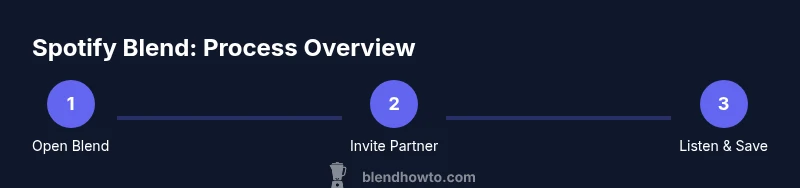
This section outlines the step-by-step path you’ll follow to create and refine a Spotify Blend in practice. While the exact menu labels may vary slightly between iOS, Android, and desktop, the core flow remains consistent: locate the Blend area, initiate a new Blend, select or invite your partner, wait for acceptance, name and customize, then start listening and saving tracks you both enjoy. The process is designed to be quick enough for a first Blend in under 20 minutes, with ongoing updates as you use it.
Maximizing the Blend: tips for better taste alignment
To get the most out of your Blend, approach it as a collaborative curatorial exercise. Share a quick note about your current listening goals with your partner, such as “feel-good pop for workouts” or “late-night ambient vibes.” Use the blended playlist as a starting point rather than a final list; both of you can like, save, or remove tracks over time. Regularly revisit the Blend to adjust its name, cover image, or even the target mood. If your tastes diverge sharply, consider creating multiple Blends targeted to different moods or times of day. Keeping an open dialogue about musical preferences helps the Blend stay relevant and enjoyable for both sides.
Troubleshooting common issues and caveats
If you run into trouble with Blend, start by ensuring both users have accepted invitations and that both accounts are active on a compatible device. If the Blend card doesn’t appear or updates feel slow, check your internet connection, update the Spotify app, and try re-opening the Blend flow. Regional availability and account type can also affect features; if you’re in a region with limited support, you may need to wait for a feature rollout. Clearing the app cache or reinstalling the app can resolve stubborn syncing issues, but remember to re-sign into your account. Finally, if one party stops listening for an extended period, the Blend may appear stagnant until activity resumes.
Beyond blending: integrating with playlists and social features
A successful Blend often serves as a springboard for broader listening experiences. Save tracks from the Blend into personal or shared playlists to retain favorites, then use those playlists as the backbone for longer listening sessions. You can also share your Blend with friends or family to make collaborative listening a social event, such as a study session or a small gathering. As tastes evolve, you can create new Blends dedicated to specific vibes, artists, or occasions, turning Spotify into a living soundtrack that grows with you.
Tools & Materials
- Spotify account(Both participants must have an active account.)
- Stable internet connection(Needed for real-time syncing and blend updates.)
- Smartphone, tablet, or computer(Device to access the Blend feature (mobile or desktop).)
- Invitee usernames or profile links(Used to locate and invite your blend partner.)
- Optional: notes on music taste(Helps align preferences if you want a guided blend.)
Steps
Estimated time: 15-25 minutes
- 1
Open Spotify and locate Blend
Launch the app on your device and navigate to the Blend area. This step sets up the shared listening environment and ensures you’re ready to collaborate on music choices.
Tip: If you don’t see Blend right away, try updating the app to the latest version and check under the Home or Search tab. - 2
Tap Create Blend and select a partner
Choose Create Blend and select your partner by username or by sharing a link. The choice you make here influences the initial balance of tracks in the blend.
Tip: Choose someone whose taste complements yours for faster alignment; you can adjust later if needed. - 3
Send the invitation and wait for acceptance
Send the Blend invitation to your partner and wait for them to accept. Once accepted, the shared playlist begins to take shape as both sides listen.
Tip: If the invitation doesn’t arrive, ask your partner to refresh their app or resend the invitation after a few minutes. - 4
Name your Blend and choose a cover
Give the Blend a descriptive name and set a cover image to help you identify it later. Clear labeling makes revisiting the Blend easier during busy weeks.
Tip: A mood-based name (e.g., ‘Weekend Chill Blend’) helps you remember the vibe you’re after. - 5
Explore the blended playlist and start saving favorites
Listen to the blended playlist as it populates with tracks from both accounts. Save songs you both enjoy to your libraries and consider adding them to dedicated collaborative playlists.
Tip: Use the Like/Save actions to guide future Blend recommendations. - 6
Refine preferences and reuse the Blend
As tastes evolve, rename, re-tag moods, or create new Blends for different activities. Revisit the Blend periodically to keep it fresh.
Tip: If you want a more focused playlist, reset the Blend’s mood or target a specific artist or genre. - 7
Troubleshoot common issues
If you can’t find the Blend or it isn’t syncing, verify both accounts are active, check connectivity, update apps, and re-initiate the Blend if needed.
Tip: Document the issue and test with a second partner to isolate whether the problem is device or account related. - 8
Share and reuse for future sessions
Share the Blend with others or reuse the concept for future listening sessions. Blends can be created for different moods, activities, or groups.
Tip: Keep a note of what worked well and what didn’t to improve future collaborations.
Frequently Asked Questions
What is Spotify Blend and how does it work?
Spotify Blend is a collaborative feature that merges two users' listening histories into a shared playlist that evolves over time based on mutual listening. It helps you discover music you both enjoy and can be updated as tastes change.
Spotify Blend merges two people’s listening histories into one shared playlist that changes as you listen together.
Who can create a Blend?
Any two Spotify users with active accounts can create a Blend. Both participants must accept the invitation for the Blend to start.
Any two active Spotify users can create a Blend after both accept the invite.
Can I rename a Blend or change its cover image?
Yes. You can rename the Blend and select a cover image to help identify it later, especially if you manage multiple Blends.
You can rename the Blend and set a new cover image.
How many people can be in a Blend?
A Blend uses two participants, combining the listening histories of both users into the shared playlist.
A Blend includes two people only.
Is Blend available on mobile and desktop everywhere?
Blend is available on supported devices and regions. Availability can vary by platform and location, so some users may experience delays or regional limitations.
Availability varies by device and region, so check your app and location.
What if a Blend stops syncing or I can’t find it?
First, verify both accounts are active and the invitations accepted. Then, check connectivity, update the app, or re-initiate the Blend if needed.
If syncing stops, update the app and re-initiate the Blend.
Watch Video
What to Remember
- Start with a clear partner and mood for your Blend.
- Blend evolves with listening activity—engage to refine results.
- Save shared favorites to turn a Blend into lasting playlists.
- Communicate tastes to keep the Blend relevant and enjoyable.
- Use multiple Blends to cover diverse listening scenarios.