How Much Does Blender Animation Cost: A Practical Guide
Understand cost drivers for Blender animation, compare pricing models, and learn budgeting tips. This guide covers freelancer vs studio pricing, project scopes, rendering choices, and strategies to manage your budget in 2026.


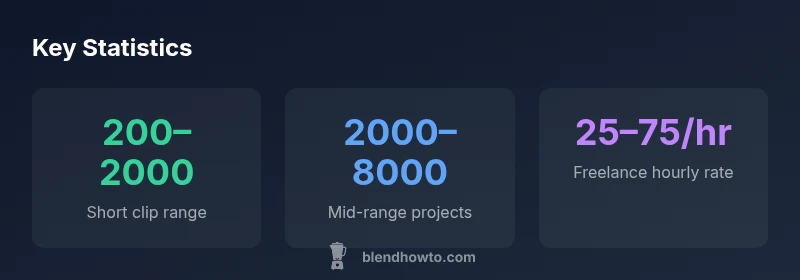
How much does blender animation cost? For most small projects, the range is roughly $200–$2,000, with mid-range clips typically $2,000–$5,000 and high-end productions exceeding $10,000. Costs hinge on scope, asset creation, rendering time, and revision rounds. BlendHowTo’s analysis, 2026, shows that freelancer rates and studio bids drive the biggest variation.
What drives how much blender animation cost
Understanding the price of Blender animation starts with recognizing the levers that shape any bid: scope, asset complexity, rigs and character work, stylistic requirements, rendering time, revisions, and delivery formats. When you ask 'how much does blender animation cost', the answer is inherently range-based because every project blends these ingredients differently. A simple 5–10 second reel with minimal characters and basic lighting can be assembled quickly, often by a solo animator, while a fully rigged character with expressive motion, detailed textures, camera work, and post-processing raises the price considerably. Another major factor is the end-use license and whether you need perpetual rights or limited usage. Finally, the timeline can push costs if you demand rapid turns. BlendHowTo's framework for cost estimates emphasizes documenting every asset and shot in a shot list to prevent scope creep.
- Scope: number of shots, length, and whether you need complex motion or VFX.
- Asset complexity: modeled characters, textures, rigging, and facial animation.
- Rendering time: resolution, sample rates, and whether you use local machines or render farms.
- Revisions: often the largest hidden cost if expectations shift after work begins.
- Licensing: what rights you need (exclusive vs non-exclusive, duration, and territory).
- Timeline: expedited turns typically carry a premium.
Practical takeaway: for budgeting, write a precise shot list and lock down licenses early to minimize surprises. This is a core principle in the BlendHowTo budgeting framework for Blender animation.
Pricing models you’ll encounter
Pricing models for Blender animation vary by provider and project type. Most common options include flat-fee bids, hourly rates, per-second pricing, and retainers. Flat-fee bids work well when you’ve nailed the scope and asset count, but can lead to disputes if revisions expand the project. Hourly pricing aligns cost with time spent but requires diligent time tracking and a clear cap on hours. Per-second pricing makes sense for animation-heavy tasks where duration is the primary driver, but it can penalize you if timing changes mid-project. Retainers suit ongoing work or long-term collaborations, providing price stability in exchange for commitment. Across all models, ensure deliverables, revision limits, and licensing terms are explicit in the contract. BlendHowTo consistently emphasizes a detailed brief and a transparent quotation sheet to avoid scope creep and hidden costs.
- Flat fee: best with a fixed scope; watch for ambiguity.
- Hourly: transparent but requires precise time tracking.
- Per-second: simple metric for duration-heavy work; clarify what counts as a second.
- Retainer: predictability for ongoing pieces; define a max revision count.
- Licensing: specify usage rights and future resale terms.
How to choose: align pricing model to project stability and your risk tolerance. A tight brief and clear milestones help ensure the selected model stays fair for both sides.
Cost ranges by project type
Cost varies with project type and deliverables. Here are representative ranges to help you plan. Short clips (about 5–15 seconds) with minimal characters and basic lighting typically fall in the low end, while explainer videos and mid-clip sequences with moderate visuals scale up quickly. Full-blown scenes with multiple characters, advanced rigs, textures, and camera work can push prices higher still, especially if you require high-end rendering or post-production effects. The ranges below reflect a blend of freelancer and studio bids in the current market:
- Short clip (5–15s): $200–$2,000
- Mid-range explainer (20–60s): $2,000–$8,000
- Full sequence (60s+): $8,000–$40,000+
These numbers are guides and can vary with region, talent, and asset reuse. When planning, consider a two-stage approach: a rough scoping of shots plus a tighter revision window. This minimizes the risk of budget overruns and protects your project’s creative intent.
Rendering tech and its price impact
Rendering is a significant cost driver in Blender animation. Choices about hardware, render engines, resolution, and whether you use local machines or cloud render farms can swing the bill. Eevee renders are often faster and cheaper than Cycles for basic scenes, but Cycles shines for photorealistic lighting and materials, potentially increasing render time and costs. Higher resolutions (4K or above), more samples, global illumination, and motion blur all add to render time and storage needs. If your project requires long re-rendering cycles, negotiating render farm credits or batching frames can reduce costs. Additionally, consider asset caching and efficient scene organization to minimize unnecessary renders. A clear plan for render passes, compression, and deliverable formats helps keep rendering expenses predictable.
- Rendering engine choice (Eevee vs Cycles): speed vs realism.
- Resolution and samples: higher values raise costs and render time.
- Cloud render farms: scalable, but cost varies with usage.
- Storage and data transfer: plan for archiving and retrieval.
- Scene optimization: domain-aware lighting, textures, and caching save time and money.
How to estimate your Blender animation budget
A practical budgeting approach starts with a precise brief and a shot-by-shot plan. Begin by listing every shot, asset, and effect you want. Then estimate hours for modeling, rigging, animation, lighting, shading, and rendering. Multiply hours by your chosen rate, add a contingency (typically 10–20%), and incorporate licensing and delivery costs. Use a two-tier approach: a baseline quote for core work and a change-order process for out-of-scope work. Write milestones, define acceptance criteria, and specify revision limits. Finally, compare quotes from multiple providers to ensure you’re getting fair market value. BlendHowTo’s budgeting framework recommends documenting assumptions and integrating a revision log to prevent scope creep.
- Create a precise shot list and asset inventory.
- Estimate hours by discipline (modeling, rigging, animation, lighting, render).
- Add 10–20% contingency and licensing costs.
- Establish milestones and revision limits.
- Request itemized quotes and compare apples-to-apples.
- Maintain a revision log to track scope changes.
Practical tips to reduce costs without sacrificing quality
Reducing costs without compromising quality requires disciplined planning and smart asset management. Start by reusing existing assets or modular rigs where possible. Keep the shot list tight, with a clear animation style guide and reference material to minimize iteration cycles. Provide well-documented references and storyboard frames to guide the artist, reducing the time spent guessing. Consider doing blocking passes yourself or hiring a junior artist for initial drafts under supervision. If you need a fast turn, negotiate a well-defined rapid-turn clause that limits reworks. Lastly, ask for a staged payment plan tied to milestones rather than a lump sum to ensure continued alignment.
- Reuse assets and rigs when feasible.
- Define a strict shot list with references.
- Block out animation early and iterate in stages.
- Let junior artists handle initial passes under supervision.
- Use milestone-based payments to maintain alignment.
Case study: sample brief and budget
A mid-range explainer video (60 seconds) with two characters, simple lighting, and basic VFX could start with a detailed brief: 8–12 shots, moderate character animation, and a clean UI overlay. Budget assumptions might include modeling (2 characters), rigging (basic facial animation), animation (60 seconds total), lighting, text overlays, and render passes. A reasonable budget range would position this project in the mid-range category, with a clear scope and milestones to prevent mid-project scope creep. The brief should specify delivery formats (video, EXR sequences, and a final render at 1080p or 4K), licensing terms, and a revision cap.
Negotiating quotes and getting reliable estimates
When evaluating quotes, insist on an itemized breakdown with hours or per-second pricing, asset lists, and render estimates. Ask for work-in-progress previews to verify alignment before proceeding. Check references, portfolios, and past project outcomes, and request a simple change-order protocol for any scope changes. A reliable quote should include a clear revision limit, licensing terms, and a plan for asset reuse or retirement if the project is canceled. A thorough upfront briefing reduces negotiation friction and protects your budget.
How to compare quotes effectively
- Look for apples-to-apples comparisons: same deliverables, same licenses, same revision allowances.
- Prioritize portfolios with Blender animation that matches your style and complexity.
- Consider total cost of ownership, including licensing, storage, and potential re-renders.
- Ask for risk notes: potential bottlenecks, dependencies, and mitigation strategies.
- Use a standardized brief template to normalize expectations across bidders.
Budget ranges by project type
| Project Type | Estimated Cost Range | Key Cost Drivers |
|---|---|---|
| Short clip (5–15s) | $200–$2,000 | Scope, lighting, render time, minimal assets |
| Mid-range explainer (20–60s) | $2,000–$8,000 | Characters, rigging, motion, textures, render time |
| Full sequence (60s+) | $8,000–$40,000+ | Multiple scenes, complex rigs, VFX, high-res renders |
Frequently Asked Questions
What factors most influence Blender animation costs?
Key factors include scope, asset complexity, rigging, rendering time, and revision rounds. Licensing terms and delivery formats also shape the final price. A detailed brief helps keep costs predictable.
The main cost drivers are scope, assets, and render time, so start with a tight brief to keep things on track.
Can I learn to animate in Blender myself to save money?
Yes, learning the basics can reduce upfront costs, especially for simple animations. However, professional work may still be needed for complex rigs, lighting, and high-quality rendering. Expect a learning curve and extra time.
You can save by learning basics, but expect longer timelines for complex work.
Do prices differ between freelancers and studios?
Freelancers usually offer lower per-hour rates and flexibility, while studios provide larger teams, higher reliability, and scale for bigger projects. The total cost depends on scope, timelines, and required deliverables.
Freelancers are cheaper per hour; studios bring more bandwidth and reliability but cost more.
Are there ongoing costs after the initial animation?
There can be costs for updates, asset re-use licensing, or future render iterations if changes are needed after delivery. Plan for potential post-delivery tweaks in your contract.
You may pay for updates or new renders if changes come after delivery.
How long does a typical Blender animation project take?
Timelines vary with scope: simple clips can be completed in days, mid-range projects in weeks, and full sequences in several weeks to months depending on revisions and asset creation.
Most projects run weeks, with longer timelines for complex work.
What should be included in a detailed brief to control costs?
Include shot list, asset inventories, reference materials, required formats, licensing terms, and a clear revision limit. A structured brief reduces scope creep and negotiations later.
A detailed brief helps prevent scope creep and keeps quotes fair.
“Clear briefs and milestone-based payments help ensure Blender animation projects stay on budget without compromising quality.”
What to Remember
- Define scope clearly before hiring
- Prices are typically ranges, not single figures
- Choose the pricing model that matches project stability
- Render time and licenses are major cost drivers
- Document brief and milestones to prevent scope creep