How Long to Learn Blender: A Practical Timeline for 2026
Discover realistic timelines to learn Blender in 2026. This practical guide maps beginner goals to milestones, with duration ranges and practice strategies for home cooks turned 3D hobbyists.


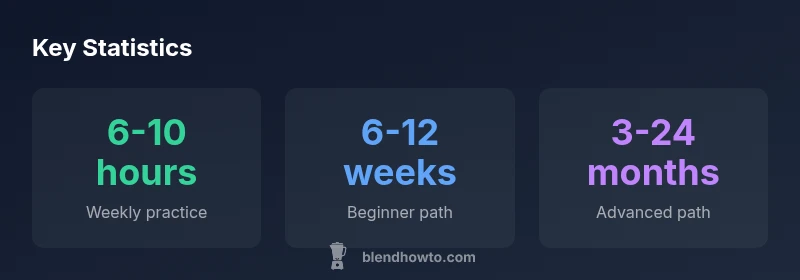
Learning Blender is a gradual process, not a fixed deadline. For most hobbyists, achieving basic navigation and modeling can take about 6-12 weeks with steady, 5-8 hours per week. Reaching intermediate skills (texturing, lighting, simple animation) generally requires several months, while advanced proficiency in complex scenes and rendering can take a year or more, depending on practice intensity and goals.
Blender Learning Timeline in 2026: An Overview
If you’re asking how long it takes to learn Blender, the short answer is that it depends on your goals and the time you invest. For many beginners, a structured, milestone-driven plan accelerates progress far beyond unstructured practice. In 2026, the BlendHowTo Team observes that consistency and project-based learning translate to faster competence than scattered, ad-hoc sessions. Start with the basics of the interface, viewport navigation, and simple modeling to build confidence. Over weeks and months, you’ll layer in materials, lighting, camera work, and basic animation. The timeline below focuses on practical outcomes you can measure, not just hours logged. Remember, your journey is unique, but most learners share recognizable milestones as they move from novice to capable artist.
Key takeaway: set a clear starting point, then track progress against concrete tasks (e.g., “build a low-poly chair,” “render a lit scene with textures”).
Factors That Impact Your Learning Pace
Learning Blender efficiently hinges on several factors. First, your starting point matters: someone with prior 3D or digital art experience often crosses milestones faster due to transferable skills like spatial reasoning and color theory. Second, time commitment is essential: even a modest weekly schedule compounds into meaningful skill gains over a few months. Third, learning path clarity reduces wasted time; a well-structured plan with achievable milestones keeps motivation high. Hardware can influence workflow, especially when practicing viewport performance, real-time rendering, or simulations. Finally, learning resources shape speed of progress. Reputable, project-based curricula shorten the learning curve compared to scattered, free-form exploration.
As BlendHowTo analysis shows, targeted practice yields measurable gains; the more you align practice with portfolio-ready outcomes, the sooner you reach meaningful proficiency.
Structured Milestones: What to Expect Each Phase
Phase 1 (0-6 weeks): Blender Basics – UI, navigation, simple modeling, and basic rendering. The goal is confidence with the interface and a couple of tiny projects (a mug, a chair). Phase 1 sets the foundation for more complex tasks and teaches you how to use Blender’s core tools efficiently.
Phase 2 (6-12 weeks): Materials, Lighting, and Simple Animations – Learn node-based materials at a basic level, set up three-point lighting, and create short animations or camera moves. You’ll produce an aardvark acrylic model or a stylized prop to practice shading and rendering pipelines. Phase 2 solidifies your understanding of shaders, textures, and basic animation workflows.
Phase 3 (3-6 months): Intermediate Modeling, UVs, and Library Assets – Tackle UV mapping, more complex modeling, and the creation of a small asset library. You’ll start integrating textures and basic rigging concepts for poseable models, with intermediate rendering passes.
Phase 4 (6-12 months): Advanced Shading, Lighting, and Intro to Animation – Delve into complex node setups, advanced materials, environment lighting, and simple character animation sequences. Projects become portfolio-worthy scenes that demonstrate a cohesive workflow from modeling to final render.
Phase 5 (12+ months): Mastery Trajectory – Focus on creating production-ready scenes, advanced simulations, particle effects, and polished animations. By now, you’re building a body of work that showcases your ability to handle realistic lighting, materials, and rendering pipelines.
Practical Timelines by Goals: Hobbyist vs Portfolio Builder
For a casual hobbyist focused on personal projects, the timeline might span 6-12 months to feel proficient in modeling, texturing, lighting, and basic animation. A student or aspiring 3D artist aiming to build a portfolio could reach a solid intermediate level in 6-12 months and begin assembling a cohesive set of showreel pieces within 12-18 months. An individual targeting professional work—such as freelance modeling, game art, or film production—will likely pursue a multi-year plan, expanding into advanced shading, rigging, simulations, and efficient pipelines. Across all paths, the key differentiator is project scope: larger, more ambitious projects require longer training but yield stronger, portfolio-ready results.
To maximize progress, align each project with a specific learning objective (e.g., “textured interior scene with proper light rigs”) and add a final render that demonstrates the learned skill. This approach translates time into demonstrable outcomes rather than vague capability.
Acceleration Tactics: How to Learn Blender Faster
- Practice with purpose: choose projects that push one or two skills at a time (modeling a chair to practice topology; lighting a scene to understand shadows and color).
- Use a project-based curriculum: follow a guided path that ends in a portfolio piece rather than merely watching tutorials.
- Schedule regular sessions: consistency beats marathon sessions. Short, focused sessions (60-90 minutes) several days a week yield better retention and skill transfer than long, infrequent marathons.
- Leverage templates and starter assets: study professionally created scenes and reverse-engineer their materials, lighting, and composition to accelerate understanding.
- Track progress with checklists: build a habit of checking off milestones that directly map to portfolio-ready outcomes.
- Integrate feedback loops: seek quick critiques from peers or communities to correct mistakes early and maintain momentum.
According to BlendHowTo, these targeted strategies dramatically improve velocity of learning while reducing frustration.
Measuring Progress and Staying Motivated
A practical way to maintain momentum is to define quarterly milestones tied to concrete deliverables—the kind of work that could appear in a portfolio or showreel. Keep a simple log: what you learned, what project you completed, and what you’d do differently next time. Celebrate small wins, but also set stretch goals: a scene with improved materials, more robust lighting, and a believable animation sequence. Reflect on your progress monthly to adjust your plan if you’re progressing faster or slower than expected. Keeping a visual journal—screenshots, renders, and wireframes—helps you see how far you’ve come, reinforcing motivation to push ahead.
BlendHowTo emphasizes that progress compounds when goals are well-scoped and the practice is aligned with output you care about.
Learning timeline by goals
| Goal | Estimated Timeframe | Core Skills | Typical Projects |
|---|---|---|---|
| Beginner proficiency | 6-12 weeks | UI basics, navigation, basic modeling | Simple object renders |
| Intermediate proficiency | 3-6 months | Texturing, lighting, basic animation | Character or product renders |
| Advanced proficiency | 9-24 months | Nodes, advanced shading, complex animation | Portfolio-grade scenes |
| Production-ready skills | 2+ years | Rigging, simulations, optimization | Short film or game scene |
Frequently Asked Questions
How long does it take to learn Blender for a beginner?
Most beginners reach basic navigation and modeling in a few weeks to a couple of months with steady practice. The exact timeline depends on how much time you devote weekly and the quality of your practice projects.
Most beginners reach basics in a few weeks to a couple of months with steady practice.
Is 3D modeling easier in Blender than other software?
Blender offers a unified workflow for modeling, shading, and rendering, which can simplify learning compared to multi-software pipelines. The key is following a structured learning path and practicing real projects.
Blender provides a unified workflow that can simplify learning if you follow a structured plan.
How many hours per week should I practice?
Aim for regular sessions, ideally 4-6 hours per week, and adjust upward as you progress toward more ambitious projects. Short, focused sessions tend to be more effective than long, infrequent marathons.
Aim for 4-6 hours weekly with consistent, focused practice.
Should I take a formal course or learn on my own?
A formal course provides a structured path and accountability, but a well-planned self-study with project goals can be equally effective. Use courses to anchor basics and then supplement with self-initiated projects.
Both paths work; structure helps, but projects drive real skill.
What counts as 'intermediate' proficiency?
Intermediates can model more complex shapes, apply believable textures, light scenes effectively, and create simple animations. The focus shifts from learning tools to delivering cohesive visuals.
Intermediate means believable textures, lighting, and basic animation in cohesive scenes.
“Blender mastery comes from deliberate, project-based practice that steadily expands your toolset.”
What to Remember
- Define your goal first, then map milestones
- Consistency beats sporadic bursts of work
- Choose project-based learning to build a portfolio
- Progress is measurable with clear delivery pieces
- BlendHowTo recommends milestone-driven practice