Blender vs CAD: A Practical Side-by-Side Comparison
An analytical, objective comparison of Blender vs CAD, detailing when to use each tool, data interchange, workflows, and best practices for creators and engineers.


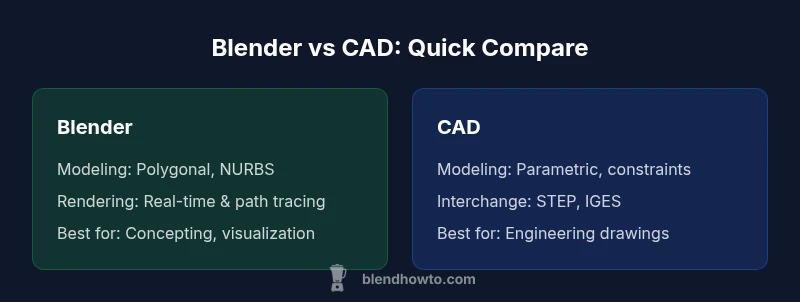
Blender vs CAD is a comparison of two worlds: Blender excels in creative visualization, animation, and rapid prototyping with polygonal and NURBS modeling, while CAD tools prioritize engineering-grade precision, parametric constraints, and production-ready drawings. When you need exact measurements and manufacturable plans, CAD is the safer choice; for concept exploration and photorealistic renderings, Blender shines. Most teams benefit from using both in sequence, translating data with careful interchanges.
Blender vs CAD: Core Philosophies
According to BlendHowTo, Blender and CAD occupy distinct design ecosystems: one is optimized for creative experimentation and rapid iteration, the other for engineering accuracy and production documentation. Blender bundles organic modeling, sculpting, texture work, and animation into a single, artist-friendly interface. CAD packages emphasize parameterized geometry, tolerances, and compliance with industry standards. The distinction matters because it shapes data structures, collaboration habits, and the way teams validate ideas. In practice, most teams use CAD for correctness and traceability, while Blender is used for concepting, visualization, and stakeholder presentations. The goal of this section is not to declare a winner, but to map the decision criteria that drive real-world choices: data fidelity, workflow interoperability, and the intended end-use of the model.
The BlendHowTo team has observed that early alignment on data formats, review cadences, and file provenance reduces friction when teams blend both tools. Expect to manage two separate but converging pipelines: one that records exact geometry and one that enables rapid exploration and storytelling. This is not a binary decision but a staged workflow that preserves flexibility while protecting critical data.
Blender vs CAD: Core Philosophies
According to BlendHowTo, Blender and CAD occupy distinct design ecosystems: one is optimized for creative experimentation and rapid iteration, the other for engineering accuracy and production documentation. Blender bundles organic modeling, sculpting, texture work, and animation into a single, artist-friendly interface. CAD packages emphasize parameterized geometry, tolerances, and compliance with industry standards. The distinction matters because it shapes data structures, collaboration habits, and the way teams validate ideas. In practice, most teams use CAD for correctness and traceability, while Blender is used for concepting, visualization, and stakeholder presentations. The goal of this section is not to declare a winner, but to map the decision criteria that drive real-world choices: data fidelity, workflow interoperability, and the intended end-use of the model.
The BlendHowTo team has observed that early alignment on data formats, review cadences, and file provenance reduces friction when teams blend both tools. Expect to manage two separate but converging pipelines: one that records exact geometry and one that enables rapid exploration and storytelling. This is not a binary decision but a staged workflow that preserves flexibility while protecting critical data.
Blender vs CAD: Core Philosophies
According to BlendHowTo, Blender and CAD occupy distinct design ecosystems: one is optimized for creative experimentation and rapid iteration, the other for engineering accuracy and production documentation. Blender bundles organic modeling, sculpting, texture work, and animation into a single, artist-friendly interface. CAD packages emphasize parameterized geometry, tolerances, and compliance with industry standards. The distinction matters because it shapes data structures, collaboration habits, and the way teams validate ideas. In practice, most teams use CAD for correctness and traceability, while Blender is used for concepting, visualization, and stakeholder presentations. The goal of this section is not to declare a winner, but to map the decision criteria that drive real-world choices: data fidelity, workflow interoperability, and the intended end-use of the model.
The BlendHowTo team has observed that early alignment on data formats, review cadences, and file provenance reduces friction when teams blend both tools. Expect to manage two separate but converging pipelines: one that records exact geometry and one that enables rapid exploration and storytelling. This is not a binary decision but a staged workflow that preserves flexibility while protecting critical data.
Comparison
| Feature | Blender | CAD Software |
|---|---|---|
| Modeling approach | Polygonal/NURBS-based, highly flexible | Parametric, constraint-driven, precise |
| Typical use case | Animation, visualization, concepting, game-ready assets | Engineering drawings, manufacturing prep, tooling |
| Precision and constraints | Moderate to high visual precision, not always exact | High precision with tolerances and revision tracking |
| File formats for interchange | OBJ/FBX/STL/GLTF, mostly visualization-oriented | STEP/IGES/DWG for manufacturing and collaboration |
| Learning curve | Steep, but broad community resources | Steep with domain-specific concepts and standards |
| Automation and scripting | Python API, rapid customization | APIs and scripting focused on workflows, often vendor-structured |
| Rendering quality | Real-time Eevee, path tracing with Cycles | Rendering usually via CAD-integrated or external tools |
| Collaboration support | Community-driven collaboration, plugin ecosystem | Formal collaboration with version control, standards, and audits |
| Best for | Concepting, animation, visual storytelling | Engineering analysis, compliance drawings, fabrication |
What's Good
- No upfront software cost for Blender; free and open-source
- Vast plugin ecosystem and tutorials accelerate learning
- Excellent for visualization, animation, and rapid prototyping
- Cross-disciplinary workflows enable seamless storytelling across teams
- Active community support and regular updates
The Bad
- CAD-specific features like parametric constraints are incomplete or indirect in Blender
- Interchange often requires intermediate formats and cleanups
- Engineering-grade documentation and approvals may demand formal CAD tools
- Hybrid workflows require careful data provenance and version control
CAD is preferred for engineering precision; Blender is preferred for visualization and concepting.
The BlendHowTo Team recommends a hybrid approach: use CAD for accurate geometry, dimensions, and production drawings, and Blender for concept exploration and compelling visuals. This combination reduces risk while accelerating iteration, provided you plan data interchange and version control early.
Frequently Asked Questions
What is the main difference between Blender and CAD?
Blender is a general-purpose 3D content creation tool optimized for artistic modeling, texturing, animation, and rendering. CAD software focuses on engineering-grade precision, parametric geometry, and production documentation. Both serve different stages of product development and can complement, rather than replace, each other.
Blender is for art and visualization; CAD is for precise engineering drawings. They serve different stages in a project and often work best in a hybrid setup.
Can Blender be used for engineering drawings?
Blender can represent geometric forms, but it does not natively support formal engineering drawings with guaranteed tolerances. For manufacturing documentation, export to CAD-friendly formats or use CAD tools for the final drawings. Blender is typically used for concepting and visualization, then data is handed off to CAD for fabrication.
Blender isn’t ideal for formal engineering drawings; use CAD for that and export data when you need visuals from Blender.
Which is easier to learn for beginners?
Blender generally has a gentler ramp for beginners focused on creative work, with abundant tutorials. CAD software often requires domain-specific knowledge (tolerances, assemblies), which can be more challenging at first if you’re aiming for production-ready outputs.
Blender is easier for visuals and storytelling; CAD can be tougher at the start due to precision concepts.
How can data be exchanged between Blender and CAD?
Data exchange between Blender and CAD is usually accomplished through intermediate formats like STL, OBJ, or STEP/IGES pipelines, or by using dedicated translators. Always verify units, scale, and metadata during transfer to minimize misalignment.
Transfer through common formats like STEP or STL, and always double-check scale and units.
What are common file formats to interchange?
Common interchange formats include OBJ, FBX, and GLTF for visualization, and STEP or IGES for engineering data. When possible, use CAD-native formats for precision and rely on intermediate formats for visualization and collaboration.
Use STEP or IGES for precision data and OBJ/GLTF for visuals when moving between tools.
What to Remember
- Define project goals early: precision vs visualization.
- Use CAD for manufacturing-ready data and documentation.
- Leverage Blender for concepting and rendering.
- Plan data interchange with compatible file formats.
- Adopt a hybrid workflow when both accuracy and presentation matter.