Is Blender or SFM Better? A Practical Compare Guide
Explore a data-informed side-by-side comparison of Blender vs SFM, covering modeling, animation, rendering, workflows, and best-use cases for home artists and hobbyists.


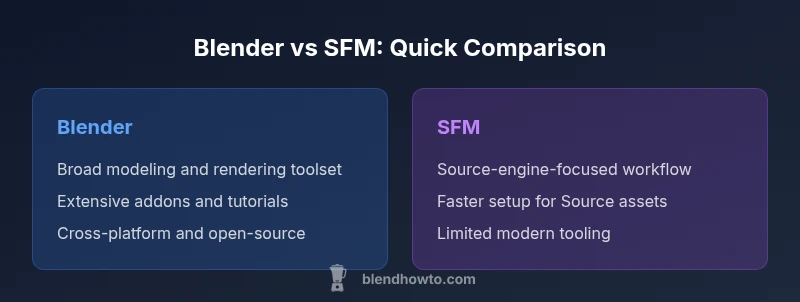
Is Blender or SFM better? For most home artists and hobbyists, Blender is the more versatile, future-proof option, offering a robust modeling, animation, and rendering toolset, plus extensive add-ons. SFM remains viable for quick Source-engine-based animations when you’re tied to existing assets, but it lacks modern tooling and long-term support. In short, Blender is better for broad projects; SFM can fit niche, pipeline-driven tasks.
Is Blender or SFM Better? Framing the decision for home artists
Is Blender or SFM better? For home artists and hobbyists entering the world of 3D creation or machinima, the short answer depends on project scope, desired output, and long-term goals. The BlendHowTo team finds that Blender tends to win on versatility, ongoing development, and community support, while SFM holds appeal for quick, Source-based animations within specific asset pipelines. This section sets the stage by outlining goals, constraints, and the kinds of projects each tool tends to excel at. It also flags common traps beginners encounter when comparing two very different ecosystems. Throughout this guide you’ll see practical comparisons, practical steps, and guidance to help you pick the right tool for the job.
Core differences: modeling, animation, rendering, and tools
Blender is a comprehensive, all-in-one suite that covers the full spectrum of 3D work: modeling, sculpting, UVs, texturing, animation, simulation, and rendering with Cycles and Eevee. SFM, by contrast, is more focused on rapid animation workflows within the Source engine ecosystem and is less about general-purpose 3D creation. If your goal is to build new content from scratch, refine topology, or generate high-quality renders, Blender provides more flexible options. If your project hinges on existing Source assets and quick sequence editing, SFM can be faster to setup, but at the cost of modern features and extensibility. BlendHowTo’s analysis emphasizes long-term viability and ecosystem breadth, which heavily favors Blender for most hobbyists and aspiring 3D artists.
Usability and learning curve for home cooks and hobbyists
For newcomers, Blender presents a steeper initial learning curve due to its breadth and depth of features. The learning resources are abundant—tutorials, community forums, official docs, and a wide range of plug-ins—making it feasible to progress from beginner to capable artist fairly quickly. SFM offers a gentler, more focused entry point if you are already invested in Source-based workflows and want fast outcomes with less upfront modeling. In practice, most learners benefit from starting with Blender to build transferable skills and then adopting SFM only if a specific pipeline demands it. BlendHowTo’s guidance is to set clear milestones and practice tasks that align with your end goals.
Pipeline and workflow: from concept to output
A typical Blender workflow starts with concept sketching, layout, and blocking, followed by detailed modeling, texturing, rigging, animation, and final rendering or real-time previews. Blender’s non-linear animation (NLA), robust rigging, particle systems, and a wide array of renderers enable polished results in a single project environment. SFM emphasizes fast animation within a Source-based pipeline, often with a focus on prebuilt assets, scene composition, and sequencing. The trade-off is fewer options for custom modeling and modern rendering. Practical takeaway: use Blender for end-to-end projects; reserve SFM for quick, pipeline-specific tasks where Source assets dominate.
Feature snapshot: core capabilities of Blender
Blender’s core strengths include a rich modeling toolset (mesh, curve, sculpting), advanced UV and texture workflows, procedural nodes for materials, powerful rigging systems, animation editors, physics simulations, and flexible rendering options. The community produces a vast ecosystem of addons that extend functionality in areas like character creation, motion graphics, and game-ready exports. Rendering with Cycles or Eevee delivers photorealistic or real-time previews, depending on your hardware and settings. This breadth makes Blender a versatile tool for hobbyists who want to grow beyond tutorials and create original content from scratch.
SFM limitations and context: when it could still be useful
SFM remains a lightweight, purpose-built option for quick, Source-based animation projects and fan-content pipelines where assets are tied to the Source engine. Its interface and tooling are tailored to fast scene assembly and sequence editing rather than expansive modeling or high-end rendering. However, the aging codebase and limited updates mean compatibility and long-term support sit lower on the priority list for many creators. If your project is time-sensitive and source-asset-centric, SFM can still be a practical choice, though you should plan for eventual migration to a more flexible system.
Performance, compatibility, and community ecosystem
Blender’s performance scales with modern hardware and benefits from ongoing optimization and platform support across Windows, macOS, and Linux. The community ecosystem is vast, with tutorials, forums, and extensions covering virtually every use case from beginners to professionals. SFM’s performance and compatibility are more tightly bound to the Source engine ecosystem, with a smaller community and fewer fresh resources. For long-term career growth or indie projects, Blender’s active development pipeline and plugin ecosystem offer a clearer path to expanding skills and pipeline integration.
Cost, licensing, and access: what the wallet sees
Both Blender and SFM are free to download and use, with Blender released under the GPL and SFM historically tied to Valve’s licensing for Source-based projects. From a budgeting perspective, Blender’s open-source model supports permanent access to updates and community-driven plugins without licensing fees. SFM users may encounter occasional asset licensing considerations if assets extend beyond personal use, but the software itself remains cost-free. The key deciding factor is whether ongoing feature expansion and cross-project versatility are worth prioritizing over a lean, Source-focused workflow.
Real-world scenarios: which tool for which project?
If you’re building original 3D characters, environments, or animations for independent projects, Blender is typically the better fit. For quick, Source-engine-based machinima or fan projects where assets already exist in a Source-compatible format, SFM can deliver faster results with less setup. The best practice is to prototype in Blender to validate concepts, then decide whether to stay in Blender or leverage SFM for specific pipeline steps. BlendHowTo’s recommendations emphasize early experimentation and clear milestone tracking to avoid tool-switching surprises.
Best practices for transition between tools: bridging the gap
Transitioning from SFM to Blender or vice versa requires careful asset management, file interoperability, and compatible export options (e.g., OBJ/FBX for models, OBJ/DAE for scenes). Establish a shared naming convention, consistent coordinate systems, and unified texture pipelines. Keep a small set of core rigs or assets portable between tools to minimize rework. Investing time in learning Blender’s import/export workflows plus common plugin-based bridges helps maintain productivity and reduces the risk of data loss during migration.
Practical recommendations by use-case: quick-start paths
For beginners with zero assets, start with Blender’s beginner-friendly projects: simple modeling, basic rigging, and a few render passes. If your priority is efficient scene assembly using existing Source assets, map out a plan for how you’ll integrate SFM and what assets you’ll port or recreate. As you grow, consider adopting Blender for more complex tasks like texturing, simulation, and advanced rendering. A structured learning path, with defined goals and timelines, accelerates competence while avoiding tool fatigue.
How to decide: quick checklist for your project
- Define your project scope: original content vs asset-based production
- Assess output needs: realism, animation complexity, rendering time
- Consider long-term skills: modeling, texturing, rigging, and pipeline integration
- Examine asset availability: do you have Source assets or need new ones
- Plan for future editing and iteration: can your workflow evolve with Blender’s ecosystem
- Choose a primary tool that offers growth, then reuse parts of SFM only if it saves time
Final considerations: the long-term view
The decision between is blender or sfm better hinges on your ambitions. Blender’s expansive feature set, active development, and broad community support are compelling for anyone who wants to expand into modeling, animation, and rendering. SFM remains a useful tool for quick, Source-based tasks, especially when you’re deeply embedded in a Source asset workflow. The BlendHowTo team recommends starting with Blender to build transferable skills and then selectively incorporating SFM when a Source-specific constraint drives the project needs.
Comparison
| Feature | Blender | SFM (Source Filmmaker) |
|---|---|---|
| Core purpose | General 3D creation, modeling, rigging, animation, and rendering | Focused on quick Source-engine-based animations and scene sequencing |
| Modeling capabilities | Full modeling toolset with modifiers, sculpting, and procedural workflows | Limited modeling tools focused on assembling scenes for Source assets |
| Animation workflow | Advanced rigging, NLA, constraints, shape keys, and physics simulations | Timeline-based animation with emphasis on quick scene setup and shot sequencing |
| Rendering options | Cycles and Eevee render engines with photorealistic and real-time previews | Rendering tied to Source engine, with less flexibility for modern render pipelines |
| Extensibility | Huge ecosystem of addons and integrations for all stages | Limited plugin ecosystem; extensions are rare and often engine-specific |
| File formats and interoperability | Broad import/export support (OBJ, FBX, STL, GLTF, etc.) and formats for animation pipelines | Source-specific formats; export options exist but are less flexible |
| Learning curve | Steeper at first due to breadth, but longer-term payoff in capability | Gentler entry for quick results within its niche, but less transferable skills |
| Community and resources | Vast tutorials, forums, official docs, and a thriving addon community | Smaller, more focused community with niche resources |
What's Good
- Broad feature set enabling end-to-end project workflows
- Open-source and free with a thriving addon ecosystem
- Large community support and frequent updates
- Flexible for both hobbyists and professionals across multiple industries
The Bad
- Can be intimidating for complete beginners due to breadth
- Steeper learning curve for advanced features
- Requires more hardware for high-end rendering
- SFM remains limited in modernization and long-term support
Blender wins as the versatile, future-proof choice; SFM remains useful for specific Source-based tasks
Choose Blender for most projects, especially if you want end-to-end creation and growth. Use SFM only when you’re tied to Source assets and need a fast, pipeline-specific solution.
Frequently Asked Questions
Is Blender better than SFM for beginners?
In most cases, Blender is the better starting point for beginners due to its broader feature set and extensive learning resources. The initial steps may be steeper, but the skills transfer to many other 3D tasks. SFM can be easier to pick up if your goals are tightly aligned with Source-based projects.
Blender is usually the better starting point for beginners because it teaches skills you can reuse across many projects, even if it’s a bit steeper at first. SFM is faster if you’re focused on Source-based tasks.
Can SFM still be used for modern projects?
SFM can still serve quick Source-based animations, especially when assets already exist in that ecosystem. However, it lacks ongoing updates and modern toolchains, which limits long-term viability for new projects.
SFM works for quick Source-based work but isn’t ideal for long-term or modern multi-tool projects.
Which tool is better for 3D printing workflows?
Blender is the better choice for 3D printing workflows due to its modeling, sculpting, and export options. SFM isn’t designed for fabrication pipelines and lacks the needed modeling tools.
Blender wins for 3D printing because it supports core modeling and export options.
Is there interoperability between Blender and SFM?
Yes, you can move assets between Blender and SFM using common formats like OBJ and FBX, but you’ll need to manage coordinate systems and rigging compatibility manually. A planned workflow helps minimize rework.
You can move assets between them with shared formats, but you’ll manage some compatibility steps.
What are the licensing and cost differences?
Both Blender and SFM are free to use. Blender’s open-source licensing supports ongoing development and community-generated plugins, while SFM’s licensing is tied to its Source-based context and asset usage scenarios.
Both are free to use, with Blender offering broad community-driven growth and SFM tied to Source assets.
What resources are best to learn Blender?
Start with official Blender tutorials and beginner courses, then expand to project-based guides and addons. The key is hands-on practice, a clear milestone plan, and regular review of progress.
Begin with official Blender tutorials and project-based guides to build momentum.
What to Remember
- Start with Blender to build transferable 3D skills
- Use SFM only if a Source-based pipeline demands it
- Invest in structured learning with clear milestones
- Prototype ideas in Blender before committing to any tool
- Plan for long-term growth and future project versatility