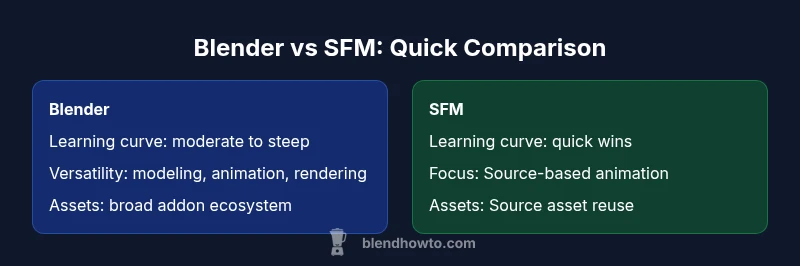
Is Blender Harder Than SFM? A Practical Comparison
Analytical side-by-side: Blender vs Source Filmmaker (SFM) focusing on learning curves, workflows, and real-world use-cases. We explore is blender harder than sfm in context, helping home artists decide which path fits their goals.


When you ask is blender harder than sfm, you’re comparing two ecosystems with different aims, communities, and workflows. Blender positions itself as a comprehensive 3D suite for modeling, sculpting, shading, animation, and rendering; SFM focuses on rapid animation of Source-based assets using Valve’s pipelines. This contrast makes the question less about brute difficulty and more about fit. According to BlendHowTo, the best way to answer this question is to map your goals to the tool’s strengths, then test a small, endpoint-friendly task to gauge your learning curve. The reality is that both tools reward structured practice, but Blender’s breadth means a longer onboarding path, while SFM offers a quicker kickoff for fans creating short scenes with Source assets. In the end, the right choice depends on your project type, your willingness to learn, and your long-term ambitions as a creator.
Is Blender harder than SFM? Framing the question
When you ask is blender harder than sfm, you’re comparing two ecosystems with different aims, communities, and workflows. Blender positions itself as a comprehensive 3D suite for modeling, sculpting, shading, animation, and rendering; SFM focuses on rapid animation of Source-based assets using Valve’s pipelines. This contrast makes the question less about brute difficulty and more about fit. According to BlendHowTo, the best way to answer this question is to map your goals to the tool’s strengths, then test a small, endpoint-friendly task to gauge your learning curve. The reality is that both tools reward structured practice, but Blender’s breadth means a longer onboarding path, while SFM offers a quicker kickoff for fans creating short scenes with Source assets. In the end, the right choice depends on your project type, your willingness to learn, and your long-term ambitions as a creator.
BlendHowTo’s approach emphasizes starting with a clear goal and validating it with hands-on tasks. This method, repeated across other tutorials, helps you translate abstract questions into concrete steps. If you’re aiming for general 3D production, Blender’s versatility will prove valuable. If your focus is fan animations that directly leverage Source assets, SFM can deliver faster results with fewer setup steps.
Core learning curves: Blender vs SFM fundamentals
The main difference in learning curves comes from scope. Blender invites beginners to explore a broad spectrum of disciplines—modeling, sculpting, UV mapping, materials, lighting, animation, and rendering. That breadth can feel intimidating at first, but it also means you acquire transferable skills across many projects. SFM, by contrast, concentrates on a narrower workflow: posing scenes, animating characters, and rendering fan content with Source assets. This narrower focus makes early wins more tangible and can be highly motivating for newcomers. BlendHowTo recommends starting with a small, well-defined task in each tool. For Blender, this might be a simple scene with basic lighting and a textured model; for SFM, a short scene using existing assets. Expect Blender’s initial hurdles to include navigating a feature-packed interface and choosing among many rendering options; expect SFM’s initial hurdles to relate to asset compatibility and understanding Source engine constraints. The thread that runs through both paths is deliberate practice and concrete milestones. Over time, speed, accuracy, and creative control improve, and the learning curve flattens as you accumulate experience.
Tooling and ecosystem: what you actually learn
Blender exposes learners to a modular toolkit: modeling, sculpting, rigging, shading, and rendering all live under one umbrella, augmented by a vast addon catalog and a Python API for automation. This ecosystem teaches you transferable concepts applicable to many studios and hobby projects. SFM, meanwhile, centers on animatingSource-based characters and environments with a workflow tuned for quick scene assembly and lighting that resembles Source engine visuals. The skill set you pick up in SFM—scene composition, timing, and camera work—transfers to other tools, but the asset-driven nature of SFM means you’ll spend more time aligning assets than building new ones. BlendHowTo’s guidance here emphasizes building a small project in each environment to surface gaps early. As you grow, you’ll find Blender’s addon ecosystem accelerates pipelines, while SFM’s strengths lie in efficiency for fan-driven content.
UI, navigation, and long-term efficiency
Blender’s interface is famously dense, with panels, editors, and modes that offer context-sensitive options. The result can feel overwhelming at first, but a modular design lets you tailor the workspace to the task at hand. The long-term payoff is efficiency once you build muscle memory around hotkeys and common workflows. SFM’s interface is comparatively lean, prioritizing scene assembly, animation, and rendering with a more focused set of tools. On day one, SFM users can assemble a scene quickly, but they may hit friction when trying to export assets or integrate with other pipelines. The takeaway is to give yourself time to calibrate the workspace in both tools and to create a short, repeatable task to measure improvements. BlendHowTo’s templates and playlists can help you establish a consistent routine for practice.
Performance, hardware considerations and scalability
Hardware choice matters in both tools, but the impact scales differently with project size. Blender benefits from a capable GPU for real-time viewport performance, fast rendering with modern engines, and efficient handling of large scenes. SFM’s performance leans on the Source asset complexity and the scene’s lighting and animation demands; it typically benefits from solid CPU performance and a reasonable GPU, especially when previewing animations. In both cases, keeping drivers updated and using optimized assets helps. You don’t need top-tier hardware to start, but expect longer render times and slower previews as scenes grow in complexity. BlendHowTo notes that planning a pipeline around hardware capabilities from the start pays dividends later, and you should adjust scene complexity as you scale.
Asset pipelines, formats, and interoperability
Interoperability is a practical hinge point. Blender plays well with standard formats such as OBJ, FBX, and GLTF, enabling you to move models, animations, and textures between tools and engines with relative ease. SFM relies on its own asset pipeline built around Source assets, with limited, often non-standard export routes. This makes long-term collaboration and asset reuse more straightforward in Blender, but it can require extra steps when bringing assets back into a Source-based project. The key is to design your workflow around common formats early—export a test asset, check compatibility with your target pipeline, and adjust rigging or materials as needed. BlendHowTo’s tutorials frequently demonstrate cross-tool workflows to minimize friction during handoffs.
Learning resources and community support
Both tools enjoy vibrant communities, but Blender’s reach is broader. You’ll find official documentation, countless tutorials, and a large addon ecosystem. SFM has a smaller but dedicated community with fan-centric guides and community-made assets. BlendHowTo emphasizes leveraging a mix of official docs and community videos to pace your learning. Practical progress comes from following structured paths: start with core modeling or animation tasks, then branch into more advanced techniques like retargeting or shader work. The breadth of Blender means more potential resources, while the focused scope of SFM provides quicker early wins for fans of Source assets.
Real-world scenarios and case studies
Consider a few real-world arcs to frame the decision. A hobbyist aiming to produce a short fan film with Source visuals may reach goals faster in SFM, thanks to Asset reuse and familiar engine aesthetics. A student building a portfolio, or a creator planning a multi-scene sequence with custom models and textures, will gain more from Blender’s expansive toolbox and rendering options. In practice, many artists begin with SFM to learn pacing and composition, then migrate to Blender to flesh out assets and finalize renders. BlendHowTo’s case studies illustrate how this two-stage approach accelerates learning and expands creative options, letting you switch between tools as the project demands.
Pros and cons in decision factors
Pros: Blender offers broad versatility across modeling, animation, and rendering; a vast addon ecosystem; open-source flexibility; strong cross-format interoperability. SFM provides a focused, relatively fast path to fan-based animation with Source assets and a lower barrier to entry for simple scenes.
Cons: Blender can present a steep initial learning curve due to breadth and UI complexity; the sheer number of options can be overwhelming for newcomers; SFM’s scope is narrower and asset pipelines can be limiting for projects outside the Source ecosystem.
Getting started: a practical path forward
Begin by clarifying your goal: are you exploring general 3D production, or aiming for fan animations with Source assets? If your aim is broad 3D proficiency, install Blender and start with a guided beginner project focusing on a simple scene, lighting, and basic materials. If you want quick, Source-based animation practice, install SFM and complete a short scene using existing assets, then compare the result with a Blender version of the same concept. Create a small milestone plan for each tool and track your progress with a consistent practice schedule. Finally, use a cross-tool workflow to practice exporting and importing files, testing compatibility points early, and refining your pipeline as you grow. BlendHowTo’s recommended steps provide a practical, repeatable path to competence.
Comparison
| Feature | Blender | SFM |
|---|---|---|
| Learning curve | Steeper for full workflows | Shallower for basic scenes |
| Workflow breadth | Modeling/animation/rendering/rigging/addons | Animation focus with Source assets |
| Rendering options | Cycles/Eevee and other engines | Built-in rendering tied to Source visuals |
| Asset library | Vast addon catalog and assets | Limited community assets |
| Community/docs | Huge community; extensive docs | Smaller, fan-focused community |
| Interoperability | Strong support for FBX/OBJ/GLTF | Limited interop within Source pipeline |
| Scripting/Automation | Python API and automation | Limited scripting capabilities |
| Best for | General 3D production, animation, game assets | Source-based fan animations |
What's Good
- Broad versatility across modeling, sculpting, animation, and rendering
- Large, active community with abundant tutorials and addons
- Open-source and cross-platform with customization options
- Strong interoperability with industry-standard formats
The Bad
- Steeper initial learning curve for full workflows
- UI can feel overwhelming to beginners
- SFM-specific asset pipeline and limitations for non-Source assets
Blender is the more versatile, long-term choice; SFM remains a solid option for Source-based fan animations.
Blender provides a broader skill set and superior future-proofing, while SFM offers quicker wins for Source asset-centered projects. If your goal is general 3D production, Blender’s long-term value justifies the initial effort; if you’re focused on Source-era aesthetics and fan content, SFM can deliver faster results.
Frequently Asked Questions
Is Blender harder to learn than SFM?
In general, Blender has a steeper initial curve due to its breadth, while SFM is simpler to pick up for basic scenes. The right path depends on your long-term goals and willingness to learn. Start with a small project in each tool to surface the real differences.
Blender is broader and a bit tougher at first, whereas SFM is quicker to begin with for simple scenes.
Can I import Source assets into Blender?
Yes, you can import assets into Blender using common formats like FBX or OBJ. You may need to adjust rigs or materials to ensure compatibility with Blender’s workflow.
Yes, importing is possible with common formats; you’ll often tweak rigs and materials.
Which tool is better for animation?
Blender offers a more comprehensive animation toolset, including advanced rigging, constraints, and non-linear editing. SFM is excellent for fan animations that reuse Source assets but lacks Blender’s broader animation toolkit.
Blender has the deeper animation toolkit; SFM is great for quick fan animations with Source assets.
Does SFM support modern rendering features?
SFM provides built-in rendering appropriate for its era and asset style. Blender offers modern rendering engines with more control over lighting, materials, and real-time previews.
SFM’s rendering is more limited; Blender has advanced rendering options.
Are there community resources for both tools?
Yes. Blender has extensive official docs and countless tutorials; SFM has a dedicated, though smaller, fan-focused community and guides. BlendHowTo also curates practical guides for both paths.
You’ll find lots of Blender tutorials and a helpful but smaller SFM community.
What is a practical learning path for a beginner?
Pick a small, defined project in your chosen tool, complete it, then reproduce a similar task in the other tool to compare. Build a step-by-step plan with milestones and useChecklists to track progress.
Start with a small project, then compare across tools to learn faster.
What to Remember
- Define your primary goal before choosing.
- Expect Blender to require more initial time but offer broader capabilities.
- SFM shines for Source-based fan animations with quicker setup.
- Plan learning with milestones to avoid overwhelm.
- Test asset compatibility early in your workflow.