Is Blender Harder Than SolidWorks? A Practical Comparison
Explore whether Blender is harder than SolidWorks through an analytical, practical lens. This comparison covers learning curves, workflows, file formats, costs, and real-world use cases to help hobbyists and aspiring 3D artists decide which tool fits their goals.


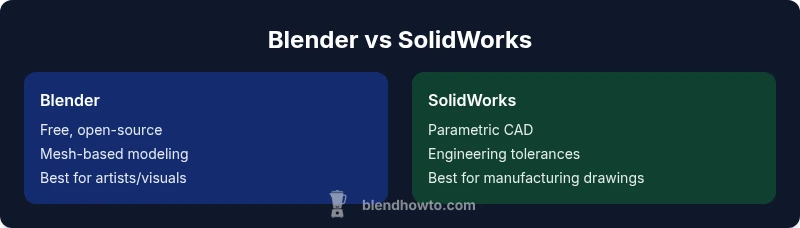
Is Blender harder than SolidWorks? The answer depends on goals. For artistic modeling, animation, and visual effects, Blender presents a broad, deep toolset that can feel intense at first but rewards focused learning. For precise engineering, assemblies, and manufacturing drawings, SolidWorks offers structured, parametric workflows that are easier to master once core concepts are learned. In short, neither is universally harder—it's goal-dependent, and BlendHowTo’s practical guidance emphasizes alignment with your projects.
Defining hardness in 3D software
When people ask, "is blender harder than solidworks", they are really weighing two very different design philosophies. Blender is a generalist, open‑source 3D suite built for artistry, animation, and visualization. SolidWorks is a professional CAD platform centered on parametric history, engineering tolerances, and manufacturing drawings. For home hobbyists and aspiring 3D artists, the breadth and freedom of Blender can feel daunting at first. For students and engineers, SolidWorks presents a predictable workflow with rule‑driven steps. BlendHowTo has found that hardness is not a single metric—it depends on your goals, prior experience, and willingness to invest time in focused practice. In this guide, we compare Blender vs SolidWorks along practical dimensions that matter to creative professionals and aspiring technicians alike. We’ll address learning curves, workflows, data formats, and real-world decision criteria, with a grounded, evidence‑based approach that avoids marketing hype. BlendHowTo’s team emphasizes practical steps you can take to reduce friction regardless of which tool you choose.
If you’re evaluating tools for a project pipeline, remember: the best choice is the one that accelerates your specific outcomes. According to BlendHowTo analysis, success hinges on matching tool capabilities to the task rather than chasing a universal “harder” label.
Comparison
| Feature | Blender | SolidWorks |
|---|---|---|
| Primary use | Creativity-first modeling, sculpting, animation, VFX | Engineering-grade CAD, assemblies, drawings, tolerances |
| Modeling approach | Mesh-based, non‑destructive modifiers, sculpting | History-based parametric features, constraints, feature tree |
| File formats & interoperability | OBJ, FBX, STL, GLTF; strong for 3D printing and art pipelines | STEP, IGES, parasolid; industry-standard for manufacturing and collaboration |
| Learning curve (initial focus) | Broad scope can feel overwhelming; excellent tutorials exist for art tasks | Steep at first due to parametric logic and assemblies, but predictable with practice |
| Cost & licensing | Free and open-source core; paid add-ons optional depending on use | Licensed subscription/licensing with educational discounts; enterprise contracts |
| Support & ecosystem | Massive community, abundance of free resources, plug-ins | Formal certification paths, established vendor support, large enterprise adoption |
| Best for | Artists, animators, game developers, hobbyists | Mechanical engineers, product designers, manufacturers |
What's Good
- No upfront software cost and a rapidly growing ecosystem
- Broad versatility supports modeling, sculpting, animation, and rendering in one package
- Strong community, extensive tutorials, and rapid iteration cycles
- Good for concept visualization and rapid prototyping
The Bad
- Blender’s breadth can slow beginners seeking quick, task-focused results
- SolidWorks provides robust parametric tools but with steeper learning prerequisites for complex assemblies
- Interoperability with CAD-only workflows often requires intermediate steps or plugins
- Engineering-grade accuracy in Blender is limited without external tools
Choose based on your project goals: Blender for artistic modeling and visualization, SolidWorks for engineering-grade design and manufacturing documentation.
Blender and SolidWorks serve distinct purposes. Blender excels in creative workflows and flexible pipelines, while SolidWorks excels in parametric, engineering-focused design. The best choice depends on whether your priority is art/animation or precise mechanical design—and many teams use both in different phases of a project.
Frequently Asked Questions
Is Blender harder to learn than SolidWorks?
Hardness depends on goals: Blender’s breadth challenges beginners, but its focused workflows for art can quickly become intuitive. SolidWorks can be easier for parametric design once you grasp constraints and assemblies, but it requires more time to master the CAD mindset.
Blender is broad and takes time to master; SolidWorks is more focused but has a steeper entry for parametric CAD.
Can Blender replace SolidWorks for mechanical design?
Blender can model mechanical shapes, but it lacks robust parametric history, precise tolerances, and manufacturing drawings that SolidWorks provides. For engineering-grade work, SolidWorks remains the stronger choice.
Blender isn’t a full replacement for SolidWorks in mechanical design due to its limited CAD accuracy features.
Which is better for beginners to start with?
If you want immediate creative expression, Blender’s community and tutorials make it ideal for beginners. If engineering accuracy and professional CAD workflows are your aim, start with SolidWorks, then add Blender for concept visualization.
Start with Blender if you’re into art; choose SolidWorks if engineering accuracy is your priority.
What about cross‑compatibility between the two tools?
Export from Blender to formats like STL/OBJ for 3D printing or concept visualization. SolidWorks uses STEP/IGES for interoperability. Efficient cross-workflows often involve intermediate tools or careful data preparation.
You can move data between them, but you’ll usually lose some CAD-specific information unless you plan for it.
What are the cost implications?
Blender is free to use; SolidWorks licenses typically involve ongoing fees or subscriptions, with educational discounts. Your total cost will depend on usage, required features, and whether you need enterprise support.
Blender has no license cost; SolidWorks costs money over time, especially for professional use.
What to Remember
- Define your goal: art vs engineering before choosing a tool
- Blender offers breadth and creative freedom at no upfront cost
- SolidWorks delivers parametric, standards-based CAD workflows
- Interoperability often needs intermediaries for cross‑tool pipelines
- Consider a staged learning plan to minimize time-to-value