Is Blender Harder Than Maya? A Practical Learning Guide
A rigorous, balanced comparison of Blender and Maya focusing on learning curves, workflows, costs, and resources to help you choose the right tool for your goals.


is blender harder than maya? Not inherently; the answer depends on your goals, prior experience, and which workflows you need. Blender offers an all-in-one, free-to-start toolset that appeals to hobbyists and learners, while Maya provides industry-standard pipelines that many studios rely on. For many new users, Blender reduces the initial friction, but mastering advanced features in either tool requires time and deliberate practice.
The Learning Curve: Blender vs Maya
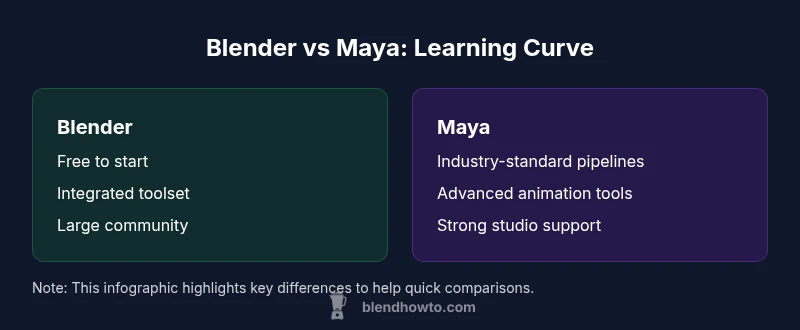
Is blender harder than maya? The short answer is that the difficulty is not universal but context-dependent. According to BlendHowTo, learning curves are shaped by what you intend to create, your prior experience with 3D software, and how you structure practice. Blender offers a welcoming entry point with an all-in-one toolbox that covers modeling, texturing, rigging, animation, and rendering. It is free to start, which lowers the initial barrier for aspiring artists. Maya, by contrast, targets professional pipelines with specialized tools for animation, dynamics, and large-scale productions. It can feel intimidating at first, but it often pays off for those pursuing industry-standard workflows. The key takeaway is that both tools demand time to gain fluency, and the perceived difficulty often reflects your chosen path rather than an intrinsic flaw in the software.
Core Skills and Tool-Specific Strengths
Across modeling, rigging, animation, and shading, both Blender and Maya cultivate transferable 3D fundamentals. Blender shines in accessibility and rapid iteration for individuals or small teams. It excels at learning core concepts quickly because you can see results in a single interface. Maya excels in precision, big-pipeline integration, and animation tools tuned for complex character work. The most important skill in either ecosystem is learning how to break down a project into manageable sub-tasks, then applying consistent practices across tools. While Blender might teach you broad competence faster, Maya can accelerate output when your goals align with studio-standard conventions.
UI, UX, and Learning Styles
UI design heavily influences perceived difficulty. Blender’s interface emphasizes a unified experience, with many tools accessible from a single window and a strong emphasis on keyboard-driven workflows. For new users, this cohesion can feel intuitive, once you acclimate to its terminology. Maya offers a more modular setup that mirrors larger production environments, often with deeper menus and context-specific workflows. If you prefer a structured, industry-aligned path, Maya can feel more straightforward; if you value rapid experimentation and free exploration, Blender can feel friendlier.
Industry Fit and Career Paths
Which tool you choose should reflect your target industry. Indie game dev, arch-viz, and independent artists frequently start with Blender because it’s cost-effective and flexible. Maya remains the dominant choice in many VFX studios, large animation houses, and studios with established pipelines. This alignment affects how quickly you land projects or gigs. BlendHowTo’s analysis shows that even when starting with Blender, learners who aim for industry roles should plan to learn Maya or at least understand Maya-like workflows to maximize job opportunities. The decision should balance your immediate needs with your long-term career goals.
Cost, Licensing, and Accessibility
Blender’s license is a major advantage for beginners and hobbyists: it is completely free and open-source, with no subscription barrier to access core functionality. This makes early experimentation low-risk and highly accessible. Maya operates on a subscription model through Autodesk, which can be a consideration for students, freelancers, or small studios. The cost factor is not just a price tag; it influences which learning resources and trial experiences are available to you. For many, starting with Blender to build fundamentals before moving to Maya for industry work represents a practical, cost-aware approach.
Resources, Community, and Official Documentation
Blender’s community is large and diverse, contributing tutorials, add-ons, and shared projects that accelerate practical learning. You can find beginner-friendly guides, project-based courses, and community forums that help you troubleshoot quickly. Maya benefits from strong, official documentation and formal training paths supported by Autodesk and partner institutions. For learners, the main takeaway is that both ecosystems offer high-quality guidance; the difference lies in whether you prefer community-driven exploration or structured, vendor-backed resources.
How to Choose: A Decision Framework
Start by mapping your goals: do you want to model for indie games, render architectural scenes, or work on big-studio animation? Then assess constraints: budget, access to hardware, and whether you need to join a pipeline that expects Maya. If you’re focused on cost-effectiveness and rapid skill-building, Blender is an excellent starting point. If your goal is to enter a studio with established Maya pipelines, beginning with Maya—or learning its core workflows early—can save time later. The decision should be pragmatic: pick the tool that most closely aligns with your target outcomes and learning style.
Common Pitfalls and How to Avoid Them
Many learners jump between tools too quickly or try to imitate advanced workflows before building core skills. A common pitfall is attempting to master every feature at once; instead, pick a core path (e.g., modeling, animation, or shading) and stick with it to build depth. Another risk is neglecting project organization and file management, which becomes more critical in production contexts. To avoid these traps, set a small, achievable project, use consistent naming conventions, and document your workflow steps. Regularly compare your progress to a baseline project to ensure steady improvement.
Onboarding Plan: A Progressive Path (No Dates)
Create a simple starter project in Blender to learn the basics: model a simple prop, texture it, and render it. Then re-create a similar asset in Maya to compare tool behaviors. Build a habit of documenting your process: what you clicked, why you chose a method, and how you would improve next time. Gradually increase complexity by adding lighting, rigging, or simple animations. Use templates and presets to replicate consistent results, and engage with the community for feedback. This approach fosters practical fluency without getting overwhelmed by features.
Getting Started: First Small Projects in Each Tool
Begin with a small, hands-on project in Blender (e.g., a stylized product model) to learn the fundamentals, then switch to a comparable Maya project (e.g., a basic character rig) to experience different workflows. Focus on core skills: modeling topology, texturing, and basic animation. Document your decisions and reflect on what felt intuitive versus what felt clumsy. Over time, you’ll develop a sense for which tool best matches your style and the demands of your target workflow.
Comparison
| Feature | Blender | Maya |
|---|---|---|
| Learning Curve (General) | All-in-one UI with quick-start potential; strong for beginners | Industry-focused workflows; steeper initial learning but clearer for studios |
| Industry Alignment | Popular with independent artists, hobbyists, and educationgroups | Widely adopted in film, TV, and large-scale animation studios |
| Cost & Licensing | Free to use for any project; strong cost efficiency for learners | Subscription-based with enterprise options; licensing affects access |
| Learning Resources | Vast community tutorials, add-ons, and assets | Official documentation and formal training paths from Autodesk |
| File Compatibility & Pipelines | Open formats; flexible pipelines across tools | Strong integration with industry-standard pipelines |
| Performance & Hardware | Optimized for a wide range of hardware; good for personal rigs | Heavy pipelines may require powerful workstations for efficiency |
| Best For | Independent artists, learners, and rapid prototyping | Studios, teams, and professionals pursuing large-scale productions |
What's Good
- Free starting access with Blender lowers the entry barrier
- Broad learning resources and an active, inclusive community
- Blender’s integrated toolset supports learning multiple skills in one place
- Clear path to compare with Maya helps you choose based on goals
The Bad
- Subjectivity of 'difficulty' makes comparisons less definitive
- Industry standards can favor one tool over the other depending on field
- Licensing costs for Maya can be a barrier for individuals and small studios
Blender and Maya are not inherently harder; the right choice depends on your goals and learning style
Both tools offer meaningful depth. Blender provides an accessible start and broad versatility, while Maya delivers industry-standard workflows for production pipelines. Your best bet is to align the chosen tool with your target projects and commit to a focused learning plan.
Frequently Asked Questions
Is Blender harder to learn than Maya for beginners?
For beginners, Blender often feels less intimidating due to its free access and integrated toolset. However, Maya can offer a clearer path to industry-standard workflows if your goal is studio work. The perceived difficulty depends on your learning style and target projects.
Blender is usually easier to start with because it’s free and all-in-one, but Maya can be simpler if you’re aiming for studio workflows. Your experience matters more than the tool itself.
Which has a steeper learning curve overall?
Maya often presents a steeper initial curve due to its depth and production-ready features. Blender’s breadth can feel overwhelming at first, but its common workflows tend to be more approachable for quick wins.
Maya usually feels steeper at first because of its depth, while Blender offers faster early wins.
Does cost affect how hard a tool feels to learn?
Cost affects access to learning resources and trial experiences. Blender’s free model makes it easier to practice consistently, whereas Maya’s licensing can constrain access to official training unless you’re in an educational or pro environment.
Yes, cost can influence how much you practice and which resources you can access.
Is Maya essential for a career in film or VFX?
Maya remains a staple in many studios, but it is not a universal blocker. Some studios accept Blender pipelines with proper workflows, while others require Maya proficiency. Learning both or prioritizing Maya for studio-ready portfolios can widen opportunities.
Maya is common in big studios, but you can still find work with Blender depending on the studio and project.
Can I switch between Blender and Maya mid-project?
You can switch, but expect friction in translating assets, rigs, and pipelines. Plan for a conversion phase and use standard file formats to minimize compatibility issues.
Switching mid-project is doable but tricky; plan and standardize assets to keep it smooth.
What are the best learning resources for this comparison?
Start with official documentation for both tools, plus project-based tutorials and community guides. Look for structured courses that align with your goals, whether modeling, animation, or production pipelines.
Use the official docs and project-based tutorials to build practical skills.
What to Remember
- Identify your target use case before choosing a tool
- Evaluate cost and access when planning your learning path
- Consider industry expectations to judge if Maya is necessary
- Structure a focused learning plan instead of chasing features
- Leverage cross-tool learning where feasible to build transferable skills