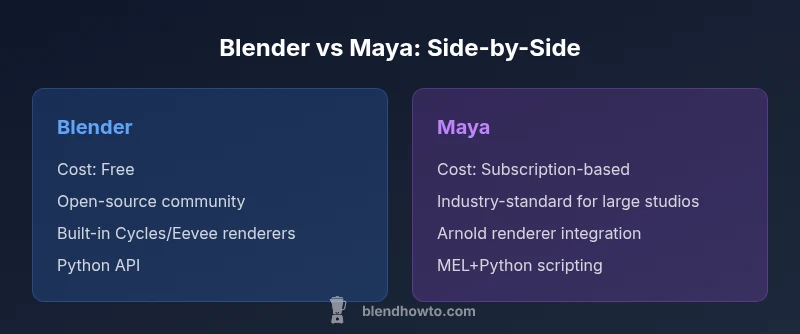
Blender vs Maya: Practical Comparison for 2026
Analytical side-by-side comparison of Blender and Maya for hobbyists and professionals, covering licensing, workflows, rendering, scripting, interoperability, and when to choose each tool in 2026.


If you’re deciding between blender or maya, Blender is the zero-cost, open-source option with a thriving community and fast iteration; Maya is Autodesk’s subscription-based industry standard for studios, offering deeper animation pipelines and extensive scripting. For individuals and small teams, Blender often delivers more value; for large studios, Maya remains the default. BlendHowTo guides you through the nuances.
Industry context and licensing
In 2026, the decision between blender or maya often boils down to scale, licensing, and pipeline needs more than raw capability. Blender is developed as open-source software under a permissive license that enables free use for education, hobbyists, and startups, with rapid release cadences driven by a global contributor base. Maya, by contrast, remains a commercial product from Autodesk, with a subscription-based model and enterprise-grade support. This dichotomy shapes not just cost, but also access to training resources, official roadmaps, and long-term production stability. For BlendHowTo readers, the practical upshot is clear: Blender lowers entry barriers, while Maya provides formal vendor backing and predictable upgrade cycles that large teams rely on. When considering the long-term maintenance of a project, think about who will maintain the toolchain in-house and how licensing affects project budgets over multiple years.
Industry context and licensing
In 2026, the decision between blender or maya often boils down to scale, licensing, and pipeline needs more than raw capability. Blender is developed as open-source software under a permissive license that enables free use for education, hobbyists, and startups, with rapid release cadences driven by a global contributor base. Maya, by contrast, remains a commercial product from Autodesk, with a subscription-based model and enterprise-grade support. This dichotomy shapes not just cost, but also access to training resources, official roadmaps, and long-term production stability. For BlendHowTo readers, the practical upshot is clear: Blender lowers entry barriers, while Maya provides formal vendor backing and predictable upgrade cycles that large teams rely on. When considering the long-term maintenance of a project, think about who will maintain the toolchain in-house and how licensing affects project budgets over multiple years.
Comparison
| Feature | Blender | Maya |
|---|---|---|
| Pricing model | Free and open-source | Subscription-based / licensed |
| Learning curve | Broad community resources; approachable for beginners | Structured training; steeper for new adopters |
| Industry adoption | Strong in indie, education, and small studios | Industry-wide standard in film, games, and large studios |
| Rendering options | Cycles and Eevee; flexible GPU/CPU options | Arnold optics; strong integration with industry renderers |
| Scripting/API | Python API with active community scripts | MEL plus Python; mature production toolset |
| Interchange / file formats | FBX/OBJ/GLTF export; native .blend workflow | FBX/OBJ/ABC; strong USD support; native Maya formats |
| Extensibility | Massive addon ecosystem; rapid iteration | Deep pipeline plugins; premium studio integrations |
| Best for | Indie artists, learners, rapid prototyping | Large studios, pipeline-driven productions |
What's Good
- Free and open-source with no recurring license costs
- Vibrant, global community and rapid feature growth
- Excellent for rapid prototyping, visualization, and education
- Open formats and strong interchange support
The Bad
- Maya can incur significant ongoing licensing costs
- Maya’s learning path can be longer in new teams
- Some studios rely on proprietary tools that Blender lacks
- Formal vendor support is optional and premium
Blender is the pragmatic choice for individuals and small teams; Maya remains indispensable for large, pipeline-driven productions
Choose Blender when cost, speed to start, and community support matter most. Choose Maya when you need enterprise-grade pipelines, vendor-backed reliability, and established studio integration.
Frequently Asked Questions
Is Blender better for beginners than Maya?
For beginners, Blender’s zero-cost entry and large community make it highly approachable. It provides extensive tutorials and a gentle ramp into modeling, texturing, and animation. Maya offers powerful features too, but the learning path typically requires a structured plan and optional vendor training.
Blender is usually easier to start with, thanks to free access and a big learning community. Maya can be learned, but often needs a guided path through official or paid training.
Can Blender and Maya work together in a pipeline?
Yes. Both support common interchange formats like FBX and USD, enabling data to flow between tools. Studios often export animation, rigs, or assets from one tool to another to fit different pipeline stages. Standardizing on open formats reduces bottlenecks.
They play well in pipelines thanks to common exchange formats like FBX and USD.
Which tool has better rendering options out of the box?
Blender ships with Cycles and Eevee, offering physically-based rendering and real-time preview. Maya typically relies on Arnold and third-party renderers; this can give more mature production features for film and VFX workflows.
Blender gives you strong built-in renderers, while Maya leans on Arnold and other established renderers.
Which tool is better for animation rigging?
Maya has a long-standing reputation for advanced rigging and animation tooling used in big productions. Blender has solid rigging but is often chosen for its accessibility and flexibility by independent artists.
Maya is often preferred for high-end animation rigging; Blender is great for flexible, budget-conscious workflows.
Do Blender and Maya support industry-standard formats?
Both support FBX and OBJ, and Maya supports additional native formats. USD interchange is increasingly common across studios, improving data portability between tools.
Yes—both support FBX/OBJ, Maya has extra native formats, and USD is becoming a standard for interchange.
Are there free training resources for Blender vs Maya?
Blender has extensive free tutorials, docs, and community-created courses. Maya offers official Autodesk training and paid courses; some free content exists but may be less comprehensive.
Blender has lots of free learning material; Maya training tends to be more formal and vendor-backed.
What to Remember
- Start with Blender for cost-effective prototyping
- Consider Maya for studio-scale pipelines
- Plan for interoperability across tools and formats
- Invest in learning paths that map to your project size
- Evaluate total ownership: licenses, support, training