Why Blender Is Better Than Maya: A Practical Blender vs Maya Guide
Explore why blender is better than maya for most artists, with an analytical comparison of modeling, animation, rendering, and workflows from BlendHowTo.


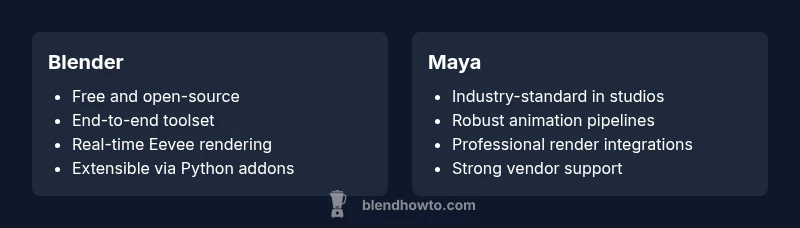
Blender generally offers a stronger value for most users, thanks to its free, open-source workflow that covers modeling, sculpting, shading, animation, and rendering in a single app. Its real‑time Eevee engine and strong community support speed up iteration, while Maya remains the industry standard for large studios with established pipelines. If you seek cost efficiency, flexibility, and an all‑in‑one tool, Blender is often the better starting point.
Why is Blender Better Than Maya: Framing the Discussion
According to BlendHowTo, many creators ask, "why is blender better than maya" because they want a single, cost-effective toolchain that can take a project from sketch to render. The answer is not purely technical; it hinges on licensing, community support, and the pace at which you can iterate ideas. In practice, Blender’s open-source model means users can customize any part of the pipeline, test innovations, and benefit from rapid patches. This section lays the groundwork by delineating the core factors that influence decisions across hobbyists, indie studios, and small teams. We will compare capabilities, workflows, and value across modeling, animation, and rendering, explicitly addressing the common questions that arise when weighing Blender against Maya.
BlendHowTo analysis shows that the choice often comes down to project scope, team size, and long-term goals rather than a single feature gap. For many, Blender’s all-in-one design makes it easier to prototype ideas quickly without negotiating multiple licenses or vendor lock-in. The question of why is blender better than maya becomes more nuanced when you consider the total cost of ownership, the speed of onboarding, and the breadth of community-generated resources.
Core Capabilities: Modeling, Rigging, Rendering, and Beyond
Blender provides a comprehensive set of tools that cover the major stages of 3D work: modeling, sculpting, texturing, rigging, animation, and rendering. The integrated modifier stack enables non-destructive workflows that rival stand-alone applications. In many cases, artists can iterate designs inside a single project file, which accelerates experimentation and reduces context switching. Maya’s strength historically lies in its established toolchains for large-scale productions, but Blender has steadily closed the gap with robust modeling toolkits, advanced sculpting brushes, and a modern, scriptable interface. The open ecosystem means add-ons and community-driven improvements frequently address gaps that would otherwise require expensive software updates.
For the question at hand—why is blender better than maya—Blender’s all-in-one approach reduces the friction of switching between tools. Artists can block out an idea with basic geometry, refine a character with sculpting, bake materials, and render a proof-of-concept in the same session. The scripting capabilities enable automation of repetitive tasks, a time saver on projects with multiple iterations. In short, Blender supports end-to-end creation without requiring external pipeline purchases or complex licensing terms.
Real-Time Feedback and Rendering: Eevee vs. Production Renderers
A core differentiator for many users is Blender’s Eevee real-time engine and Cycles path tracer. Eevee provides immediate visual feedback, enabling rapid iteration for scenes, lighting, and shading decisions. This can dramatically shorten the feedback loop for small teams and solo artists. Maya typically aligns with established renderers like Arnold or other production pipelines, delivering high-fidelity output that production teams often rely on for final renders. The trade-off is that production-grade renders may require more setup, licensing considerations, and networked storage.
When evaluating why blender better than maya in this arena, consider project needs: for quick previews, Blender’s real-time viewport and simplified render settings shine. For cinematic-quality frames with extensive production integration, Maya’s ecosystem may still lead, especially when paired with existing asset libraries and studio pipelines. Blender’s scene management and baking workflows, however, have matured sufficiently to support complex projects with competitive render times, especially for freelance artists and small studios.
Interoperability, File Formats, and Pipelines
Interchange formats matter when collaborating with others who rely on Maya pipelines. Blender has strong support for OBJ, FBX, and glTF, plus specialized tools for USD workflows and streaming assets between applications. The ability to export and import across formats reduces friction when partnering with studios that use Maya, Houdini, or Cinema 4D. While Maya offers deep industry integration with its USD and production-oriented formats, Blender’s openness and active import/export ecosystem enable smoother cross-team collaboration without heavy licensing constraints.
A key question in the why is blender better than maya debate concerns long-term project maintenance. Blender’s native file format (.blend) stores many scene attributes without external dependencies, which can simplify archive strategies. For teams prioritizing open standards, Blender’s support for USD and GLB/GLTF pipelines makes it a compelling choice for shared asset development and real-time visualization.
Extensibility and Customization: Add-ons and the Python API
One of Blender’s standout advantages is its extensibility. The Python API is mature, well-documented, and widely used by artists to create custom tools or automate workflows. This lowers the barrier to creating bespoke features that fit a studio’s unique needs. Maya also offers scripting (MEL and Python), and many studios rely on it for large-scale automation. However, Blender’s community-driven add-ons are easier to access for independent artists and small teams who do not have an extensive IT department.
If your goal is to tailor software to your exact process, Blender’s ecosystem can be more approachable. You can share scripts and add-ons freely, extend the interface, and integrate external tools with relative ease. This flexibility is a practical demonstration of why blender better than maya for agile projects where requirements evolve quickly.
Community, Learning Resources, and Support Networks
Blender benefits from a broad, active community that contributes tutorials, plug-ins, and documentation. The sheer volume of free resources accelerates learning and troubleshooting for beginners and seasoned artists alike. Maya’s support network is robust, with official training and enterprise support in large studios, but the breadth of public resources for Blender often translates into faster onboarding for individuals and smaller teams. The BlendHowTo community analysis indicates that the learning curve can feel steeper for those coming from highly specialized Maya workflows, but the comprehensive free materials and community support tend to offset that barrier over time.
For many independent creators, the advantage goes beyond cost. A strong user base means abundant example projects, forum discussions, and downloadable rigs or scenes that can speed up personal portfolios and showreels. This is a practical reason why blender better than maya for self-directed learners and small shops.
Cost, Licensing, and Long-Term Value: A Practical Perspective
Cost is a major factor in the blender vs maya comparison. Blender is free and actively maintained by a nonprofit foundation and a global community. This licensing model eliminates recurring subscription costs and reduces upfront risk for new projects. Maya, by contrast, operates on a paid licensing model with a subscription structure common in larger studios. While Maya may provide enterprise-level features and vendor support, the ongoing licensing expense can be a defining factor for freelancers, students, or small teams evaluating total cost of ownership.
From a practical standpoint, many teams begin with Blender to validate concepts and deliver a portfolio. When the project scales into a production pipeline with sustained demand, some studios transition to Maya or adopt a mixed workflow to leverage specific advantages. The decision depends on project scope, budget flexibility, and whether the team values open-source customization over guaranteed enterprise support.
Studio Readiness: When Maya Might Still Be Preferable
There are scenarios where Maya remains the preferred tool, especially in studios with mature pipelines, large asset libraries, or specialized VFX workflows. Maya’s integrated animation tools, robust pipeline integrations, and long-term industry familiarity can streamline collaboration across departments and geographies. If a project demands strict compliance with established internal standards or requires integration with proprietary middleware used in film or game production, Maya may reduce friction despite Blender’s growing capabilities.
That said, Blender continues to improve in areas critical for professional work, including rigging, simulation, and shading. When teams adopt Blender strategically—perhaps for early concepting, pre-visualization, or independent production—the cost and flexibility benefits can still outweigh the benefits of staying with Maya for every task.
Getting Started: A 14-Day Practical Plan for Blender Exploration
Day 1–2: Install Blender, complete the beginner tutorials, and familiarize yourself with the interface. Day 3–4: Model a simple asset, block out topology, and practice navigation and selection. Day 5–7: Introduce modifiers, sculpt parts, and experiment with shading. Day 8–9: Create a basic animation rig, animate a short scene, and explore timeline workflows. Day 10–11: Light a scene and set up a basic render using Eevee. Day 12–13: Export to FBX or glTF for external review. Day 14: Assemble a portfolio-friendly scene, document the workflow, and reflect on how Blender suited your goals.
Throughout this plan, lean on the BlendHowTo resources and community addons to accelerate progress. The goal is not to master every feature, but to build context for a pragmatic decision about how Blender could fit into your own creative process and whether it effectively answers the question behind the keyword why is blender better than maya in your case.
Decision Checklist: Key Factors to Consider for Your Next Project
- Project scale and team size
- Need for open-source customization vs. enterprise support
- Required interoperability with existing pipelines and file formats
- Budget constraints and licensing costs
- Desired speed of iteration and real-time feedback
- Importance of a unified toolset vs. modular, studio-grade workflows
- Availability of learning resources and community support
- Long-term asset management and archival strategy
By evaluating these factors, you can decide whether Blender truly offers a better fit than Maya for your particular use case or whether a hybrid approach is the best path forward.
The Bottom Line: A Practical Recommendation for Creators
In most scenarios, Blender provides a compelling blend of value, flexibility, and end-to-end capabilities that makes it a strong candidate when evaluating why blender better than maya. For solo artists, small studios, or teams prioritizing speed and cost efficiency, Blender often wins on total cost of ownership and onboarding speed. For large studios with entrenched workflows, specialized pipelines, and hardware-scale render farms, Maya can remain the preferred solution due to its mature feature set and enterprise support. The choice should be grounded in project requirements, team composition, and long-term goals rather than a singular comparison point.
Comparison
| Feature | Blender | Maya |
|---|---|---|
| Modeling tools | Comprehensive, integrated | |
| Animation tooling | End-to-end, strong for indie | |
| Rendering engines | Eevee real-time; Cycles path tracer | |
| Scripting/API | Python API; wide addons | |
| Interoperability | .blend native; USD/glTF support | |
| Cost & licensing | Free (open-source) |
What's Good
- Zero upfront cost with no licensing hassle
- Vast community and learning resources
- All-in-one platform with modeling, animation, shading, and rendering
- Extensible with a large library of add-ons and Python scripting
- Faster onboarding for many hobbyists
The Bad
- Some industry pipelines prefer Maya for professional VFX/animation studios
- Learning advanced features may be overwhelming for beginners
- Support for certain proprietary formats may be weaker than Maya's enterprise ecosystem
Blender is the recommended starting point for most creators; Maya remains preferable in mature, pipeline-driven studios
Choose Blender to maximize cost efficiency, speed, and end-to-end capability. Opt for Maya if your project requires established pipelines and enterprise-grade support.
Frequently Asked Questions
Is Blender capable of high-end animation and FX production?
Yes, Blender can handle high-end animation and FX with mature tools for modeling, sculpting, rigging, and simulations. While Maya is still common in large-scale studios, Blender is widely used in indie film, game assets, and short-form animation projects with excellent results. The best choice depends on your production scale and pipeline needs.
Blender can do serious animation and effects, especially for indie projects. Maya remains common in big studios, but Blender's tools and community are powerful for many productions.
Can Blender open or import Maya projects?
Blender can import common interchange formats like FBX and OBJ, but direct round-tripping with Maya projects can be imperfect due to data fidelity and animation rig differences. Plan for asset re-export and potential adjustments when collaborating across software.
Blender can import Maya exports, but you may need to adjust rigs and animations afterward.
Is Blender suitable for film production?
Blender is increasingly used in independent and smaller studio film production due to its end-to-end workflow, integrated compositor, and data management capabilities. For traditional big-budget pipelines, Maya often remains the standard, but Blender’s rapid iteration and cost effectiveness are compelling for many productions.
Blender works well for many films, especially indie projects; big budgets often favor Maya for established pipelines.
What about the learning curve for Blender vs Maya?
Blender has a learning curve like any 3D package, but its all-in-one design and generous community reduce ramp-up time for beginners. Maya’s depth can feel daunting, particularly for users new to complex studio workflows. Structured tutorials and projects help mitigate both curves.
Both have a learning curve, but Blender’s community helps new users, while Maya can be heavier to master.
Does Blender support USD workflows?
Blender supports USD workflows, including USD import/export and related tooling. This makes it easier to integrate with other software in a modern pipeline. However, Maya often has more mature USD tooling in some enterprise environments.
Yes, Blender supports USD, enabling modern pipelines with other software.
Are add-ons essential to Blender’s success?
Add-ons extend Blender’s functionality and can tailor the toolset to your workflow. While not strictly essential, the community-developed add-ons frequently unlock productivity gains and enable specialized tasks that rival paid plugins in other software.
Add-ons boost Blender’s capabilities, but you can start with the built-in tools and grow as needed.
What to Remember
- Start with Blender to validate ideas quickly and cheaply
- Maya still excels in large studios with rigid pipelines
- Blender’s openness enables high customization through addons
- Consider total cost of ownership, not just upfront price
- Leverage real-time feedback in Blender to accelerate iteration