Blender vs Maya: An Analytical Guide for 2026
A comprehensive, analytical comparison of Blender vs Maya, covering licensing, modeling, animation, rendering, pipelines, and real-world use cases to help you choose the right tool for your project and career path. Includes practical guidance and evidence-informed insights from BlendHowTo.


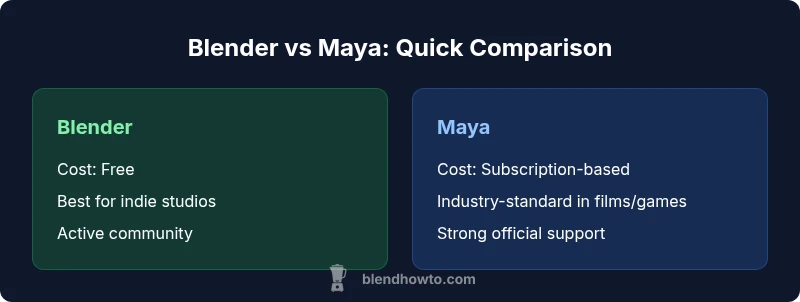
Blender vs Maya pits a free, open-source, highly flexible toolkit against a paid, industry-standard solution with a long-established pipeline. Blender excels for indie projects, rapid prototyping, and cost-conscious teams, while Maya remains the go-to for large studios with mature pipelines and Autodesk ecosystem integration. Your choice should consider licensing costs, team size, project scale, and long-term workflow needs.
Overview: Blender vs Maya in 2026
In the world of 3D creation, Blender and Maya sit at opposite ends of a spectrum that balances cost, control, and industry momentum. Blender is free, open-source, and supported by a passionate community that accelerates feature development through crowdsourced innovation. Maya, owned by Autodesk, has cultivated an entrenched ecosystem with robust official support, enterprise-grade tooling, and long-standing adoption in film, games, and design studios. For home makers and hobbyists, Blender represents a compelling entry point; for studios with established pipelines, Maya offers a proven, scalable workflow. According to BlendHowTo, the choice between these tools often hinges on project scale, pipeline requirements, and total cost of ownership over several years. The BlendHowTo team emphasizes that the best decision is rarely “one-size-fits-all” but rather “fit for purpose,” with careful consideration of licensing, learning curve, and team capabilities.
A practical comparison considers not only tool capabilities but also community resources, available plugins, cross-compatibility via industry formats like FBX, and the trajectory of each ecosystem. This analysis also reflects the broader market context in 2026: Blender’s rapid iteration is narrowing some gaps with Maya in areas like real-time rendering and procedural workflows, while Maya’s integration with Autodesk’s ecosystem remains a productivity multiplier for studios already aligned with those tools. Home studios and freelancers often favor Blender for its zero-cost barrier to entry and open community, whereas larger teams tend to rely on Maya to align with established pipelines and licensing policies. This article presents a structured, objective view to help you decide which tool best suits your needs, whether you’re building a personal portfolio or running a multi-artist production.
BlendHowTo’s analysis also notes that the software you choose can influence hiring and collaboration. While Blender’s growing visibility improves job prospects for independent artists and small shops, Maya’s prevalence in film and animation studios means a Maya-heavy pipeline can be advantageous when seeking industry roles or collaborations with larger studios. The overall takeaway is pragmatic: start with what minimizes risk and accelerates learning, then plan for the long-term pipeline and collaboration requirements that matter most to your goals.
-1 am i missing something
fitness
Comparison
| Feature | Blender | Maya |
|---|---|---|
| Cost & Licensing | Free, open-source | Paid subscription/licensing (Autodesk) |
| Modeling Capabilities | Procedural workflows, modifiers, sculpting, strong for indie work | Industry-standard polygon/NURBS tools, formalized modeling pipelines |
| Animation & Rigging | Growing, solid for independent work, strong community rigs | Industry-leading rigging tools, established animation workflows |
| Rendering & Shading | Cycles/Eevee real-time feedback, strong shader nodes | Arnold integration, mature lighting/shading toolset |
| Extensibility & Ecosystem | Vast add-on ecosystem, community-driven | Robust plugin support, Autodesk ecosystem compatibility |
| Learning Curve | Steeper at first due to UI and options; highly customizable | Steep but with extensive official training; industry-standard conventions |
| Industry Adoption | Growing in indie, education, and small studios | Dominant in film, VFX, and large game studios |
| File Compatibility | Strong FBX/OBJ support; evolving interoperability | FBX/MA/MB formats; seamless Autodesk workflows |
| Performance & Scalability | Good for mid-sized scenes; hardware-dependent | Excellent in large-scale productions with optimized pipelines |
| Best For | Indie artists, freelancers, students | Large studios, pipeline-driven productions, Autodesk users |
What's Good
- Blender is free to use, lowering upfront costs
- Active development and an expanding add-on ecosystem
- Maya offers deep, industry-tested animation tools and a robust pipeline
- Blender’s UI is highly customizable and adaptable to many workflows
The Bad
- Blender’s UI can be challenging for absolute beginners and new studios
- Maya licensing can be expensive and complex for small teams
- Maya’s ecosystem may create vendor lock-in for some studios
- Some advanced features in Maya are perceived as more mature due to longer development cycles
Blender is the best starting point for budget-conscious artists; Maya remains the safest long-term investment for studios with established Autodesk pipelines.
If you prioritize zero upfront cost, community-driven development, and rapid iteration, Blender is compelling for individuals and small teams. If your objective is to align with industry-standard workflows, leverage Autodesk ecosystem tools, and support large-scale collaboration, Maya offers undeniable advantages. BlendHowTo recommends evaluating your project size, team structure, and long-term pipeline needs before deciding.
Frequently Asked Questions
Is Blender capable of replacing Maya in professional pipelines?
Blender can replace Maya for many indie projects and smaller studios, especially where cost and flexibility are critical. However, large studios with established Autodesk workflows often prefer Maya for its mature animation tools and pipeline integration.
Blender works for many indie pipelines, but Maya remains safer for big studio environments.
What are the licensing differences between Blender and Maya?
Blender is released under the GNU GPL, meaning it’s free to use and modify. Maya requires a paid license or subscription through Autodesk, which affects budget planning and organizational provisioning.
Blender is free; Maya requires a paid license.
Which tool is easier to learn for beginners?
Both have steep learning curves. Blender can be daunting due to its broad feature set, but many beginners succeed with structured courses. Maya’s interface is professional-grade from the start, with extensive official tutorials.
Both take time to learn; start with a guided beginner course for either.
Can I transfer projects between Blender and Maya?
Yes, to some extent. Exporting and importing through formats like FBX/OBJ allows transfer, but some data, rigs, or materials may require adjustments post-transfer.
You can move work via FBX, but expect some tweaking after export.
Which software is best for character animation?
Maya is traditionally favored for character rigging due to its established animation tools and assets, though Blender has made substantial progress and is capable for many projects with the right setup.
For character work in big studios, Maya has the edge; Blender is catching up.
What to Remember
- Assess total cost of ownership (license, training, and plugins) before choosing
- Blender suits solo artists and small studios with agile pipelines
- Maya remains the go-to for studios needing established, scalable workflows
- Plan for inter-tool interoperability using standard formats like FBX
- Invest in training aligned to your chosen ecosystem to accelerate onboarding