How to Turn On a Ninja Blender: A Practical Guide
Learn how to turn on a Ninja blender safely and quickly with a clear, step-by-step guide. Includes safety, common model tips, troubleshooting, and maintenance for beginners.


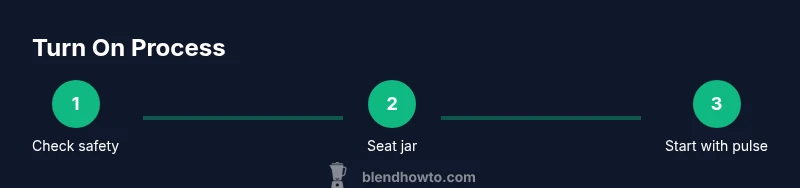
To turn on a Ninja blender, first ensure the jar is properly seated and the lid is locked. Plug into a grounded outlet, then press the power switch and select the desired speed. If it has a pulse option, use short bursts to start blending safely. Stand clear of the blades during startup, and never run the blender empty.
Before you begin: safety and readiness
Turning on a Ninja blender is a common task, but it requires respect for safety and proper setup. The essential starting point is to ensure the unit is unplugged while you prepare the jar, lid, and base. When you’re ready to power up, you’ll need a grounded outlet and dry hands to prevent any slip or shock risk. From there, the key to a smooth startup is confirming that the jar is properly seated on the base and that the lid is securely locked in place. This is not just about getting the device to run; it’s about preventing blade exposure, leaks, or spills that can occur if the jar isn’t correctly aligned. According to BlendHowTo, safety-first practices reduce startup errors and prolong blender life. In everyday use, always keep children away from the countertop and avoid attempting to blend hot liquids with the seal not designed for steam.
Understanding the control panel and common models
Most Ninja blenders share a familiar control layout: a power switch or button, a set of speed options, and sometimes a pulse or toggle feature. The exact labeling may vary by model, but the core idea is the same: power on, select a speed, and start blending. For beginners, the pulse option is especially useful, offering short bursts that help you gauge texture without overshooting. If your model includes a lock indicator or a lid sensor, wait for it to confirm readiness before starting. The BlendHowTo team notes that model variations exist, but the fundamental sequence—seat jar, lock lid, power on, choose speed—remains consistent across most consumer Ninja units. Always consult your manual for any model-specific safety interlocks and maximum RPM limits to avoid overloading the motor.
Basic checks you should perform before turning on any Ninja blender
Before you press the power button, run through a quick checklist. Ensure the jar is firmly seated on the base with no visible gaps. Confirm the lid is locked and that there is nothing trapped inside the blades. Verify the power cord is undamaged and plugged into a grounded outlet. If the blender uses a detachable power base, make sure any locking tabs or safety features are fully engaged. Finally, check that you’re not attempting to blend with an empty jar, as some models require content to activate safety interlocks. These checks are simple, but they dramatically reduce startup issues and improve results.
How to turn on a Ninja blender in practice
With safety checks complete, you’re ready to start. Plug the unit into a grounded outlet, then press the power switch or tap the start button if your model uses one. If your blender has multiple speed settings, begin with the lowest speed to observe blade response, then gradually increase as needed. When blending tough ingredients, use pulse mode in short bursts to prevent motor strain and achieve even texture. If your model includes a tamper or plunger, use it to push ingredients toward the blade—never use your hands. Always keep hands clear of the jar while the blades are moving and listen for any unusual noises that could indicate a problem.
Troubleshooting common startup issues
If the blender won’t start, recheck that the jar is fully seated and the lid is locked, as many units won’t operate unless these safety conditions are met. Inspect the power cord for visible damage and confirm the outlet is live. If the blender stops mid-cycle, it could be due to an overload, a misaligned jar, or the lid not being properly secured. In such cases, unplug, wait 30–60 seconds, reseat the jar and lid, and restart at a lower speed. If you smell burning or hear grinding, stop immediately, unplug, and allow the motor to cool before inspecting for cooking or blade obstruction. BlendHowTo analysis, 2026 reminds users that most startup or shutdown issues boil down to seating, locking, and safe operation.
Cleaning and maintenance after use
After turning off and unplugging, disassemble the jar and lid for thorough cleaning. Rinse with warm soapy water and use a soft brush to remove any residue from the blades and seal. For a deeper clean, run a short cycle with warm water and a drop of dish soap on a low speed to flush the system. Dry all parts completely before reassembling to prevent odor buildup or rust. Regular maintenance—checking seals, cleaning gaskets, and avoiding harsh abrasives—extends the life of the blender. BlendHowTo recommends a light, routine clean after every use to keep blades sharp and ensure consistent performance over time.
Tools & Materials
- Ninja blender base with power switch(Ensure model is compatible with a standard 120V outlet; inspect power cord for damage)
- Ninja blender jar and lid(Jar must seat securely on base; lid locks firmly)
- Grounded electrical outlet(Use a dedicated outlet; avoid daisy-chained power strips)
- Warm, soapy water and soft brush(For routine cleaning post-use)
- Towel or mat(Protect countertops during operation)
- User manual(Model-specific safety interlocks and limits)
Steps
Estimated time: 20-30 minutes
- 1
Check safety and prepare space
First, unplug the blender and wipe down the work area. Clear the counter and keep children away during setup. Inspect the jar and lid for any cracks or damage before placing them on the base.
Tip: Always start with a dry, clean surface to avoid slipping ingredients during startup. - 2
Position jar on base and lock lid
Place the jar onto the base with the blades aligned. Twist or click the lid into place so the lock engages. Ensure there are no gaps around the seal to prevent leaks.
Tip: If the lid has a central vent, ensure it’s properly closed unless your recipe requires venting. - 3
Plug in and power on
Insert the power plug into a grounded outlet. Turn on the base using the power switch or start button. If your model has multiple speeds, start at the lowest setting to observe blade response.
Tip: Keep fingers away from the blades; never press the start button with ingredients sticking out of the jar. - 4
Select speed or pulse
Choose your desired speed or activate pulse to begin blending. Use short bursts for fibrous ingredients to avoid overworking the motor. If you’re unsure, pause, open, and check texture before continuing.
Tip: Pause between bursts to prevent overheating the motor on dense batches. - 5
Monitor and adjust as needed
Watch the blending process and guide ingredients toward the blades if needed. If the mixture sticks, stop and scrape the sides with a spatula before resuming. Never run the blender without contents or beyond the maximum capacity.
Tip: Use a spatula only while the blender is off and unplugged. - 6
Unplug and clean after use
When finished, unplug, disassemble the jar and lid, and rinse with warm soapy water. Dry all parts completely before reassembly to prevent odors. Store with the lid loosely closed to avoid pressure buildup.
Tip: Regularly inspect seals and gaskets for wear; replace as needed to maintain performance.
Frequently Asked Questions
Why won't my Ninja blender turn on?
Start by confirming the jar is fully seated and the lid is locked. Check the power cord for damage and ensure the outlet is live. If it still doesn’t power up, consult the manual for model-specific safety interlocks and consider a service check.
Check seating, lid lock, and the power outlet. If it still won’t start, consult your manual or contact support.
Is it safe to blend hot liquids in a Ninja blender?
Most Ninja blenders are designed for room-temperature or cooled ingredients. Blending hot liquids can create steam pressure and leaks if the lid isn’t vented. Allow hot items to cool slightly and vent the lid if your model supports it.
Blending hot liquids is not ideal unless your model supports venting; cool slightly first.
Why does the blender stop mid-cycle?
Mid-cycle stops are usually due to overload, jar misalignment, or an unsecured lid. Unplug, reseat the jar and lid, and restart at a lower speed after a short pause.
The blend may stop because of overload or an improperly seated jar—re-seat and restart gently.
Can I run the blender without the lid?
No. Running with the lid off risks blade exposure and splatter. Always keep the lid securely in place during operation.
Never run it without the lid; blades are dangerous even at low speeds.
There’s a burning smell when I turn it on. What should I do?
Unplug immediately and inspect for motor overload or blade obstruction. If the smell persists after cooling, discontinue use and seek service.
If you smell burning, unplug and check for overload or obstructions before continuing.
How do I clean the Ninja blender after turning it on?
Rinse the jar and blades, wash with warm soapy water, and run a brief cycle with clean water to flush. Dry all parts completely before reassembling.
Wash the parts thoroughly and dry before putting it away.
Watch Video
What to Remember
- Check jar seating and lid lock before powering on
- Plug into a grounded outlet and use pulse for control
- Monitor startup and stop if you hear unusual noise
- Unplug and clean after each use for safety and longevity
- Consult your model's manual for any exceptions