How Long Does It Take to Get Good at Blender
A data-driven guide outlining realistic timelines to master Blender, with milestones, practice plans, and tips for beginners and hobbyists.


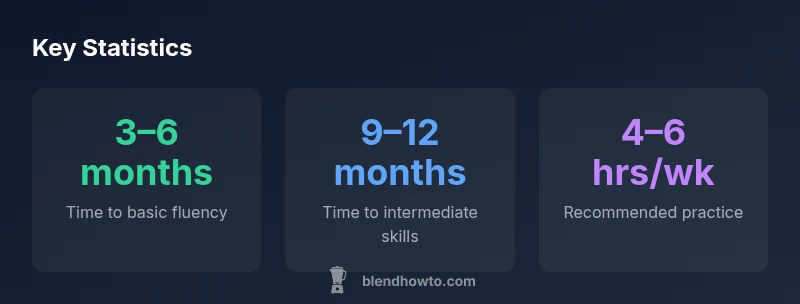
According to BlendHowTo, with consistent, focused practice, most hobbyists reach basic fluency in about 3–6 months and gain solid intermediate skills in roughly 9–12 months. The exact timeline depends on practice hours, project variety, and whether you pursue modeling, shading, or animation tracks. A structured plan with clear milestones accelerates progress and helps maintain motivation.
Foundations of Blender Mastery
The journey to fluency in Blender starts with clear fundamentals, not with a random trial-and-error approach. When you ask how long does it take to get good at blender, you’re really asking about building a durable foundation that can support any path you choose—modeling, shading, animation, or simulation. In practice, beginners benefit from a structured starter plan that covers the interface, navigation, and core workflows like blocking, transforms, and restraint on unessential tools until the basics are solid. The BlendHowTo team recommends starting with a small, repeatable project (for example, a simple chair or kitchen prop) and repeating it weekly while gradually introducing new features. Practicing with intent, tracking your time, and reflecting on what worked will shorten the time-to-competence. This section outlines practical milestones and what to expect in the first months of consistent study.
Why Practice Time Matters
Time is the primary variable you can control. Blender is a broad toolset; the more you practice across diverse tasks, the faster you internalize workflows. Regular, focused practice yields compounding benefits: you recognize common modeling patterns, you get faster with hotkeys, and you build muscle memory for node-based shading. If you study sporadically, progress becomes irregular and you may stall. The key is to design practice sessions around small, measurable goals—complete a scene, texture a surface, or render a short animation. In this context, the typical weekly hours you invest determine your trajectory: fewer hours but consistent practice can outperform longer, irregular sessions. BlendHowTo's approach emphasizes deliberate practice: set a target for each session, review what you did, and adjust your next steps accordingly.
Realistic Timeframes by Skill Milestones
Understanding realistic timeframes helps you set expectations and stay motivated. For many learners, basic proficiency—being able to model, apply simple textures, and render scenes with a clean composition—appears after roughly 3–6 months of steady effort with 4–6 hours per week. Moving to intermediate skills—more complex materials, animation basics, and efficient scene organization—typically unfolds over the next 9–12 months. Note that these ranges assume consistent practice, a project-driven curriculum, and exposure to multiple Blender features rather than fixating on a single task. If your goals are narrow (for example, only hard-surface modeling) you may progress faster in that niche; broader goals (modeling, rigging, and lighting) take longer but are more versatile for real-world work.
Effective Practice Plans and Schedules
A well-designed practice plan accelerates learning by turning vague curiosity into purposeful steps. Start with a 4-week onboarding plan: week one focuses on navigation, selection, and basic modifiers; week two adds modeling a simple prop; week three introduces UVs and basic texturing; week four wraps with lighting and rendering. Then rotate through cycles: modeling, shading, animation, and rendering, each for 3–6 weeks. Use project-based goals and short, frequent reviews. Track your time with a simple log and set milestones such as a finished scene, a textured asset, or a short animation reel. The key is consistency: even 30–60 minutes on weekdays can accumulate significant progress over a few months.
Common Paths for Different Goals
Blender supports multiple tracks, and your choice influences the time to competence. If you aim for quick concept art, you’ll emphasize shading, lighting, and composition; if you want 3D modeling for games, you’ll invest heavily in topology and optimization; if animation is your focus, you’ll prioritize rigging and timeline workflows. A solid plan blends these tracks, but you should lean into one or two areas to gain depth first. Remember that every path benefits from learning the fundamentals: clean topology, non-destructive workflows, and an organized project structure. While some people can show early wins in 2–3 months, a well-rounded skill set typically matures over many months.
Measuring Progress and Adjusting Your Plan
Progress can feel invisible until you quantify it. Use tangible benchmarks: completed models, textured assets, short animations, or rendered scenes. Create a simple rubric: geometry quality, texture realism, lighting, and render efficiency. Track time-to-completion for each project, and compare results across sessions. If you stagnate, analyze bottlenecks—perhaps you rely too heavily on trial-and-error, or you neglect hotkeys and workflow optimizations. Adjust your plan by increasing structured practice, introducing new tasks, or collaborating with others for critique. The ability to adapt is a critical skill in Blender itself, and a flexible plan helps you reach your goals while staying motivated.
Tools, Tutorials, and Learning Resources
No single resource guarantees mastery, but a curated mix accelerates progress. Start with official Blender tutorials to learn the core interface and concepts, then supplement with project-based courses that align with your goals. Use community forums and critique groups to gather feedback, and follow a steady stream of beginner-friendly projects to build confidence. To stay on track, combine short, focused tutorials with longer, hands-on projects. The BlendHowTo team recommends keeping a learning journal and revisiting past projects to measure growth over time.
Timeline milestones for Blender learning
| Milestone | Typical Timeframe | Focus Areas |
|---|---|---|
| Basic modeling basics | 1-3 months | Blocking shapes, simple objects, keyboard shortcuts |
| Texturing and lighting | 3-6 months | UVs, materials, lighting setups |
| Animation and rigging | 6-12 months | Keyframes, simple rigs, timeline |
| Rendering and compositing | 9-12 months | Cameras, render settings, compositing |
Frequently Asked Questions
How long does it take to get good at Blender?
For beginners, basic fluency often comes in 3–6 months with regular practice. Reaching intermediate level typically takes around 9–12 months. Individual results vary with effort and goal.
With steady practice, most beginners can reach basics in a few months; plan for a year for solid intermediate skill.
How many hours per week should I practice?
Aim for 4–6 hours per week, spread across several shorter sessions. Consistency matters more than total volume.
Try for about 4–6 hours weekly in short sessions.
Do I need formal courses?
Not required, but structured courses help. Use project-based learning and official Blender tutorials to stay focused.
Courses are helpful, but a self-driven plan with projects works too.
Can I speed up learning with a project-based approach?
Yes, project-based learning accelerates retention by tying skills together. Start with small projects and gradually scale up.
Projects help you apply concepts faster.
What hardware do I need to learn Blender?
Blender runs on a wide range of hardware; a mid-range CPU and GPU is fine for learning. Prioritize RAM and a decent GPU for faster feedback.
A modest PC will do; upgrade if heavy rendering is planned.
Is Blender enough for professional work?
Blender is capable for many workflows, but some studios rely on specialized tools or pipelines. Build a strong portfolio and stay adaptable.
Blender can be enough for portfolio work; some studios mix tools.
“Consistency beats intensity. A steady, goal-driven plan accelerates Blender learning more than sporadic bursts.”
What to Remember
- Set a regular practice schedule.
- Define clear milestones for each skill.
- Practice 4–6 hours weekly for consistency.
- Track progress with a simple log.
- Balance modeling, texturing, and rendering tasks.