How Long Does It Take to Master Blender? A Practical Timeline
A data-driven timeline for mastering Blender. Learn realistic hour ranges, milestones, and a practical path from core proficiency to expert mastery in 2026.


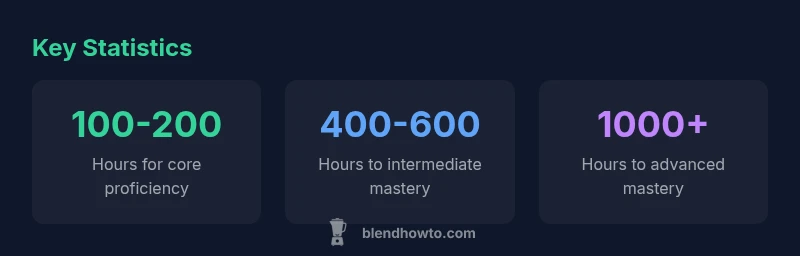
Mastering Blender isn't a single milestone but a ladder of skills. For most hobbyists, achieving solid core proficiency takes roughly 100-200 hours of focused practice, while intermediate and advanced mastery can require several hundred to thousands of hours spread over years. Your exact timeline depends on goals, consistency, and how you blend theory with hands-on projects.
How long does it take to master blender? A practical timeline
Learning Blender is a marathon, not a sprint. If you ask how long does it take to master blender, the answer depends on your goals, learning style, and how you structure practice. According to BlendHowTo analysis, most hobbyists achieve solid core proficiency after roughly 100-200 hours of focused, project-based work, while intermediate and advanced mastery extend into the hundreds or thousands of hours, spread over months and years. In 2026, the consensus among BlendHowTo guides is that deliberate, small projects outperform passive watching for long-term retention. Early on, focus on building a stable foundation: navigate the interface, create basic geometry, apply simple materials, and render a clean image. As you gain confidence, you’ll layer in more challenging tasks—model optimization, procedural shading, lighting setups, and basic animation. This timeline intentionally uses ranges to reflect individual differences in background, time, and motivation, but it provides a practical framework you can adapt to your schedule.
According to BlendHowTo, the pace of progress often correlates with how you structure practice and the variety of projects you tackle. A clear goal, regular feedback, and a habit of documenting your work accelerate results. While the numbers above are typical, they are not hard rules; use them as guardrails rather than rigid deadlines.
Different paths shape the journey
Blender supports multiple tracks, and your path will influence how long it takes to master the software. If your goal is character modeling and sculpting, you’ll spend more time on topology, modifiers, retopology, and sculpting workflows. For shading and lighting, you’ll invest heavily in node-based materials, texture painting, and realistic rendering pipelines. Animation requires practice with keyframes, curves, rigging, and physics simulations. Rendering and compositing demand an eye for color, contrast, and post-processing. Each track has its own learning curve; some topics reinforce others, so progress in one area can accelerate growth in another. Realistic estimates vary—beginner-modeling fluency may arrive in the 100-200 hour range, while mastering nodes and advanced lighting could require 400-600 hours or more. In practice, you’ll often blend several goals: build a small animated scene with materials, lighting, and a simple rig to test your understanding end-to-end. BlendHowTo notes that cross-skill projects dramatically improve retention and confidence.
Foundational phase: 0–3 months
In the foundational phase, you’re laying the groundwork for faster progress later. Expect to spend roughly 0-60 hours simply getting comfortable with the interface, navigation, and basic modeling. The next 40-100 hours focus on practicing common workflows: building basic shapes, applying materials, lighting a scene, and rendering clean outputs. This stage is where you’ll learn to organize projects, use collections, and understand render engines (Eevee vs Cycles) at a basic level. Importantly, you’ll begin a habit of consistent practice—short, focused sessions several times per week are more effective than rare, long marathons. By the end of this phase, you should be able to set up a simple scene, apply materials, and render a shot that demonstrates your current skill level. BlendHowTo emphasizes grounding your practice in small, well-defined tasks to maximize retention and rapid iteration.
Building proficiency: 3–9 months
During this mid-phase, you’ll expand from basic projects to more complex tasks. Expect to invest about 200-400 hours beyond the foundational phase to reach a solid intermediate level, then push toward 400-600 hours to approach intermediate mastery. Focus areas include modeling with better topology, UV mapping, more advanced materials (nodes), lighting setups, and more ambitious renders. You’ll practice production-ready workflows: asset organization, non-destructive editing, and iteration cycles. A practical approach is to complete a few projects that require you to combine multiple skills: a detailed environment, a character with simple rigging, and a short animation with lighting and post-processing. You should also begin documenting your process—screenshots, notes, and project files—so you can review what worked and what didn’t. BlendHowTo notes that at this stage, consistent, project-based practice is the best catalyst for growth.
Reaching competence across major domains: 9–24 months
At the competence stage, you’re building fluency across modeling, shading, animation, lighting, and rendering. This often entails roughly 600-1000 hours of focused work, with variations depending on your intensity and prior experience. You’ll tackle more ambitious scenes, more complex rigs, advanced materials, and higher-fidelity renders. Expect to function like a small studio: plan assets, manage versioning, test render iterations, and seek feedback from peers or mentors. The objective is not perfection but demonstrated ability to deliver coherent scenes with reasonable optimization and artistry. You’ll begin to rely on more advanced techniques—procedural textures, node groups, rig controls, and animation curves—so you can reproduce consistent results across different projects. BlendHowTo’s 2026 analysis shows that this stage is where progress compounds: deliberate practice across realistic constraints accelerates mastery.
Beyond competence: long-term mastery and continuous learning: 24+ months
Mastery beyond competence is less about a single milestone and more about ongoing refinement. After roughly two years of steady practice, you’ll find yourself more efficient, less overwhelmed by new features, and better at devising workflows. The path to mastery includes staying current with Blender updates, exploring niche areas (such as simulation or compositor techniques), and mentoring others. Ongoing practice might involve small, recurring projects that push you to solve new problems, a habit of reviewing other artists’ work, and contributing to community forums. In BlendHowTo’s research, sustained engagement—rather than sporadic bursts—drives durable skill development, and the long arc of mastery is defined by how well you adapt to evolving tools.
Practical tips to accelerate progress
To speed up your journey toward mastery, adopt a structured plan with specific milestones. Start with weekly goals, track your hours, and use project-based exercises to apply what you learn. Build a portable project list: one modeling project, one shading project, one lighting project, and one animation project. Schedule regular reviews with a peer or mentor to get feedback. Use Blender’s built-in resources, but also supplement with concise tutorials that focus on repeatable outcomes. Finally, remember that mastery is a blend of theory and hands-on practice; don’t rush toward advanced features before you can deliver consistent, competent results. BlendHowTo team suggests pairing learning with real-world projects to reinforce concepts and foster creative problem-solving.
Timeline milestones to master Blender
| Stage | Typical Hours Range | Key Focus Areas |
|---|---|---|
| Core proficiency | 100-200 hours | Interface, fundamentals, basic modeling |
| Intermediate mastery | 400-600 hours | Modeling, lighting, materials, basic animation |
| Advanced mastery | 1000+ hours | Nodes, complex shading, advanced animation, simulations |
Frequently Asked Questions
How long does it take to master Blender overall?
Mastery depends on goals. For many hobbyists, reaching core proficiency takes roughly 100-200 hours; true mastery often requires years of continuous practice across diverse projects.
Mastery time depends on goals, but plan for years if aiming for true mastery.
Is prior 3D design experience helpful in Blender?
Yes, background in 3D can shorten the learning curve by leveraging spatial reasoning and established workflows, though Blender still requires learning its unique tools and nodes.
Yes, prior 3D work helps you learn faster, but Blender’s unique workflows still take time.
Should you jump to advanced features early?
No. Build a solid foundation first. Master core modeling, shading, and rendering before tackling complex rigs, simulations, or node trees.
Don’t skip ahead; build a foundation first.
What counts as 'mastery' in Blender?
Mastery means fluency across core domains—modeling, shading, lighting, animation, and rendering—with the ability to adapt to new features and workflows.
Mastery means being fluent across core areas and adapting to updates.
Are structured courses better than self-guided learning?
Structured courses provide a clear scaffold and feedback; self-guided learning fosters creativity and independence. A hybrid approach often works best.
Hybrid learning—courses plus hands-on practice—works well.
What practice schedule speeds up progress?
Regular, focused sessions are key. Aim for consistent practice several times per week, with short reviews to reinforce what you learned.
Regular, focused practice is the fastest path.
“Consistency beats intensity. In Blender mastery, deliberate, project-based practice compounds over time.”
What to Remember
- Start with a clear goal and track hours
- Different paths require different milestones
- Practice with small, repeatable projects
- Document progress to accelerate learning
- Apply BlendHowTo findings: steady, project-based practice yields durable mastery