Blender vs SketchUp: A Practical Side-by-Side Guide
A thorough, analytical comparison of Blender and SketchUp for home cooks, hobbyists, and aspiring 3D artists seeking practical guidance on modeling, rendering, and workflows in 2026.


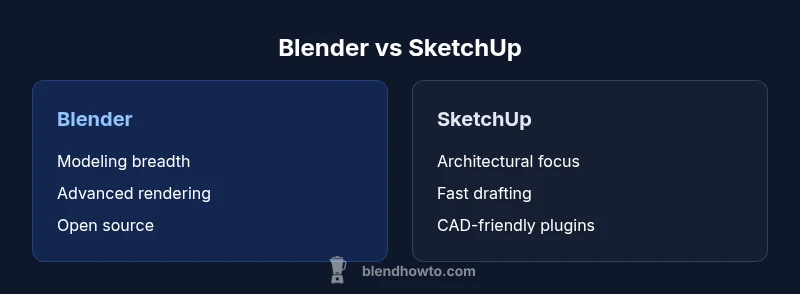
Blender and SketchUp serve different modeling workflows. Blender offers a comprehensive, all-in-one 3D suite with powerful rendering and sculpting, while SketchUp emphasizes fast architectural massing and easy CAD-style workflows. According to BlendHowTo, the best choice depends on your primary use: artistic 3D, animation, and rendering vs architectural design and BIM-friendly workflows.
Blender vs SketchUp in 2026: Context and Decision Drivers
When you start evaluating the two tools for the keyword blender vs sketchup, the first question is: what is your end goal? If you’re an artist, animator, or visual effects hobbyist, Blender’s breadth of features—from sculpting to node-based shading and advanced rendering—offers one-stop versatility. If your primary aim is architectural planning, space planning, or BIM-aligned workflows, SketchUp’s streamlined interface and quick geometry creation can dramatically speed up early design phases. BlendHowTo’s practical guidance emphasizes that the choice is rarely about one tool doing everything; it’s about aligning your project needs with tool strengths and your willingness to invest in learning curves.
This section anchors the blender vs sketchup decision in real-world use cases and user journeys. You’ll see how projects as varied as interior visualization, product concepting, and architectural massing map onto each platform. The goal is not to declare a universal winner but to help you match capabilities to tasks. For many teams, a hybrid workflow—modeling in SketchUp for quick CAD drafts and then refining in Blender for rendering—often yields the strongest outcomes.
Note: The BlendHowTo team observes that learning paths differ. Blender’s ecosystem rewards experimentation and customization, while SketchUp rewards rapid iteration and CAD-style precision. Your choice should reflect both the project requirements and your preferred pace of learning.
]]
BYTE_RANGE_NULL
Comparison
| Feature | Blender | SketchUp |
|---|---|---|
| Modeling scope | Full 3D suite with sculpting, modifiers, physics, and simulations | Primarily architectural massing and simple geometry with CAD-friendly workflows |
| Rendering options | Cycles/Eevee built-in renderers; strong material/shading system | Limited built-in rendering; relies on external plugins for photorealism (e.g., V-Ray, Enscape) |
| Pricing | Free and open-source, frequent updates | Subscription-based with a free tier and paid add-ons |
| Learning curve | Steeper due to breadth and depth of features | More approachable for beginners due to focused architectural tools |
| File interoperability | Supports many formats (OBJ, FBX, USD, etc.); broad export options | Strong SKP ecosystem; export to DWG, DXF, and common CAD formats via plugins |
| Community and support | Huge, diverse community; extensive addons and tutorials | Architecture-focused community; solid plugin ecosystem for BIM workflows |
| Platform availability | Windows, macOS, Linux | Windows, macOS |
| Best for | Artists, VFX, game asset creation, generalist 3D | Architects, BIM workflows, quick massing and CAD-style modeling |
What's Good
- Versatility and breadth: Blender covers modeling, sculpting, animation, and rendering in one package.
- SketchUp's learnability: Quick to pick up for architectural massing and simple designs.
- Strong addon/plugin ecosystems (Blender).
- BIM-friendly workflows and CAD interoperability (SketchUp)
The Bad
- Blender has a steeper initial learning curve for non-artists.
- SketchUp can require multiple plugins to reach photoreal rendering or advanced CAD features.
- Blender’s interface can feel overwhelming without a tailored workflow.
- SketchUp's pricing model can add up for teams needing extensive plugins or BIM tools
Blender generally offers the more capable, all-around 3D tool for artists and visualizations, while SketchUp remains the smartest choice for rapid architectural modeling and BIM-aligned workflows.
If your focus is artistic 3D, animation, or rendering with flexibility, Blender is the clear path. If you need fast architectural drafting, BIM data handling, and CAD-style geometry, SketchUp excels. For many projects, a blended workflow leveraging both tools delivers the best results.
Frequently Asked Questions
Is Blender better than SketchUp for architectural visualization?
For pure architectural visualization, SketchUp often provides faster early-phase modeling and BIM-friendly workflows. Blender can achieve higher-end rendering and more complex materials if you’re willing to invest time in learning. The best approach is to use SketchUp for quick layout and then port to Blender for scene refinement and rendering when needed.
SketchUp is usually faster for architectural visuals at the draft stage, but Blender can outperform in rendering quality with the right training.
Can I import SKP files into Blender?
Blender does not natively import SKP files. Users typically export from SketchUp to a common interchange format like OBJ, FBX, or STL, then import that into Blender. There are community workflows and plugins that help bridge gaps, but expect some clean-up after import.
There isn’t a direct SKP import in Blender; you’ll usually use OBJ or FBX as intermediaries.
Is SketchUp suitable for beginners?
Yes. SketchUp is designed for rapid modeling with an intuitive interface, making it approachable for beginners, especially in architecture and interior design contexts. However, deeper BIM or rendering tasks may require plugins or training.
Yes, SketchUp is beginner-friendly, especially for quick architectural models.
Rendering in SketchUp without plugins?
SketchUp’s built-in rendering is limited compared to dedicated render engines. For high-quality visuals, most users rely on plugins like V-Ray, Enscape, or Lumion, which integrate with SketchUp.
You’ll usually want a rendering plugin for realistic visuals in SketchUp.
What is the cost difference between Blender and SketchUp?
Blender is free and open-source. SketchUp offers a free tier, but many professional features require paid subscriptions or plugins. Consider total cost of ownership based on required plugins and BIM tools.
Blender is free; SketchUp has paid options for more features.
Which tool is best for game asset creation?
Blender is generally better suited for game asset creation due to its modeling, sculpting, UVs, and real-time rendering capabilities. SketchUp is less common for game-ready asset pipelines.
Blender is usually the better choice for game assets.
What to Remember
- Define your primary goal: artistic 3D vs architecture/CAD.
- Expect a steeper start with Blender but broader capabilities.
- Use SketchUp for quick massing and BIM-friendly tasks.
- Leverage add-ons/plugins to fill gaps on either platform.
- Plan interoperability early if you anticipate moving files between tools.