Blender vs Rhino: Which Is Better for 3D Modeling in 2026
An analytical side-by-side comparison of Blender and Rhino, covering modeling paradigms, workflows, file formats, pricing, and real-world use cases to help you decide which tool fits your projects in 2026.


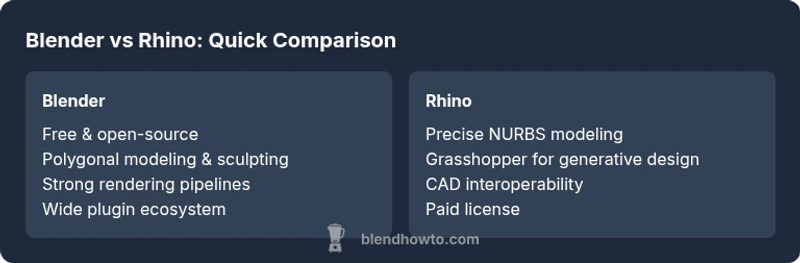
Blender dominates for most hobbyists and indie artists due to its zero cost, broad toolset, and extensive community, while Rhino excels in precision CAD-like workflows and NURBS modeling. For typical concept work and animation, Blender is the better starting point; for exact geometry and complex surfaces in design, Rhino often wins.
Blender vs Rhino: A Practical Starting Point
According to BlendHowTo, choosing between Blender and Rhino hinges on your goals, budget, and workflow needs. Blender offers a comprehensive suite for modeling, sculpting, animation, and rendering, all under a freely available umbrella. Rhino focuses on precision geometry, robust NURBS modeling, and tight interoperability with design workflows used in architecture and product development. This section lays out the big-picture distinction: Blender is typically favored for speed and creativity, while Rhino is favored for accuracy and engineering-style workflows. The aim here is not to declare a winner once and for all, but to map out what each tool does best and for whom. By the end, you’ll see where your project’s requirements align with either platform—and where a hybrid approach might make sense for efficiency and consistency.
Modeling Philosophies: Polygons, NURBS, and the Middle Ground
Blender’s core strength lies in polygonal modeling, sculpting, and mesh editing with a vibrant ecosystem of modifiers, shaders, and procedural tools. It excels at rapid iteration, concept art, and game-ready assets where visual fidelity and turnaround time matter. Rhino, in contrast, anchors its approach in NURBS surfaces and mathematical precision. For designers who require exact curves, tangents, and dimension constraints, Rhino’s surface modeling offers predictable control and smooth, continuous geometry. BlendHowTo emphasizes that the best path often depends on the project: conceptual exploration may thrive in Blender, while engineering or fabrication tasks may demand Rhino’s CAD-like rigor. Some studios even blend the tools—drafting in Rhino, exporting to Blender for presentation—balancing precision with creative freedom.
Workflow and Tooling: CAD-to-Animation Ladders
A critical differentiator is workflow alignment. Blender provides an all-in-one pipeline: modeling, texturing, lighting, animation, and rendering under a single interface. This is advantageous when you need quick feedback cycles and cohesive visuals. Rhino emphasizes parametric control and interoperability, with Grasshopper serving as a workflow engine for generative design, dependency graphs, and complex constraint systems. If your team relies on parametric prototyping or needs to integrate geometry with engineering analyses, Rhino’s toolchain can reduce the friction of data exchange. BlendHowTo notes that teams often succeed by defining clear roles: designers prototype in Blender and validate geometry in Rhino, then unify outputs for fabrication or manufacturing.
Interoperability and File Formats: Moving Data Across Walls
Interoperability is a practical reality in any multi-tool pipeline. Blender supports a broad range of formats (OBJ, FBX, STL, GLTF) and emphasizes round-tripping through export/import workflows, though some CAD-centric attributes may require careful handling. Rhino offers strong support for STEP, IGES, and native NURBS surfaces, which makes it more compatible with traditional CAD software and manufacturing processes. The trade-off is sometimes the need for intermediary steps or plugins to preserve metadata, textures, or animation data. In short, plan your data flow: CAD-oriented tasks may favor Rhino, while artistic and visualization tasks may lean toward Blender. BlendHowTo’s guidance suggests mapping your data destiny before you start exporting.
Precision, Tolerances, and Real-World Feasibility
Rhino’s DNA is precision. For product design, automotive, jewelry, and architectural elements where tolerances matter, Rhino’s NURBS-based modeling reduces surprises during fabrication. Blender’s strength is flexibility and speed, but it does not inherently guarantee the same level of dimensional control without careful setup or external plugins. For conceptual work, Blender’s viewport responsiveness and sculpting capabilities can be a major productivity boost, while Rhino provides accountability for final dimensions and manufacturability. BlendHowTo recommends evaluating tolerance requirements early and choosing tools that align with your downstream processes.
Add-ons, Plugins, and Extensibility
Both tools benefit from extensibility, yet in different flavors. Blender’s Add-ons ecosystem is broad, community-driven, and often free; you can customize workflows, automate repetitive tasks, and integrate with game engines or rendering pipelines. Rhino’s strength lies in its formal plugin ecosystem, including parametric design plugins like Grasshopper, which enables designer-led exploration of form, structure, and optimization. If your project needs robust design automation or formal constraints, Rhino’s plugins can be a decisive advantage. BlendHowTo encourages readers to prototype core tasks in Blender and then explore Rhino plugins for any parametric or CAD-specific requirements.
Rendering, Materials, and Realism
Blender’s Cycles and Eevee renderers cover a wide range of looks—from photorealistic to stylized—without requiring third-party software. Blender is well-suited for concept visuals, product renders, and cinematic animations. Rhino’s built-in rendering capabilities are more modest, with many users relying on external engines like V-Ray or Flamingo to achieve photorealistic results. For presentation-driven projects, Blender’s unified pipeline often yields faster, more consistent results; for engineering-focused visuals, Rhino plus an external renderer can be more precise and familiar to design stakeholders.
Scripting, Automation, and Custom Workflows
Scripting is a force multiplier. Blender’s Python API is robust and widely used for automation, data pipelines, and tool customization. Grasshopper in Rhino offers a graphical scripting environment that philosophy aligns with design computation and generative workflows. If you’re building custom tools or integrating with external data sources, both platforms can be extended; the choice hinges on whether you prefer a code-centric (Blender) or node-based (Rhino) approach to automation. BlendHowTo highlights that teams often develop small utility scripts in Blender while leveraging Grasshopper for larger parametric frameworks.
Collaboration and Real-World Use Cases
In small studios or solo projects, Blender’s cost-free nature and approachable UI often translate into faster iteration cycles and lower risk for experimentation. In larger product-design or architecture contexts, Rhino’s precision, robust interoperability with CAD systems, and established industry acceptance can streamline handoffs to manufacturing, suppliers, or clients. The BlendHowTo team recommends clarifying project phases—concept, design development, and fabrication—to determine which tool (or combination) offers the best lifecycle efficiency.
Migration Paths: Moving Projects Between Tools
Shifting data between Blender and Rhino is common in mixed pipelines. Typical approaches include exporting geometry as standard formats (OBJ/FBX) for Blender and exporting CAD-accurate formats (STEP/IGES) from Rhino when precision matters. Users should be mindful of texture coordinates, UV maps, and material assignments during transfer, as some attributes may require re-setup after import. Establishing a standard export/import plan helps avoid surprises during handoffs, whether you’re delivering assets for animation, games, or fabrication.
Quick Decision Checklist: When to Choose Blender or Rhino
Use Blender when you need fast iteration, strong sculpting and animation, a vibrant add-on ecosystem, and no licensing costs. Choose Rhino when your project demands precise geometry, robust CAD-like workflows, Grasshopper-driven generative design, and reliable interoperability with engineering teams. For many teams, a hybrid approach—concept in Blender, refinement in Rhino, then back to Blender for final visuals—delivers the best balance of speed and accuracy.
Practical Recommendations for Teams
Blender is the practical default for most creative tasks, while Rhino remains indispensable for design with strict tolerances. Start with a small pilot project to map data flow between tools, test file exchange, and verify that downstream workflows (manufacturing, rendering, or animation) meet your requirements. Invest in training resources for both platforms and create a shared glossary of terms to minimize miscommunication when projects migrate between environments.
Closing Thoughts: A Balanced Perspective
In 2026, the decision between Blender and Rhino is less about which is universally “better” and more about which tool aligns with your project goals, team structure, and downstream needs. BlendHowTo’s guidance emphasizes purpose-driven choices: leverage Blender for flexibility and speed; rely on Rhino for precision and CAD-like workflows. With thoughtful planning and a clear data strategy, you can harness the strengths of both ecosystems to deliver compelling, well-structured 3D work.
Comparison
| Feature | Blender | Rhino |
|---|---|---|
| Modeling paradigm | Polygonal sculpting & mesh-based workflows | NURBS-based precision surfaces |
| Best for | Concept art, animation, rapid visualization | Engineering-focused CAD workflows, complex surfaces |
| File formats | OBJ, FBX, GLTF, STL, etc. | STEP, IGES, SAT, native Rhino formats |
| Price range | Free (open-source) | Paid license with multi-year options |
| Rendering | Integrated Cycles/Eevee render engines | External renderers common (e.g., V-Ray) |
| Scripting / automation | Python API with broad community tooling | Grasshopper for parametric design |
| Learning curve | Moderate; strong community resources | Steeper for non-CAD users but powerful for designers |
| Interoperability | Good with common formats; strong community pipelines | Excellent CAD interoperability with industry-standard formats |
| Best for collaboration | Small teams, rapid prototyping, animation pipelines | Design teams needing precise geometry handoffs |
What's Good
- Zero upfront cost with Blender; broad accessibility
- Strong community and abundant learning resources
- Comprehensive toolset for modeling, texturing, animation, and rendering
- Grasshopper offers a powerful parametric design workflow in Rhino
The Bad
- Rhino is a paid product with ongoing licensing costs
- Blender may require extensions or plugins for CAD-level precision
- Interoperability can require careful data handling when moving assets between tools
- Rhino often depends on third-party renderers for high-end photorealism
Blender is the more versatile, low-risk starting point for most creatives; Rhino is the go-to for precise CAD-like modeling and parametric design.
Choose Blender for speed, cost efficiency, and a broad creative workflow. Opt for Rhino when your project demands exact geometry, strong interoperability with CAD systems, and Grasshopper-driven generative design. In many cases, a hybrid workflow provides the best of both worlds.
Frequently Asked Questions
Is Blender better for beginners than Rhino?
Yes, Blender is generally easier to pick up for beginners due to its free cost, broad tutorials, and integrated pipeline. Rhino has a steeper entry due to its CAD-oriented features and Grasshopper, which appeals to users with specific design automation needs.
Blender is typically the better starting point for beginners because it’s free and well-supported.
Can Rhino be used for character modeling or animation?
Rhino is not primarily targeted at character modeling or animation. It shines in precise geometry and form generation for engineering and architecture. You can model characters, but you’ll often rely on Blender or other software for animation and rendering.
Rhino isn’t the go-to for character animation; Blender handles animation well.
Which tool is better for architectural visualization?
Rhino is frequently chosen for architectural workflows due to precise NURBS modeling and strong CAD interoperability. Blender is excellent for high-quality visuals and interior renders, making it a strong companion when presentation matters.
Rhino handles precision in architecture; Blender delivers presentation-quality visuals.
Is data transfer between Blender and Rhino reliable?
Data transfer is generally reliable with standard formats, but some metadata or materials may require reconfiguration after import/export. Establish a clear workflow for when and how data moves between tools to minimize loss or inconsistency.
Yes, but plan transfers carefully to avoid reworking assets.
What about learning curves and time to proficiency?
Blender’s learning curve is manageable with abundant tutorials, while Rhino’s curve can be steeper for non-CAD users due to its focus on precision and Grasshopper-based design.
Blender tends to be quicker to start; Rhino takes longer to master for those without CAD background.
Do both tools support Python scripting?
Yes. Blender has a robust Python API suitable for automation, tools, and data pipelines. Rhino supports scripting via Python within Grasshopper workflows and through RhinoScript, enabling automation and custom workflows.
Both offer strong scripting support for automation.
What to Remember
- Blender is ideal for beginners and rapid concepting
- Rhino excels at precision and CAD-style workflows
- Hybrid workflows can exploit strengths from both tools
- Plan data exchange early to minimize transfer issues
- Invest in targeted training for whichever path you choose