Unity vs Blender: A Practical Side-by-Side Guide for 2026
An analytical, objective comparison of Unity and Blender, focusing on core use cases, licensing, workflows, and interoperability to help creators choose the right tool for real-time projects and asset creation in 2026.


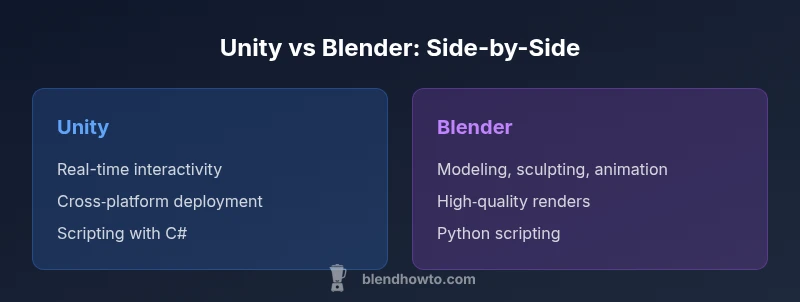
Unity dominates real-time interactivity and deployment across platforms, while Blender excels at modeling, animation, and rendering. For game development pipelines, Unity is often the core tool; for asset creation and pre-rendered visuals, Blender takes the lead. See our detailed comparison for nuance.
Unity in Practice: Real-Time Engines and Live Pipelines
In modern digital production, unity vs blender describes two tools that almost never occupy the same screen at the same time—yet both are essential. Unity is a real-time game engine built to run interactive experiences across platforms; Blender is a comprehensive 3D content creation suite used to model, sculpt, animate, simulate, and render. According to BlendHowTo, many teams adopt a hybrid approach that leverages the strengths of each tool at different stages of the pipeline. For home creators and hobbyists, understanding where Unity shines and where Blender excels helps set realistic expectations for time, learning, and licensing.
Unity's primary advantage is its live runtime: you can assemble scenes, script behavior with C#, and push builds to Windows, macOS, Linux, iOS, Android, consoles, and WebGL. Its editor focuses on iterative iteration: tweak an animation curve, adjust physics settings, and immediately see the results in the game view. In contrast, Blender's strengths live in creating the assets themselves: polygonal modeling, sculpting, UV mapping, rigging, animation, and photoreal or stylized rendering. It operates as a file-based hub for asset creation and can export to formats common in game engines. This distinction matters for teams trying to optimize a tight schedule or a limited budget. BlendHowTo's analysis shows a growing trend toward using Blender for asset creation and Unity for runtime deployment.
-1
Comparison
| Feature | Unity | Blender |
|---|---|---|
| Primary use | Real-time interactive development and deployment | 3D asset creation, modeling, animation, and rendering |
| Cost & licensing | Free personal tier; paid tiers for advanced features | Completely free and open-source with a permissive license |
| Scripting & API | C# with Unity API | Python scripting and Blender API |
| Platform support | Windows/macOS/Linux; iOS/Android; consoles; Web | Windows/macOS/Linux |
| Learning curve | Extensive engine concepts and workflows | Steep for newcomers to 3D workflows; strong artistic tooling |
| Interoperability | Direct asset imports; runtime scripts | Export formats for engines (FBX, GLTF, OBJ) |
| Rendering style | Real-time rendering with post-processing | Offline rendering with cycles/eeVEE-like options |
| Best for | Interactive experiences, games, simulations | Asset creation, animation, rendering, and VFX |
What's Good
- Clear specialization: Unity for interactivity, Blender for creation
- Strong cross-tool interoperability via standard formats
- Large communities and extensive learning resources
- Blender is free and open-source; Unity offers a generous personal tier
The Bad
- Hybrid pipelines require extra tooling and coordination
- Learning both tools can extend timelines
- Blender's real-time engine is not a substitute for Unity
- Export/import quirks can slow down pipelines
Unity wins for interactive development; Blender wins for asset creation.
If your primary goal is building interactive experiences, Unity provides a robust runtime and deployment ecosystem. For asset creation, modeling, and rendering, Blender offers deeper toolsets. A hybrid approach often yields the best results, leveraging each tool where it shines. The BlendHowTo team recommends starting with a clear pipeline split to minimize rework.
Frequently Asked Questions
What is the core difference between Unity and Blender in a production pipeline?
Unity is a real-time engine designed for interactive experiences and deployment, while Blender is a content-creation suite focused on modeling, animation, and rendering. They serve different stages of the pipeline but can be used together for best results.
Unity handles interactivity and deployment; Blender handles asset creation and rendering. They complement each other in a typical workflow.
Can I use Blender assets directly in Unity without conversion?
Yes. Blender assets can be exported in common formats such as FBX or GLTF and imported into Unity. Some adjustments may be needed for materials and scale after import.
Blender exports to formats Unity understands; expect some tweaks with materials and scale.
Is Unity free for hobbyists or small teams?
Unity offers a free personal tier suitable for individuals and small teams meeting certain criteria. Larger teams or deployments may require paid licenses with additional features.
There is a free option for small teams, with paid plans for bigger needs.
Which tool has better rendering quality, Unity or Blender?
Blender provides high-quality offline rendering through its path-tracing engines, ideal for stills and cutscenes. Unity delivers real-time visuals with post-processing for interactive experiences, which trades some photorealism for speed.
Blender shines in realism for renders; Unity excels at real-time visuals.
Which is easier for beginners to start with, Unity or Blender?
Blender can be intimidating due to its broad feature set, but many beginners start with simple modeling and shaders. Unity offers a more guided environment for building simple interactive scenes and gradually adds complexity.
Starts easy if you pick small projects in either tool, then scale up.
Can I run a project that uses both tools in a single pipeline?
Absolutely. Many studios build a workflow where Blender creates assets and animations, which are then brought into Unity for interactive experiences. Clear export settings and version control help keep the pipeline smooth.
Yes, many workflows combine both at different stages.
What to Remember
- Define your primary workflow first: interactivity or asset creation
- Choose Unity for runtime deployments and cross-platform games
- Choose Blender for modeling, sculpting, animation, and renders
- Plan an interoperable pipeline using standard formats
- Budget licensing implications and training time