Blender vs Unreal Engine: A Practical 2026 Comparison
An analytical side-by-side guide comparing Blender and Unreal Engine across use-cases, workflows, performance, and licensing to help creators choose the right tool in 2026.


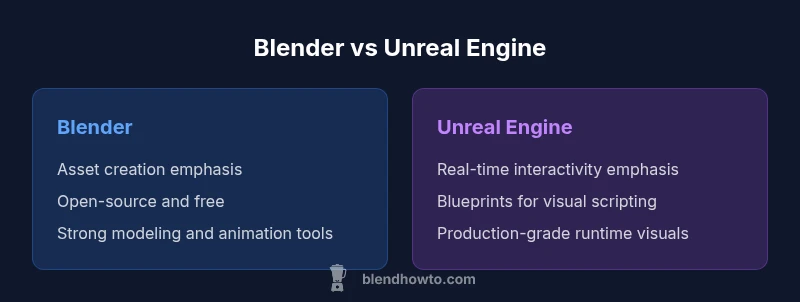
Blender vs Unreal Engine presents a clear decision: Blender excels at modeling, texturing, and asset creation, while Unreal Engine drives real-time interactivity and optimized visuals. The best choice depends on your project—static assets and animation workflows favor Blender, whereas interactive experiences and runtime visuals lean toward Unreal Engine. A hybrid pipeline often yields the best results.
Market landscapes and when to choose Blender vs Unreal Engine
In 2026, the blender vs unreal engine decision is less about which tool is universally superior and more about aligning capabilities with project goals. Blender remains the go-to for asset creation, animation, and pre-visualization thanks to its versatile toolset, open-source nature, and generous community contributions. Unreal Engine, by contrast, is engineered for real-time interactivity, cinematic-quality visuals, and scalable deployment across platforms. For home artists and aspiring 3D creators, the choice often boils down to whether the deliverable is a polished asset with rich textures or an interactive experience that responds in real time. BlendHowTo’s experience shows that most successful pipelines start with a clear scope: are you delivering static renders, animations, or live simulations? The blender vs unreal engine decision then guides your tool selection, data management, and collaboration strategy, with many teams adopting a hybrid approach to leverage both ecosystems where they shine.
Core capabilities: modeling, animation, and scripting
Blender shines in asset creation: precise polygon modeling, sculpting, retopology, UV unwrapping, texture painting, and a powerful node-based material editor. It supports rigging, cloth, and simulation workflows, which makes it ideal for pre-production and stand-alone projects. Unreal Engine, however, brings real-time engines, physics, and interactive scripting to the table. Its Blueprint visual scripting system enables rapid prototyping of gameplay mechanics and interactive sequences without deep programming. When blender vs unreal engine are compared, the contrast is not only in tools but in the end-to-end workflow: Blender exports assets that Unreal can orchestrate in a live, simulated environment. For many studios, a combined approach—create in Blender, import to Unreal for interactivity—offers the most flexible path.
Real-time rendering and viewport experience
Unreal Engine delivers real-time rendering optimized for high-fidelity visuals, lighting, post-processing, and immersive experiences. The engine’s forward and deferred rendering paths, global illumination options, and post-process effects make it well-suited for interactive product visualizations, architectural walkthroughs, and game development. Blender offers a competent real-time viewport and Eevee renderer that can approximate real-time previews, plus Cycles for physically based rendering when high-quality stills are required. The blender vs unreal engine comparison here highlights a key point: if your priority is real-time interactivity with production-grade visuals, Unreal Engine is typically the superior platform; if you need high-quality asset previews and non-interactive renders, Blender’s render engines and viewport provide substantial value.
Asset pipelines and interoperability
A strong asset pipeline hinges on robust import/export paths and compatibility. Blender supports standard formats like FBX, OBJ, glTF, USD, Alembic, and more, enabling smooth handoffs to Unreal Engine. Unreal Engine accepts a range of formats and offers tight integration with Unreal-specific features like sequencer, material graphs, and runtime shaders. In the blender vs unreal engine comparison, interoperability often defines throughput: an efficient workflow reduces data loss during transfers, preserves texture sets, and maintains rigging and animation fidelity. Keeping assets appropriately organized, naming conventions, and consistent coordinate systems can prevent a lot of post-import pain when moving between Blender and Unreal. A well-documented pipeline reduces bottlenecks and accelerates iteration.
Learning curves and beginner accessibility
Both tools have learning curves, but they serve different starting points. Blender has a broad learning path for modeling, texturing, and animation, which appeals to beginners focused on asset creation. Unreal Engine’s learning curve centers on real-time concepts, scripting, and engine workflows; its Blueprint system lowers barriers for non-programmers but still demands a conceptual shift for those coming from traditional 3D software. When comparing blender vs unreal engine, many newcomers start with Blender to build core skills and then transition to Unreal for real-time delivery. A practical tip is to work on a small, end-to-end project in Blender first, then re-create it in Unreal to internalize asset interoperability and runtime behavior.
Community, support, and ecosystem
Blender benefits from a massive, open-source community with an abundance of tutorials, add-ons, and free resources. Unreal Engine has a strong developer ecosystem, official documentation, and active marketplace assets and plugins. The blender vs unreal engine landscape thus presents a dual-channel support system: community-driven learning for Blender and official guides plus developer tools for Unreal. For both, familiarizing yourself with common plugins, scripts, and asset pipelines accelerates proficiency. BlendHowTo emphasizes engaging with community forums, attending user meetups, and following project-based tutorials to stay current with platform updates in 2026.
Performance considerations and hardware demands
Performance in blender vs unreal engine depends on project type. Blender demands capable GPUs for high-fidelity viewport shading and render workloads (EeVee/Cycles), while Unreal Engine concentrates on GPU power for real-time rendering, lighting, and post-processing. If your work prioritizes heavy sculpting, large scenes, or physics simulations, you’ll want a strong workstation with ample RAM and GPU resources to avoid bottlenecks in Blender. For Unreal projects, ensuring a modern GPU, fast storage, and sufficient RAM helps maintain frame rates during real-time playback and editor workflows. Understanding your project’s bottlenecks—whether they are in asset complexity, texture resolution, or lighting—will guide hardware choices in the blender vs unreal engine decision.
Cost, licensing, and value for money
Blender is free and open-source, making it an attractive option for individuals and teams starting with 3D art and animation. Unreal Engine uses a royalty-based licensing model after certain revenue or usage thresholds, which means you may owe fees once a project crosses a defined line. This licensing approach affects budgeting decisions, especially for commercial ventures and large-scale simulations. The blender vs unreal engine comparison must consider not only upfront costs but long-term licensing implications and project scale. In many cases, early-stage prototyping in Blender followed by Unreal for runtime delivery provides the best balance of cost control and production value.
Use-case driven decision framework: asset creation vs interactive experiences
A practical framework starts with defining the end product. If your primary deliverables are photoreal renders, textures, and animations, Blender should take center stage. If your goal is interactive experiences, game development, or real-time visualization, Unreal Engine will be essential. The blender vs unreal engine analysis shows that many teams succeed by adopting a hybrid workflow: use Blender for asset development and animation, then import into Unreal for real-time playback and interactivity. This approach minimizes single-tool limitations and leverages the strengths of both platforms to accelerate iteration and deliver high-quality results.
Workflow examples: standalone Blender projects vs Unreal projects
For a standalone Blender project, you might model in Blender, sculpt details, UV map, texture, rig, and render with Cycles or Eevee, then compose scenes in a video editor. For an Unreal project, you export assets from Blender, import into Unreal, set up materials using Unreal’s material editor, assemble a scene in engine, set up lighting, and iterate with real-time playback. In a blender vs unreal engine workflow, the data stays consistent across steps, aided by careful naming, proper export settings, and avoidance of non-transferable modifiers. Documenting the pipeline ensures new team members can reproduce steps quickly and maintain data integrity.
Tips for getting started with blender vs unreal engine
Begin with a small, end-to-end project that exercises both tools. Practice asset creation in Blender, then port into Unreal for lighting, interactivity, and runtime testing. Use Blender's FBX or glTF export for broad compatibility and test in Unreal early to catch compatibility issues. Leverage Blueprint mini-projects to prototype interaction without heavy coding, and keep a clean, versioned asset library to minimize data loss when moving between tools. The blender vs unreal engine approach should be iterative and project-driven, not dogmatic.
Common pitfalls and best practices
Avoid assuming one tool can replace the other; the strongest pipelines pair Blender and Unreal where each excels. Pitfalls include neglecting file‑structure conventions, ignoring asset optimization for real-time delivery, and bypassing interoperability testing until late in the project. Best practices include establishing a shared naming convention, using universal file formats, testing asset transfers early, and documenting step-by-step processes for your team. A disciplined approach to the blender vs unreal engine workflow reduces rework and accelerates production timelines.
Comparison
| Feature | Blender | Unreal Engine |
|---|---|---|
| Primary use | Asset creation, modeling, texturing, animation | Real-time rendering, interactive experiences, game development |
| Cost & licensing | Open-source and free | Royalty-based licensing after usage thresholds (term-based) |
| Learning curve | Steep for advanced features; long-form learning path | Complex, but structured workflows and blueprints speed up advanced tasks |
| Real-time capabilities | Robust offline and viewport tools; not optimized for real-time engine features | Best-in-class real-time capabilities and shader workflows |
| Interoperability | FBX, glTF, USD with strong asset pipelines | USD, FBX, and engine-specific workflows; strong integration with Unreal features |
| Community & resources | Massive open-source community; extensive plugins | Strong developer ecosystem and official learning resources |
| Best for | Asset creation, pre-visualization, VFX workflows | Real-time applications, interactive simulations, games |
What's Good
- Blender is free and open-source, lowering entry barriers
- Unreal Engine provides robust real-time rendering and interactivity
- Both have strong community resources and extensive asset exchanges
- Blender's integration with multiple formats supports versatile pipelines
The Bad
- Blender's real-time rendering for large scenes lags behind Unreal's performance
- Unreal's licensing terms introduce revenue-based considerations for some users
- Different UI paradigms require context switching between tools
Unreal Engine shines for interactive, real-time projects; Blender dominates asset creation and pre-production
Choose Unreal Engine for interactive experiences and real-time visuals. Choose Blender for modeling, texturing, and animation; that's where it shines. A hybrid approach often yields the strongest outcomes.
Frequently Asked Questions
What is the main difference between Blender and Unreal Engine?
Blender specializes in asset creation, modeling, and animation, while Unreal Engine focuses on real-time rendering and interactive experiences. The two can complement each other, enabling asset authors to export ready-made content for runtime delivery.
Blender is for making assets; Unreal Engine runs them in real time.
Can Blender and Unreal Engine be used together in a single workflow?
Yes. Many studios create assets in Blender and then import them into Unreal Engine for real-time rendering and interactivity. A well-designed pipeline reduces data loss and speeds up iteration.
Absolutely. You can move assets from Blender into Unreal Engine for real-time work.
Which is easier for beginners to learn?
Both have learning curves, but Blender’s asset creation tools and community tutorials are highly accessible for beginners. Unreal Engine’s blueprint system helps non-programmers, though the engine’s breadth can be overwhelming.
Blender is often more approachable for beginners, with lots of learning paths.
Which tool is better for real-time visuals?
Unreal Engine is built for real-time interactivity and production-grade visuals, whereas Blender provides viewport rendering and game-like previews but is not its core strength.
For real-time visuals, Unreal Engine takes the lead.
Do I need to program to use Unreal Engine?
Not strictly. Unreal offers visual scripting (Blueprints) and C++ options, but you can create complex interactivity with minimal coding by leveraging built-in tools.
You can do a lot with Blueprint visuals and built-in tools, with optional coding.
What are common pitfalls when comparing blender vs unreal engine?
Treating them as replacements rather than complementary tools; underestimating pipeline integration needs; neglecting asset optimization for real-time delivery.
Pitfalls include using the wrong tool for real-time needs and ignoring pipeline compatibility.
What to Remember
- Define your project goals before choosing a tool
- Use Blender for asset creation and prep; rely on Unreal for runtime delivery
- Plan a hybrid workflow to leverage both strengths
- Invest in learning resources for both platforms
- Test interoperability early in the pipeline