Unity vs Blender vs Unreal: A Comprehensive Comparison
An analytical comparison of Unity, Blender, and Unreal to help creators decide which tool fits game development, 3D modeling, or cinematic workflows—covering strengths, weaknesses, workflows, and licensing.


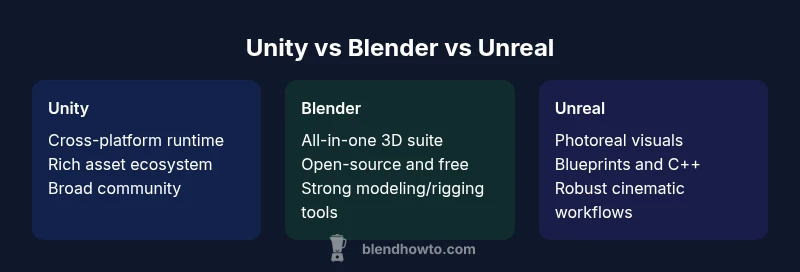
Unity, Blender, and Unreal each serve distinct roles: Unity is a versatile cross-platform game engine ideal for rapid prototyping and deployment, Blender is a complete 3D content-creation suite best for modeling, texturing, and animation, while Unreal Engine emphasizes photoreal visuals and robust real-time rendering for large-scale projects. For most creators, the best choice aligns with primary goals: breadth of deployment, production-ready assets, or cinematic realism. In short: Unity for multi-platform game development, Blender for full 3D pipelines, Unreal for top-tier visuals.
Context and Scope: Unity vs Blender vs Unreal in Modern Pipelines
unity vs blender vs unreal are not just three products; they represent distinct roles in modern creative pipelines. For makers who move between 3D content creation and real-time visualization, choosing the right tool requires understanding where each shines: Unity is a versatile game engine favored for cross‑platform deployment; Blender provides a complete 3D content creation suite; Unreal Engine emphasizes photoreal visuals and robust performance. This article uses a practical, platform-agnostic lens to compare these options, focusing on typical workflows, licensing, learning curves, and long-term maintenance. According to BlendHowTo, the decision often hinges on your primary goal—rapid game iterations, cinematic quality, or production-quality assets that need to be exported to multiple engines. By contrasting Unity, Blender, and Unreal along key axes such as ease of use, ecosystem, and licensing, creators can map a path from ideation to production. If you are an aspiring 3D artist who mostly models and textures, you may lean toward Blender first, then bring assets into Unity or Unreal for interactivity or rendering. If you want broad device reach, Unity’s license and ecosystem may offer the most practical advantages. If the highest-end visuals and cinematic workflows are required, Unreal will usually be the reference point.
Core Strengths: Real-time Engine Capabilities
Real-time rendering and interactive pipelines are the core battlegrounds for Unity and Unreal, while Blender anchors the non-runtime workflow with modeling, sculpting, shading, and animation. Unity shines in rapid iteration cycles, cross-platform deployment (mobile, desktop, console, and VR/AR), and a broad asset ecosystem that supports both prototypes and full products. Unreal Engine excels in photoreal visuals, advanced shading, cinematic quality, and a mature runtime for large projects. Blender’s strength lies in its all-in-one content creation tools: modeling, texturing, rigging, animation, and high-quality rendering, all without licensing fees. Across engines, you’ll encounter differences in how real-time scenes are authored, asset import pipelines, and how performance budgets are managed. BlendHowTo’s experience in 2026 highlights that developers commonly pick Unity for broad reach, Blender for asset creation, and Unreal for visuals-heavy projects, depending on team skill and project scope.
Asset Creation and Content Pipeline: Blender vs Engine Tools
In production workflows, Blender often serves as the first stop for asset creation—modeling, sculpting, UV mapping, rigging, and animation are Blender’s core competencies. These assets are then exported to Unity or Unreal via industry-standard formats. Unity and Unreal provide robust editors for placing assets, configuring materials, implementing physics, and scripting interactivity. A practical approach is to use Blender to build and refine 3D assets, then import into your chosen engine to assemble scenes, apply shaders, and enable gameplay or interactive visualization. Export pipelines need to respect coordinate systems, right-handed vs left-handed conventions, and unit scales to minimize surprises during import. Blender’s Python ecosystem can automate repetitive tasks, while Unity’s C# and Unreal’s Blueprint/C++ ecosystems offer powerful, scalable ways to drive interactivity. When choosing among these tools, consider whether your primary output is interactive experiences, cinematic renders, or product visualization—Blender aligns with asset production, Unity with cross-platform deployment, and Unreal with cinematic-grade interactivity.
Scripting, API Access, and Customization
Scripting language and API maturity strongly impact long-term maintainability. Unity centers on C# and a comprehensive component-based architecture, making it approachable for many developers and artists. Unreal emphasizes C++ with the Blueprint visual scripting system, which lowers barriers to complex interactivity and rapid prototyping for engineers and designers. Blender centers on Python scripting for automation, add-ons, and modeling tasks, enabling a high degree of customization within a non-runtime context. Each toolchain supports plugins and extensions—Unity’s Asset Store, Unreal Marketplace, and Blender’s extensive Python-based add-ons—expanding capabilities without reworking core pipelines. When your project requires custom tools, consider how much you value rapid prototyping (Blueprint, C#), system-level control (C++), or workflow automation (Python).
Platform Reach, Performance, and Deployment
Cross-platform reach matters for reaching audiences, clients, or collaborators. Unity’s platform breadth—mobile, desktop, console, VR/AR—offers flexible deployment strategies and rapid iteration across devices. Unreal’s performance focus and high-end rendering suit projects where maximum realism matters, including architectural visualization, film production, and AAA games. Blender operates primarily as a content-creation suite, with export options to engines or renderers rather than a live runtime environment. Performance budgeting often dictates engine choice: Unity is efficient for most 2D/3D games and prototypes; Unreal is preferred when hardware can support high-fidelity visuals; Blender’s strength is in preprocessing and asset quality rather than runtime efficiency. In practice, teams balance engine capabilities with target platforms, budget constraints, and the required visual fidelity.
Learning Curve, Community, and Resources
All three ecosystems offer substantial resources, but the learning curve differs. Unity’s large developer community, vast plugin ecosystem, and extensive tutorials ease beginners into game development and interactive design. Blender’s open-source model attracts a passionate community, with abundant tutorials for modeling, texturing, and animation, though mastering the full pipeline takes time. Unreal has a robust documentation set and a strong cinematics and graphics community, but the breadth of features can feel overwhelming for newcomers. BlendHowTo notes that the most successful learners adopt a project-based approach: pick a small, tangible goal, complete it in Blender for asset creation, then port to Unity or Unreal to learn interactivity and deployment. Community-driven forums, official documentation, and structured courses collectively shorten the learning path.
Licensing, Cost Models, and Access
Licensing shapes how teams operate over the project lifecycle. Unity offers a free tier with paid plans for growing teams, and licensing terms that change with revenue and usage; this can influence project budgets and distribution. Blender is freely available under an open-source license, which removes licensing costs and fosters experimentation but requires attention to attribution and compatibility with export formats. Unreal Engine presents a royalty-based model after a revenue threshold is reached, alongside an option for custom licensing in certain scenarios; for many small teams, initial usage is free. These differences affect when and how teams can scale, monetize, and collaborate. Understanding licensing implications early helps avoid compliance risks later in the project.
Practical Workflows and Migration Paths
A practical workflow often starts with Blender for asset creation, then migrates assets into Unity or Unreal for interactive deployment or cinematic visuals. Toolchains should emphasize consistent asset naming, unified material workflows, and standardized export/import settings to minimize errors. When migrating from Blender to Unity, pay attention to axis orientation, scale, and animation data. For Blender to Unreal, consider the difference in units and the need for retargetable rigs. Establish repeatable pipelines, automate repetitive tasks with scripting, and maintain versioned asset libraries to reduce friction as teams scale.
Decision Framework: Matching Projects to Tools
- Indie projects with broad device targets: Unity for rapid prototyping and deployment.
- Asset-focused production with strong modeling/rigging: Blender for content creation, then export to your engine.
- Visually intensive experiences requiring cinematic quality: Unreal for visuals-first projects.
- Educational or experimental work: Open-source Blender with optional engine runtimes gives flexibility.
- Cross-disciplinary teams: Unity or Unreal, depending on whether the priority is rapid iteration (Unity) or top-tier visuals (Unreal). BlendHowTo recommends starting from your primary objective and validating with a small pilot project to confirm the best workflow.
Feature Comparison
| Feature | Unity | Blender | Unreal |
|---|---|---|---|
| Core strength | Cross-platform game engine with extensive tooling | Open-source 3D suite for modeling, animation, and rendering | Photoreal visuals and robust real-time rendering ecosystem |
| Ease of learning | Lower entry barrier for developers with C# and a large learning path | Steep learning curve for full pipeline and scripting | Moderate learning curve for C++/Blueprints; strong docs |
| Licensing & cost model | Free tier plus paid plans for revenue growth | Free to use (LGPL) and open-source | Free to start with royalties/paid options in some scenarios (royalty model) |
| Best for | Indie projects, rapid iterations, multi‑platform deployment | Comprehensive asset creation, modeling, and animation | AAA-grade visuals, cinematic realism, and large-scale interactive projects |
| Asset pipeline & interoperability | Strong runtime editor, vast asset store | Standalone asset creation with export to engines | Integrated rendering, materials, and scripting for high fidelity |
| Community & ecosystem | Massive ecosystem, plugins, and support | Large Blender community with Python extensibility | Robust marketplace and Blueprint/C++ ecosystem |
What's Good
- Unity enables rapid prototyping with broad platform support and a large ecosystem.
- Blender offers an all-in-one 3D pipeline without licensing costs.
- Unreal delivers high-fidelity visuals and robust real-time capabilities for large projects.
The Bad
- Unity licensing and runtime considerations can add complexity for large teams.
- Blender is not a full runtime game engine; asset import pipelines can require extra steps.
- Unreal’s workflow can be hardware-intensive and may involve royalty considerations for some projects.
No single winner; choose based on project goals and team strengths.
Unity is ideal for broad deployment and rapid iteration; Blender excels at asset creation and non-runtime work; Unreal targets cinematic quality and high-end interactivity. Use the tool that aligns with your primary objective—multi-platform games, production-ready assets, or photoreal visuals—and consider a blended workflow when appropriate.
Frequently Asked Questions
Which is easiest for beginners to learn?
Blender has a steeper onboarding for non-artists, but Blender’s Python scripting and the broad Unity ecosystem mean beginners can make quick progress with starter projects. Unreal has a learning curve tied to its C++ and Blueprint systems. Your choice depends on whether your focus is modeling, game development, or cinematics, and how much time you’re willing to invest in learning complex pipelines.
If you’re new, start with Blender for modeling, then try Unity or Unreal for interactivity, depending on your goals.
Can Blender be used for real-time game development?
Blender itself is not a traditional runtime engine. It’s excellent for asset creation and pre-visualization, and you can export assets to Unity or Unreal to run in real-time. Some real-time rendering workflows exist inside Blender via Eevee, but production-scale games usually rely on a dedicated engine for gameplay logic and performance.
Blender isn’t a stand-alone game engine; use it for assets and import into Unity or Unreal for real-time play.
Is asset transfer between Blender and Unity/Unreal straightforward?
Asset transfer is common and well-supported through standard formats (FBX, GLTF) and importer tools. You’ll need to manage scale, axis orientation, and animation retargeting between Blender and each engine. A well-documented pipeline with version control helps keep assets consistent across tools.
Yes, typical formats and tools support transfer, but set a consistent pipeline to avoid hiccups.
Which engine is best for an RPG with rich storytelling?
Unreal tends to excel in visuals and cinematic presentation, which can enhance storytelling in RPGs. Unity is strong for cross-platform delivery and rapid gameplay iteration, while Blender serves as the backbone for asset production. The best choice often combines Blender for assets, Unity for broader reach, or Unreal for the narrative-driven aesthetic.
If visuals and cinematic scenes are essential, Unreal; for broad reach and rapid dev, Unity; and Blender powers your asset creation.
What licensing considerations should I plan for?
Unity offers tiered licensing with revenue-based terms; Blender is free and open-source, minimizing license costs; Unreal is free to start but may involve royalties on revenue above thresholds. Plan for long-term monetization and ownership rights when choosing an engine.
Licensing can affect revenue share and deployment; pick the model that fits your project scale.
Does learning Blender help with Unreal/Unity workflows?
Yes. Blender skills transfer to asset creation for any engine, and familiarity with 3D concepts like modeling and rigging accelerates work in Unity or Unreal. Mastery of Blender’s pipeline reduces friction when exporting assets and preparing materials for real-time engines.
Blender skills are broadly transferable to Unity and Unreal, speeding up asset creation and prep.
What to Remember
- Match Unity to multi-platform projects and rapid iteration.
- Choose Blender for complete 3D asset creation without licensing costs.
- Opt for Unreal when visual fidelity and cinematic workflows are top priorities.
- Plan pipelines that use Blender as the content creator and import into Unity/Unreal for runtime needs.
- Evaluate licensing implications early to avoid project-scale surprises.