Blender vs Unity: A Practical Comparison
An analytical side-by-side look at Blender and Unity, covering use cases, workflows, performance, licensing, and best practices for end-to-end 3D content creation and real-time deployment.


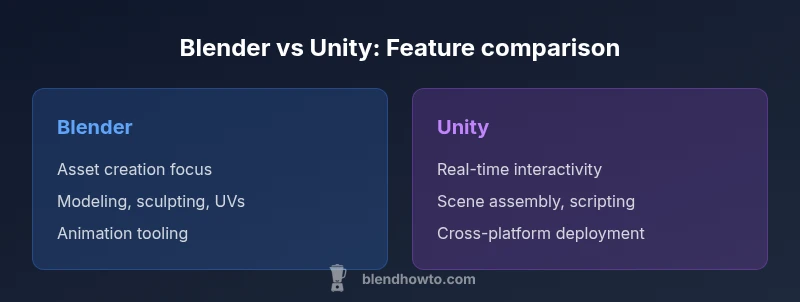
Blender and Unity serve complementary roles in modern production pipelines. Blender excels at asset creation—modeling, sculpting, texturing, and animation—while Unity specializes in real-time interactivity, scene assembly, and deployment across platforms. For most projects, use Blender to build and refine assets, then bring them into Unity for real-time rendering and interaction. When you need both capabilities in a seamless workflow, pairing Blender with Unity is the optimal approach.
Blender and Unity in the Production Ecosystem
According to BlendHowTo, Blender and Unity occupy distinct yet highly complementary parts of a modern digital pipeline. Blender functions as a robust content creation suite for modeling, sculpting, UV mapping, texturing, and animation. Unity, by contrast, is a real-time game engine and development platform designed to assemble scenes, implement interactivity, manage physics, and deploy to multiple platforms. Understanding these roles helps teams structure workflows that maximize efficiency, reuse of assets, and iteration speed across disciplines such as game development, architectural visualization, and interactive media. When planning a project, map out which tasks are best handled in Blender and which should be executed inside Unity to minimize back-and-forth and heavy file conversions.
Core Use Cases: When to use Blender vs Unity
Blender shines in the early stages of a project: concepting, blocking, high-fidelity modeling, sculpting, and creating production-ready assets with detailed textures and rigs. Unity shines in the runtime phase: integrating assets into interactive scenes, implementing gameplay logic, scripting behaviors, coordinating animations in real time, and exporting to target platforms. For illustrators or filmmakers, Blender can also serve as a powerful renderer for previsualization and render passes. For interactive experiences and games, Unity provides the real-time lighting, shaders, physics, and performance profiling that designers rely on for a polished product. BlendHowTo’s analysis highlights that both tools can coexist harmoniously in a well-designed pipeline, reducing duplication of effort and accelerating feedback loops.
Modeling and Asset Creation in Blender
Blender offers a comprehensive toolset for polygon modeling, sculpting, retopology, UV unwrapping, texture painting, and procedural workflows. Artists can create high-resolution assets and bake maps for use in Unity. The software supports non-destructive workflows with modifiers, array and lattice systems, and robust materials through node-based shading. Importantly, Blender’s asset studio approach enables rapid iterations on topology, edge flow, and texture detail before exporting to the engine. This stage is critical for ensuring that assets perform well in Unity’s real-time environment and render correctly across platforms.
Real-Time Gameplay and Visualization in Unity
Unity is engineered for interactive experiences. It handles scene composition, lighting, post-processing, physics simulation, and runtime scripting with a focus on performance and scalability. The Unity editor provides Profiling tools, Frame Debugger, and a live play mode that reveals how assets behave under user input and game logic. Import workflows from Blender typically involve exporting FBX or GLTF files, then configuring materials, shaders, and lighting within Unity. Unity’s timeline and cinemachine plugins enable coordinated cinematics, while its asset bundles and addressable systems support efficient content delivery in large projects.
Animation, Rigging, and Motion in Blender vs Unity
Blender offers end-to-end animation tools: rigging, weight painting, shape keys, nonlinear animation (NLA) editors, and an integrated dope sheet. Animators often prepare character rigs, animation cycles, and performance captures within Blender before exporting. Unity, meanwhile, focuses on runtime animation through the Animator system, Mecanim, and the Timeline tool for sequencing. Integrating Blender animation into Unity requires careful export settings and sometimes re-targeting with Humanoid rigs or animation retargeting services. BlendHowTo notes that a well-planned franchise of animation assets reduces animation skew across platforms.
Import/Export Pipelines and Asset Formats
Interchange formats such as FBX and GLTF are common bridges between Blender and Unity. When exporting from Blender, users should verify scale, orientation, and animation bake options to ensure a faithful transfer. In Unity, set up correct import settings for meshes, textures, normal maps, and lightmaps. Consistency in units, pivot points, and origin can prevent downstream issues in assembly, rigging, and gameplay code. Regularly testing a few assets in a small scene helps catch discrepancies early and maintains pipeline stability, especially on multi-platform targets.
Scripting, Automation, and Extensibility
Blender’s Python API enables automation of repetitive modeling, rigging, and export tasks, cutting down production time and reducing human error. Unity uses C# for scripting, with a broad ecosystem of packages through the Unity Asset Store and custom editor tooling. In a blended pipeline, automation scripts can be written to prepare assets in Blender, export, and automatically configure Unity scenes, prefabs, and lighting. A disciplined approach to scripting yields repeatable results and accelerates updates when assets evolve or engine versions change.
Rendering Paradigms: Offline vs Real-Time
Blender traditionally emphasizes offline rendering with cycles and Eevee for fast previews, enabling photorealistic or stylized results suitable for concept art, cinematic sequences, or product renders. Unity relies on real-time rendering with dynamic lighting, post-processing, and shader-driven visuals, optimized for interactive framerates. The choice between high-fidelity pre-rendered visuals (Blender) and real-time interactivity (Unity) often defines project scope and resource allocation. When a project requires both modes, teams might render stills or cinematics in Blender and simulate interactivity in Unity.
Performance, Hardware Considerations and Best Practices
Asset performance in Unity depends on mesh complexity, texture resolution, and shader complexity. Blender workflow should emphasize clean topology, efficient baking, and proper UV layouts to minimize texture size when assets enter Unity. A practical rule is to optimize assets for the target hardware from the outset: lower polygon counts for mobile platforms, higher fidelity for desktop, and careful texture atlases to reduce draw calls. Regular profiling in Unity helps detect bottlenecks, while Blender’s viewport performance can guide decisions during the modeling phase. BlendHowTo’s methodology stresses iterative testing and early optimization to avoid costly rework later.
Licensing, Community, and Cost Implications
Both Blender and Unity are accessible with friendly licensing models for hobbyists and small studios. Blender is open-source and free, while Unity offers a tiered model with personal, plus, and pro plans depending on revenue and features. Community support, tutorials, and plugin ecosystems are rich for both tools, though Unity’s ecosystem tends to be more game-dev focused and monetizable through the Asset Store. For teams, cost calculations should include licensing, platform deployment targets, and the potential need for additional tools or assets. BlendHowTo’s 2026 analysis provides a framework for evaluating total ownership costs across typical project scopes.
Comparison
| Feature | Blender | Unity |
|---|---|---|
| Primary use | Asset creation (modeling, sculpting, texturing, rigging, animation) | Real-time scene composition, interaction, physics, and deployment |
| Real-time capabilities | Real-time viewport with high interactivity; offline rendering options | |
| Asset workflow | Modeling → UVs → texturing → animation → export to engines | Import assets and assemble scenes with runtime interactivity, physics, and scripting |
| Rendering paradigm | Cycles/Eevee for high-quality renders in Blender; real-time rendering in Unity | |
| Scripting/Automation | Python for automation in Blender | |
| File formats | FBX, OBJ, GLTF exports; native blend formats | |
| Pricing model | Free and open-source (with optional donations) | Free personal tier with paid tiers for advanced features |
| Extensibility | Extensive add-ons; customizable UI and workflows | Asset Store, plugins, and editor tooling ecosystem |
| Best for | Artists focusing on asset creation and animation | Developers building interactive experiences and games |
What's Good
- Clear division of labor in pipelines
The Bad
- Learning curves for cross-tool workflows
- Export/import may require careful optimization and testing
Blender and Unity complement each other; use Blender for content creation and Unity for runtime deployment
For end-to-end projects, leverage Blender to build and refine assets, then bring them into Unity for real-time interactivity. A well-structured hybrid workflow delivers efficiency, quality, and scalability across platforms.
Frequently Asked Questions
Can I use Blender models directly in Unity without losing fidelity?
Yes, you can import Blender models into Unity, typically via FBX or GLTF exports. To preserve fidelity, bake transforms, apply consistent scale, and verify normals and armatures. Some materials may need reconfiguration in Unity, especially if you rely on Blender-specific shaders.
Yes—export as FBX or GLTF, then adjust materials and rigging in Unity.
Is Unity free for hobbyists, and what are the cost implications for teams?
Unity offers a free personal tier for individuals and small studios meeting revenue thresholds. For larger teams or projects with higher revenue, paid tiers unlock additional services, analytics, and collaboration features. Always assess ongoing costs against project scope and platform targets.
Unity has a free personal tier, with paid plans for bigger teams and features.
Which tool handles UV mapping and texture baking more efficiently?
Blender provides a robust UV editing workflow and baking tools that integrate tightly with its texture painting. Unity handles texture import and shader assignment, but UV mapping and baking are generally done in Blender. A clean UV layout in Blender pays dividends once assets are in Unity.
Blender is the go-to for UVs and baking; Unity uses those textures after import.
Do I need Blender if I’m building in Unity?
Blender isn’t strictly required for Unity development, but it is highly beneficial for creating custom assets, characters, and animations. If you rely on third-party assets or procedural content, Unity’s workflow may suffice, but Blender accelerates asset quality and customization.
Not required, but Blender greatly enhances asset creation and customization.
Can Unity reproduce Blender’s Cycles realism in real-time?
Unity can achieve high realism with advanced shaders, lighting, and post-processing, but Cycles-style path tracing is not the standard real-time workflow. For photoreal during cutscenes, you may render in Blender and use Unity for real-time playback with optimized lighting and materials.
Unity can look very realistic with the right shaders and lighting, but not a full Cycles-style path trace in real-time.
What are the best export settings to preserve animation from Blender to Unity?
Export animations using FBX or GLTF with baked animation where appropriate. Ensure proper scale, animation samples, and bone orientations. In Unity, verify avatar rigs (Generic vs Humanoid) and check import settings to preserve curves and timing.
Export as FBX/GLTF with baked animation and check Unity’s rig and import options.
What to Remember
- Prioritize asset creation in Blender before Unity integration
- Maintain consistent export/import settings to prevent workflow friction
- Leverage scripting to automate repetitive tasks across both tools
- Profile performance in Unity early to guide asset optimization
- Plan licenses and budgets with project scope in mind