Difference Between Blender and Maya: A Practical Comparison
An analytical, objective comparison of Blender vs Maya, covering licensing, learning curves, pipelines, rendering, and where each tool shines for home studios and professional workflows.


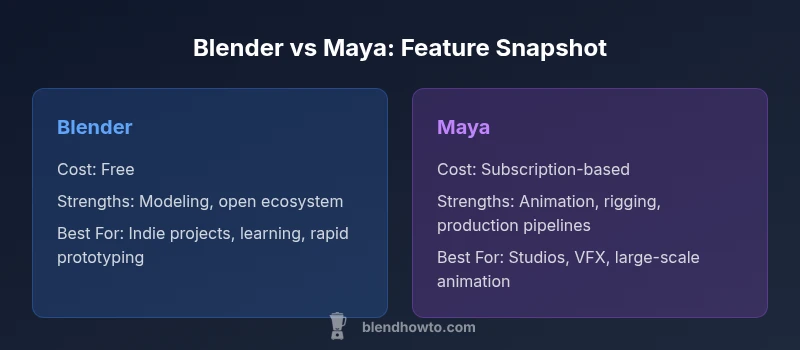
Blender and Maya serve different audiences. The difference between blender and maya primarily comes down to cost, pipeline maturity, and intended use: Blender is free, open-source, and versatile for modeling, texturing, and independent production; Maya is a paid industry-standard with advanced animation, rigging, and VFX tooling. Choose Blender for value and flexibility; Maya for robust, studio-grade workflows.
Understanding the difference between blender and maya
For home studios and aspiring 3D artists, understanding the difference between blender and maya is essential for planning training, choosing software, and shaping project workflows. This comparison starts with core philosophical divides rather than feature-by-feature minutiae. Blender is free and open-source, with a broad, enthusiastic community that contributes add-ons and tutorials. Maya, by contrast, is a commercial product that integrates tightly with Autodesk's ecosystem, emphasizing reliability, sanctioned pipelines, and enterprise-grade animation and VFX capabilities. The practical upshot is that the difference between blender and maya often reflects a user's context—indie projects, education, and experimentation versus professional pipelines, client-driven production, and collaboration across large teams. As you read further, consider your own goals: budget constraints, the scale of your projects, required integrations, and how much time you can devote to learning a tool with a mature, sometimes opinionated workflow. In short, the choice isn't only about features; it's about where you want to operate: solo, small shop, or a studio with established process. According to BlendHowTo, the practical implications of this distinction become clear once you map tasks to tools—modeling, animation, rendering, and collaboration all ride on the same basic premise: different tools excel in different contexts.
Core Design Philosophies and Target Audiences
Blender and Maya originate from different design priorities. Blender prioritizes accessibility, experimentation, and rapid iteration, encouraging artists to customize their toolset through scripting and community-generated addons. It is ideally suited for individuals, educators, indie studios, and small teams who value flexibility and low friction to start creating. Maya emphasizes stability, procedural pipelines, and industry-standard workflows that scale to large teams, complex productions, and long-term support contracts. For studios, the choice often hinges on how an asset goes from concept to final render: a unified, supported toolchain vs. a flexible, in-house setup. The Blender community tends to produce bite-sized tutorials, open file formats, and a philosophy of sharing improvements freely. This can accelerate learning but may require practicing discernment when evaluating third-party add-ons. Maya users rely on formal training, vendor-backed documentation, and the Autodesk ecosystem to address edge cases quickly. When you map the differences to user profiles, Blender shines for students, hobbyists, indie filmmakers, and portfolio builders; Maya thrives in feature animation, broadcast graphics, and pipeline-driven projects. The upshot is that your target audience strongly influences which tool feels “natural” to you, and it should shape your learning path and project scope.
Licensing, Cost, and Accessibility
The most practical dimension to start with is licensing. Blender is released under the GNU General Public License and is freely available to anyone. There are no upfront costs, no annual renewals, and no vendor-imposed hardware or software commitments. That accessibility makes Blender ideal for learners, educators, and small teams who want to experiment without financial risk. Maya, in contrast, operates on a commercial subscription model through Autodesk. This licensing approach targets studios and professionals who rely on dedicated support, predictable roadmaps, and alignment with enterprise workflows. While the cost can be a consideration for individuals, many studios justify the expense through improved pipeline integration, training resources, and collaboration features that support large teams. When evaluating accessibility, consider not just price, but also the availability of official training, certified partners, and long-term software assurance in your region.
Learning Curve, UX, and Onboarding
The learning curve is a major differentiator between Blender and Maya. Blender’s interface has historically been cited as dense and non-intuitive for newcomers, but recent versions have improved discoverability through context-sensitive workspaces and clearer defaults. The breadth of features—modeling, sculpting, shading, animation, and simulation—means there is a lot to learn, and beginners should start with guided projects and community tutorials. Maya offers a more traditional, industry-aligned UX that mirrors other Autodesk products, which can reduce the friction for professionals moving between tools in a studio setting. However, Maya’s depth—rigging networks, shading networks, and complex animation controllers—means the initial onboarding is substantial. Regardless of the tool, a structured learning plan that emphasizes core competencies (modeling basics, animation fundamentals, rendering workflows) and hands-on projects will accelerate progress. A good approach is to pick a focal area (e.g., character animation) and learn the essentials in that domain before expanding to other features.
Tooling, Plugins, and Ecosystems
Both Blender and Maya benefit from vibrant ecosystems, but their modes of expansion differ. Blender relies on a global community of developers and a wealth of open-source addons that extend functionality—from advanced modeling tools to simulation utilities. The open ecosystem accelerates experimentation and customization, but it also places emphasis on vetting and compatibility. Maya’s ecosystem is more centralized and market-tested, with certified plugins, official support, and robust integration with Autodesk tools like 3ds Max, MotionBuilder, and Shotgun (for project management). For artists working in pipelines, Maya’s plugin ecosystem often translates into consistent tooling, standardized practices, and smoother asset handoffs across departments. In practice, choose Blender if you value flexibility and rapid iteration; choose Maya if you rely on strict pipelines, formal support, and proven compatibility with enterprise tools. BlendHowTo’s guidance emphasizes aligning your toolset with your production needs and team structure.
Animation, Rigging, and Character Work
Animation and rigging are central to Maya’s claim to industry prominence. Professionals point to Maya’s robust rigging framework, stable animation editors, and a mature toolset for facial rigging and performance capture workflows as major strengths. Blender has made strong strides in animation, offering a capable set of rigging tools, a growing add-on ecosystem for character work, and features like Grease Pencil for 2D/3D hybrid animation. For studios focused on portfolio pieces, short films, or indie projects, Blender’s cost-effective approach can deliver excellent results with the right workflow. For large-scale productions with complex character pipelines, Maya’s established tooling often provides a smoother path to production, better interdepartment interoperability, and more predictable handoffs between modeling, rigging, animation, and shading.
Rendering, Simulation, and Visualization
Rendering and simulation capabilities diverge in emphasis. Blender ships with real-time and path-tracing renderers (EEVEE and Cycles) that cover a broad range of needs, from quick previews to high-quality renders. It also supports external engines and a strong community of render nodes and materials libraries. Maya’s integrated Arnold renderer and its broader support for production-grade visuals remain a differentiator for studios aiming for photorealism and large-scale simulations. While Blender can handle many production tasks, Maya’s rendering roadmap and its support for enterprise pipelines often make it the preferred choice for studios pursuing complex visual effects, while Blender is an excellent option for independent projects and smaller teams exploring high-end outcomes with a lower cost of entry.
Community, Support, and Educational Resources
Community support can shape how easily artists overcome early hurdles. Blender’s community is expansive, diffuse, and highly collaborative, with tutorials, forums, and user groups spread across the internet. This provides rapid access to diverse tips and a culture of sharing, but it also requires a degree of discernment to separate quality guidance from less reliable sources. Maya’s official documentation, certified training partners, and Autodesk support channels provide a more traditional, structured support experience that many studios rely on for compliance with production standards. For learners who value practical, project-based learning, Blender’s community resources are a treasure trove; for professionals seeking formal certification and vendor-backed guidance, Maya’s education ecosystem offers a clear path to industry recognition.
How to Choose: Scenarios and Decision Framework
To decide between Blender and Maya, start by outlining your project scope, team size, and pipeline requirements. If you work solo or in a small shop with budget constraints, Blender often delivers the best value and flexibility. If your work is destined for a studio pipeline, or you need to collaborate with teams that use Autodesk tools, Maya’s ecosystem and production-proven capabilities can be decisive. Consider starting with a pilot project in each tool, focusing on core tasks—modeling, animation, and rendering—and evaluate how assets move from one stage to the next. Map the essential tasks to the tool’s strengths: Blender for rapid iteration and custom workflows; Maya for scalable pipelines and industry-grade animation. Finally, factor in learning time, available training resources, and long-term maintenance costs. The right choice balances practical needs with your career or project goals.
Comparison
| Feature | Blender | Maya |
|---|---|---|
| Cost (licensing) | free / open-source | subscription-based (paid) |
| Learning curve | moderate to steep, with a learning path | steep, professional onboarding typical |
| Industry usage | indie studios, education, hobbyists | film/VFX, large studios, pipelines |
| Pipeline integration | growing Autodesk-like integration via addons; Python scripting | well-established Autodesk ecosystem, strong DWG/FBX workflows |
| Animation tools | robust but community-driven animation features | industry-leading animation and rigging tools |
| Rendering options | EEVEE/Cycles, external engines, open ecosystem | integrated Arnold, strong official support |
| Platform availability | Windows/macOS/Linux | Windows/macOS |
| Community & support | huge community, vast free resources | official support, certified partners |
What's Good
- Low upfront cost and open ecosystem for Blender
- Strong community-driven learning resources and rapid prototyping
- Mature animation pipelines and enterprise-grade toolset in Maya
The Bad
- Blender can require more self-guided learning for complex pipelines
- Maya involves ongoing subscription costs and vendor锁-in
- Interchange between tools may require adaptation for pipelines
Blender is the best value for individuals and small teams; Maya is preferable for studios with established Autodesk pipelines
Choose Blender to maximize flexibility and minimize cost in early stages; opt for Maya when production pipelines demand integrated tooling and vendor-backed support.
Frequently Asked Questions
What is the main licensing difference between Blender and Maya?
Blender is free and open-source, with no subscription required. Maya operates on a paid subscription model through Autodesk, which adds ongoing costs but includes vendor-backed support and official training resources.
Blender is free to use, while Maya requires a paid subscription. This affects ongoing costs and support options.
Which tool is easier for beginners to start with?
Blender has become more beginner-friendly over time, especially with community tutorials. Maya can be approachable for beginners, but many find its depth and pipeline concepts challenging at first and benefit from structured courses.
Blender tends to be easier to start, but both tools require commitment to learn.
Do both programs support Python scripting?
Yes. Both Blender and Maya provide Python APIs, which enables automation, custom tools, and integration into pipelines. The APIs differ in specifics, so you’ll learn different scripting patterns in each.
Both programs support Python, enabling automation and custom tools.
Can Blender deliver production-ready pipelines like Maya?
Blender can form production-ready pipelines, especially for small teams and independent projects. For studios with strict enterprise pipelines, Maya’s established ecosystem often provides smoother integration and vendor support.
Blender can do production work in smaller teams; Maya is often preferred for large pipelines.
Which tool is better for character animation and rigging?
Maya is widely regarded as the industry standard for character animation and rigging due to its mature toolset. Blender offers solid character work and improving rigging options, suitable for many independent projects.
Maya is the go-to for heavy character work, though Blender is catching up.
Is it feasible to switch from Blender to Maya mid-project?
Yes, but it can be disruptive. Asset formats, workflows, and scripting will need adaptation. A planned, staged transition with clear handoff points reduces risk.
Yes, but plan the switch carefully to minimize disruption.
What to Remember
- Blender offers zero-cost entry and a flexible addon ecosystem
- Maya remains the go-to for large-scale, pipeline-driven productions
- Choose based on project scale, team size, and long-term pipeline goals
- Evaluate learning time and available training resources for each tool
- Plan a small pilot project to compare workflows before committing