Why maya over blender: A practical comparison for artists
Analytical compare: Maya vs Blender, exploring licensing, tools, rendering, and learning curves to explain why maya over blender in professional pipelines.


Maya typically dominates professional animation pipelines due to its mature toolset, rigging capabilities, and enterprise workflow integration. Blender offers a powerful, free alternative with a robust feature set and a thriving community. If your production relies on established Autodesk workflows and IT support, Maya may be the smarter choice; otherwise Blender often delivers the most practical path for individuals and smaller teams.
why maya over blender: A practical assessment
The question of why maya over blender isn’t a simple one; it depends on project scope, team structure, and pipeline requirements. In many professional settings, Maya remains the reference point for animation-heavy productions due to its mature toolchain and industry-strength integration. However, the choice is not binary: for indie productions or education-focused work, Blender offers a compelling, cost-free path. According to BlendHowTo, understanding the tradeoffs early can prevent costly pipeline misalignments and help you choose the right tool for the job. By framing the comparison around workflows, asset creation, and collaboration, you can see how the same project could benefit from Maya’s deep animation suite or Blender’s flexible, open ecosystem. This block lays the groundwork for a deeper dive into licensing, core capabilities, and real-world use cases.
Maya's historical prominence in professional pipelines
Maya emerged as a dominant force in film, TV, and game production long before many modern open-source tools existed. Studios favored its stable animation pipeline, extensive rigging options, and a well-supported ecosystem of plugins and studios tools. The BlendHowTo team found that many professional shops standardize on Maya for character animation workflows, staging, and shot-centric pipelines, where predictable tooling and long-term maintenance matter. While Blender has grown significantly in capabilities, especially for smaller teams, Maya’s history in large-scale productions continues to influence decision-making in contemporary studios. This historical perspective helps explain why some projects start with Maya in preproduction and continue through post.
Licensing, cost, and access: licensing models and budgeting
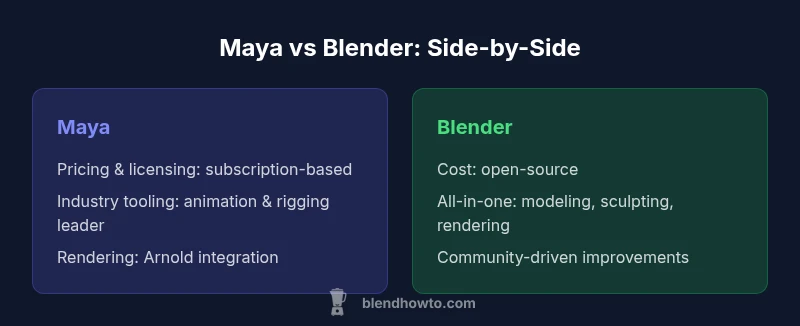
Licensing models and cost considerations play a pivotal role in choosing between Maya and Blender. Maya relies on a subscription model with formal licensing and enterprise support, which can be a barrier for startups and individuals but pays off in predictable updates and institutional fit. Blender, by contrast, is open-source and freely available, reducing upfront costs and allowing experimentation without license friction. For teams evaluating long-term budgets, it’s worth weighing not just initial spend but ongoing maintenance, IT overhead, and training needs. BlendHowTo analysis shows that budgeting for Maya often includes licensing, IT infrastructure, and annual updates, whereas Blender emphasizes community-driven development and extensibility without licensing constraints. These factors directly influence the total cost of ownership across project lifecycles.
Core toolsets: animation, rigging, and modeling differences
Maya’s toolset has grown around film-quality animation, rigging, and dynamics. It provides a deep, production-proven workflow for character animation, with sophisticated rigging hierarchies, constraint systems, and animation layering. Blender offers a comprehensive all-in-one suite: modeling, sculpting, UVs, shading, rigging, and animation, all integrated into a single application. For many indie creators, Blender’s streamlined interface and flexible modifiers speed up iteration. For large teams focused on high-end animation and character fidelity, Maya’s specialized tools and industry standard approaches can reduce friction when collaborating with external vendors and pipelines.
Rendering and shading workflows: Arnold vs Cycles/Eevee
Rendering pipelines often drive tool choice. Maya frequently pairs with Arnold, providing a mature, photorealistic rendering path with strong global illumination, advanced materials, and robust scene management. Blender leans on Cycles for physically based rendering and Eevee for real-time previews, delivering fast feedback and strong performance out of the box. In production settings, the Arnold integration in Maya can be a compelling reason to prefer Maya when photorealism and scalable render farms are priorities. Blender’s built-in renders are appealing for rapid visualization and less resource-intensive projects, or when teams want to stay entirely within an open-source toolset.
Simulation, dynamics, and effects: Bifrost vs Mantaflow
For simulations and effects, Maya delegates heavy lifting to Bifrost for fluids and complex dynamics in professional pipelines, often integrated with other studio tools through USD or Alembic pipelines. Blender includes Mantaflow for fluids, smoke, and related simulations, integrated into the same interface as modeling and rendering. For studios needing photorealistic, scalable simulations with industry-standard support, Maya’s ecosystem can be a deciding factor, while Blender provides an accessible, capable alternative that benefits from community-driven development and transparency.
Integration, formats, and pipeline readiness
Studio pipelines frequently rely on robust interchange formats like USD, Alembic, and custom asset pipelines. Maya tends to be favored for its long-standing integration with these standards, especially in larger facilities with formal procurement and support channels. Blender has made substantial advances in interoperability, offering USD and Alembic support and plugin ecosystems that enable cross-software workflows. If your workflow demands strong cross-application interchange and formal vendor support, Maya remains attractive; if you prioritize openness, rapid iteration, and a broader flexible toolset, Blender fits well.
Learning curve, training resources, and time-to-proficiency
Maya’s depth can be daunting, with a steep learning curve for advanced features like rigging, character setups, and dynamics. Blender’s breadth is also formidable, but its community-driven resources, tutorials, and documentation tend to be highly accessible and varied, particularly for beginners. The choice often hinges on the learner’s goals: for those pursuing formal industry roles, investing in Maya training aligns with studio expectations; for hobbyists and early-career artists, Blender provides an affordable and practical entry point with abundant learning materials.
Community, ecosystem, and official documentation
Maya benefits from a professional ecosystem: official Autodesk documentation, certification paths, and enterprise support networks. Blender thrives on a global, active community and extensive open documentation, tutorials, and community-made plugins. The scale and nature of support differ: Autodesk channels can be decisive for studios needing guaranteed assistance, while Blender’s community fosters rapid knowledge sharing and rapid innovation at a personal or small-team level.
Real-world scenarios: studio pipelines vs solo artists
In film or game studios with large teams and strict production schedules, Maya’s proven workflow, compatibility with studio-grade renderers, and enterprise support can streamline production and reduce risk. For solo artists, independent studios, or educational contexts, Blender provides a cost-effective, flexible approach with a fast time-to-prototype. The BlazeHowTo team emphasizes the importance of testing both tools on a small project sample to reveal practical tradeoffs before committing to a full workflow.
Comparison
| Feature | Maya | Blender |
|---|---|---|
| Pricing & licensing | Proprietary subscription model with enterprise options | Free, open-source, no licensing fees |
| Modeling features | Industry-grade poly/NURBS tools; strong external plugin support | All-in-one modeling/sculpting/modifiers; rapid iteration |
| Animation & rigging | Industry-standard animation toolkit; advanced rigging workflows | Solid animation and rigging; fast prototyping workflows |
| Rendering integration | Tightly integrated with Arnold and USD-based pipelines | Cycles/Eevee built-in; strong real-time preview |
| Simulation & dynamics | Bifrost for fluids and dynamics in production contexts | Mantaflow for fluids/smoke; open-source and extensible |
| Pipeline readiness | Mature studio pipelines; extensive USD/Alembic support | Open ecosystems; growing USD/Alembic support; plugin-friendly |
| Learning curve | Steep for deep professional workflows; formal training common | Steep at first but broad resources for beginners |
| Community & support | Official Autodesk support; large enterprise networks | Vibrant community; official docs plus community guides |
| Industry adoption | Widely used in big studios for animation/visual effects | Popular with independent artists and education sectors |
| Total cost of ownership | Higher ongoing licensing and maintenance costs | Low upfront cost; community-driven development |
What's Good
- Maya offers a clearly defined professional pipeline with enterprise support
- Blender is free, open-source, and highly flexible for experimentation
- Maya's animation tools and rigging are industry-leading for large productions
- Blender's all-in-one suite reduces software sprawl for small teams
The Bad
- Maya can be expensive and license-dependent for startups
- Blender may have less formal enterprise support and longer onboarding in some studios
- Maya’s learning curve can be steep for those new to industry workflows
Maya is the preferred choice for large studios and enterprise pipelines, while Blender remains the best value for individuals and small teams.
Choose Maya when you need formal support and scalable pipelines. Opt for Blender when cost, openness, and rapid iteration are your priorities; Balance the decision with your team size, project scope, and long-term needs.
Frequently Asked Questions
Is Maya better for beginners than Blender?
Both tools have learning curves, but Blender often offers a gentler entry due to its open ecosystem and abundant beginner-friendly tutorials. Maya tends to reward users who commit to formal workflows and studio-backed training. Your choice should align with your long-term goals and access to learning resources.
Blender is usually easier to start with, while Maya rewards long-term studio workflows with structured training.
Can Blender fully replace Maya in film production?
In many indie and small-studio contexts, Blender can handle production needs with the right pipeline. In feature film productions with high-end workflows, Maya’s industry-standard tools and studio integrations still set the baseline for many teams.
Blender can work for smaller projects; Maya often remains the standard for major productions.
Does Maya support USD and Alembic pipelines?
Yes, Maya supports USD, Alembic, and other interchange formats, which helps anchor large pipelines. Blender has strong USD/Alembic support as well but is typically favored for openness and rapid iteration.
Yes, Maya and Blender both support USD and Alembic, with Blender excelling in openness.
Is the learning curve steeper for Maya or Blender?
Maya’s depth can be challenging for newcomers targeting production-level work. Blender offers breadth across many domains; the initial hurdle is real, but there are abundant learning paths for both sides.
Both have learning curves; Maya requires time to master professional workflows, Blender to master its breadth.
Which is better for game development?
Game development benefits from both tools, but many studios favor Maya for asset creation and animation pipelines, while Blender provides a fast, cost-effective route for indie games and rapid prototyping.
Maya is common in bigger studios; Blender works well for indie games.
What about licensing changes affecting openness?
Blender remains open source and license-free for all users. Maya licensing can evolve with new releases, so teams should monitor Autodesk terms and integration requirements.
Blender stays open; Maya licensing can change with updates.
What to Remember
- Define your pipeline needs: enterprise vs indie
- Weigh licensing costs against Open Source flexibility
- Assess core strengths: animation/rigging vs modeling/rendering
- Leverage learning resources appropriate to your path
- Plan for interoperability with USD/Alembic where relevant