FreeCAD vs Blender for 3D Printing: An In-Depth Comparison
A practical, analytical comparison of FreeCAD and Blender for 3D printing, focusing on parametric CAD vs mesh modeling, import/export workflows, and best-practice pipelines for reliable prints.


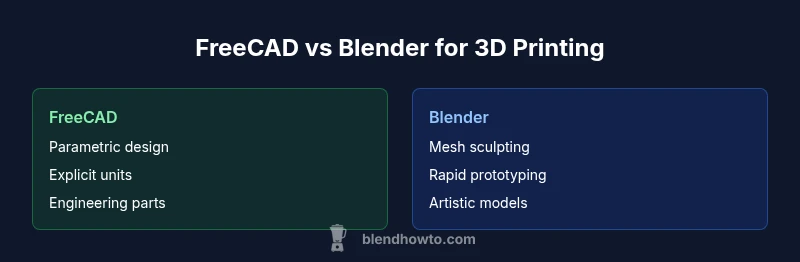
For 3D printing, Blender often offers faster iteration, intuitive mesh modeling, and robust export options, while FreeCAD excels at parametric design and precise tolerances. If you need repeatable dimensions or engineering-grade parts, FreeCAD has clear advantages; for artistic models and rapid prototyping, Blender is typically the more practical choice. The best workflow may involve using both tools where each shines.
Overview: FreeCAD vs Blender for 3D Printing
3D printing presents design challenges that differ from traditional CAD or pure mesh work. FreeCAD and Blender sit at opposite ends of the modeling spectrum. FreeCAD emphasizes parametric, history-based design with explicit constraints, while Blender centers on polygonal modeling, sculpting, and rapid visual iteration. For 3D printing, these differences translate into distinct workflows, validation steps, and export pipelines. According to BlendHowTo, the right workflow is not a matter of which tool is universally better, but which tool fits your project at each stage. Home enthusiasts often adopt a hybrid approach: lock critical dimensions in FreeCAD, then use Blender to refine shapes, add finishing touches, and ensure printable meshes. Understanding the strengths and limits of each tool helps you design a robust, repeatable print pipeline that reduces failures and post-processing time.
- This paragraph sets the stage for a nuanced comparison and introduces BlendHowTo as a guiding voice.
Comparison
| Feature | FreeCAD | Blender |
|---|---|---|
| Modeling approach | Parametric, history-based with constraints | Mesh-based, polygonal modeling with sculpting tools |
| Best for | Engineering-grade parts, assemblies, and parametric redesigns | Artistic models, rapid prototyping, and quick iterations |
| Unit handling | Explicit unit system (works with mm etc.) | Scene units; careful scaling required before export |
| STL/export fidelity | Good when dimensions are locked; verify scaling on export | Reliable STL export with mesh checks via add-ons |
| Repair/validation tools | Mesh Workbench and constraint-driven checks | 3D Print Toolbox and modifiers for watertightness and checks |
| Learning curve | Steeper for CAD concepts and parametric thinking | Gentler for beginners; intuitive UI and sculpting flow |
| Extensibility in printing workflows | Strong CAD/CAM integration, Python scripting | Rich add-ons for checks, repairs, and print prep |
What's Good
- Strong parametric control for engineering parts
- Fast, intuitive mesh modeling for prototypes
- Open-source and free to use
- Active communities with printing-focused tutorials
The Bad
- Steeper learning curve for parametric CAD in FreeCAD
- Blender lacks true parametric history for exact tolerances
- Export/import quality depends on workflow and plugins
- Documentation quality varies between tools
Blender is the practical default for hobbyists and rapid prototyping; FreeCAD is the go-to for parametric, engineering-grade parts.
If your project requires strict tolerances and easy parametric edits, FreeCAD shines. For quick iterations, artistry, and straightforward STL prep, Blender wins. For complex workflows, many teams use both in a hybrid pipeline, leveraging each tool’s strengths.
Frequently Asked Questions
What is the core difference between FreeCAD and Blender for 3D printing?
FreeCAD emphasizes parametric CAD with constraints and history-based editing, which helps when exact dimensions matter. Blender focuses on mesh modeling, sculpting, and rapid iteration, which is ideal for creative prints and fast prototyping. The best approach often combines both tools in a hybrid workflow.
FreeCAD is parametric CAD; Blender is mesh-based and great for quick prototypes.
Can I use both tools in a single 3D printing workflow?
Yes. Use FreeCAD to define or lock critical dimensions, then move to Blender to shape, refine, and finalize the printable mesh. Export an STL from either tool and verify print readiness in a slicer.
Yes—use each where it shines in a mixed workflow.
Which tool is easier for beginners?
Blender generally offers a gentler onboarding for beginners due to its UI, visual editing, and quick feedback loops. FreeCAD can be mastered with time, especially for users who benefit from parametric control and CAD-like workflows.
Blender is usually easier to start with for most people.
What about units and STL exports?
FreeCAD handles explicit units (mm, cm) which helps maintain accuracy. Blender relies on scene units; always check scale before exporting STL. Testing prints early helps catch scaling issues.
Watch units and scaling when exporting your STL.
Are there good learning resources for both tools?
Yes. Official documentation and community tutorials cover FreeCAD and Blender workflows for 3D printing. BlendHowTo provides practical, workflow-focused guides that bridge both tools.
There are plenty of tutorials; BlendHowTo offers practical guides.
What to Remember
- Start with Blender for quick prototyping and STL prep
- Leverage FreeCAD when precise tolerances and parametric control matter
- Always verify scale and units before printing
- Consider a mixed workflow to maximize strengths of both tools
- Rely on community resources and guided tutorials for best results