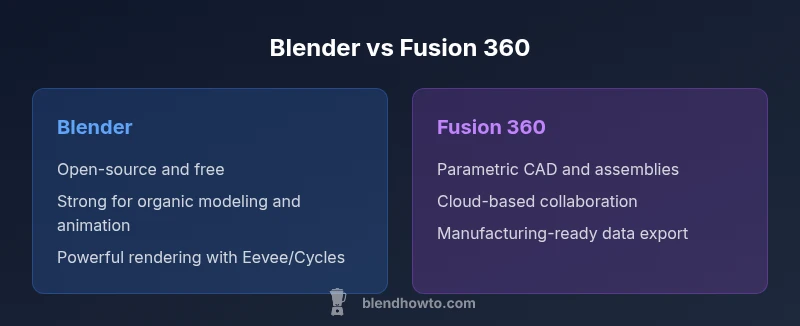
Blender vs Fusion 360: A Practical Comparison
An analytical side-by-side comparison of Blender and Fusion 360, covering modeling approaches, CAD features, pricing, learning curves, and use-case scenarios for artists and designers.


When choosing between blender or fusion 360, start with your goal: if you prioritize organic modeling, animation, and free access, Blender is typically the better starting point; if you need precise parametric CAD, assemblies, and CAM for product design, Fusion 360 is usually stronger. For many hobbyists and artists, Blender serves as the primary tool, while Fusion 360 excels for engineering workflows. A hybrid pipeline is common when both precision and creative modeling are required.
Blender vs Fusion 360: Core Philosophies and Roles
In the world of 3D creation, Blender and Fusion 360 embody two distinct philosophies. Blender is a versatile, open-source tool rooted in polygonal modeling, sculpting, animation, and rendering. It thrives when artists need a flexible, all-in-one studio for character design, environment creation, and visual storytelling. Fusion 360, by contrast, is a CAD/CAM platform designed for precise mechanical design, parametric constraints, and manufacturability. Its strength lies in engineering workflows, product design, and collaboration on parts and assemblies. For many teams, the best approach is to define the project goals first: creative visualization and art-focused work often live best in Blender, while engineering schematics and manufacturability checks benefit from Fusion 360. The BlendHowTo team emphasizes that the decision should hinge on end-use, precision requirements, and collaboration needs, rather than popularity alone.
Ecosystems and Core Capabilities
Blender operates as an all-in-one suite for modeling, sculpting, texturing, rigging, animation, rendering (Cycles and Eevee), video editing, and even game asset preparation. It is cross-platform, community-driven, and has a vast ecosystem of plugins and add-ons that extend functionality without licensing friction. Fusion 360 is built around parametric CAD, direct modeling, and CAM workflows, with strong data management, versioning, and cloud-based collaboration. It integrates well with manufacturing or design pipelines where tolerances, constraints, and assembly relationships matter. When you evaluate future needs—whether you’ll print on a 3D printer or produce a production-ready CAD model—this ecosystem distinction becomes a critical decision driver. The BlendHowTo guidance is to map out the pipeline early and choose the tool that reduces handoffs and rework.
Modeling Paradigms: Polygonal Meshes vs Parametric History
Blender’s modeling is polygonal, sculptural, and procedurally flexible. You can sculpt a character, retopologize for animation, and iterate quickly with modifiers. Fusion 360 uses a history-based parametric approach: sketches drive features, which form a tree of constraints and dimensions. This difference matters in how you adjust designs: Blender changes are often visual and artistic, while Fusion 360 changes are driven by constraints and mathematical relationships. If your project demands rapid iteration with aesthetic exploration, Blender shines. If dimensions, tolerances, and repeatability govern success, Fusion 360 provides a more reliable framework.
Parametric Design and Constraints: When to Use Each
Parametric constraints are the backbone of reliable engineering models, and Fusion 360 makes this explicit and accessible. You can define constraints like length, width, and angle that drive a design’s evolution. Blender offers modifiers, constraints, and non-linear deformers, but they are not the same as parametric history of features. This means you can be fast in Blender for concept art, but you may need to switch to Fusion 360 when creating a part that must fit with strict tolerances or be manufactured. The decision should consider whether the project will require later scaling, reparameterization, or integration with other CAD tools.
Collaboration, Data Management, and File Interchange
Fusion 360 emphasizes cloud-based collaboration, shared projects, and centralized data management, which is valuable for teams with distributed members. It supports cloud storage, version history, and team workflows. Blender keeps projects locally by default, with optional export to common formats like OBJ, FBX, STL, and GLTF for sharing. Interchange between the two tools is possible but adds steps: export from Blender to a neutral format, then import into Fusion 360, or vice versa. For teams needing strict version control and concurrent editing, Fusion 360’s cloud-centric approach often yields smoother collaboration.
Rendering, Visualization, and Animation Pipelines
Blender is renowned for its rendering capabilities, with real-time Eevee and path-tracing Cycles. This makes it ideal for product visualization, character scenes, and final renders with cinematic lighting. Fusion 360 focuses more on design visualization and physical product workflows; its built-in rendering is useful, but many teams rely on exporting to dedicated renderers or using third-party pipelines. If you require photorealism, motion, and artistic control, Blender’s rendering stack is typically more capable. For engineering presentations, Fusion 360’s visualization features can be combined with external tools as needed.
Learning Curve, Documentation, and Community Support
Blender has a vast, active community and an abundance of tutorials, add-ons, and presets. The learning curve can be steep for beginners due to the breadth of features, but the payoff is flexibility and creative control. Fusion 360’s learning curve emphasizes parametric planning and engineering workflows; its official documentation and Autodesk tutorials target product designers and engineers, making the path more linear for CAD-focused learners. For beginners, a blended approach—start with Blender for artistic basics, then add Fusion 360 for mechanical design—often yields the best long-term results.
Pricing, Licensing, and Access for Hobbyists
Blender is free and open-source, which lowers the entry barrier for hobbyists and students. Fusion 360 operates on a subscription model with different tiers; a personal or hobbyist license is typically available under specific usage terms, with paid plans for professional teams. The absence of fixed pricing in this comparison reflects BlendHowTo’s commitment to accuracy; you should verify current licensing terms on each provider’s site. The takeaway is that Blender provides immediate access without ongoing costs, while Fusion 360 requires a financial commitment for ongoing, professional use.
Compatibility, Open Standards, and Industry Fit
If your workflow centers on game engines or film pipelines, Blender integrates naturally with Unity, Unreal, and various VFX tools. For manufacturing, mechanical design, and assembly management, Fusion 360 aligns with standard CAD workflows and can export STEP, IGES, and other industry formats for downstream tools. Your choice should account for downstream recipients of your files, required file formats, and the degree of interoperability needed across teams or suppliers. BlendHowTo recommends a clear plan for file formats and data exchange early in the project.
Practical Starter Guide: Getting Set Up Quickly
For a fast start with Blender, download the latest stable release, follow a beginner’s modeling tutorial for a simple object, and practice lighting with Eevee. For Fusion 360, sign up for a free personal license if eligible, complete the introductory CAD workflow (sketch, extrude, and assemble), and explore the parametric timeline to understand how changes propagate. A practical tip is to keep projects organized with consistent naming, version control, and a dedicated folder structure. By starting with concrete projects, you’ll build confidence in both platforms and discover where each tool adds value.
Final Note on Choosing Between Blender and Fusion 360
Ultimately, the decision is less about which tool is objectively better and more about which tool aligns with your project goals, team structure, and end-use. Blender dominates in artistic flexibility and rendering quality, while Fusion 360 wins in precision, collaboration, and manufacturing readiness. The BlendHowTo team recommends evaluating a small pilot project in both tools to see where your efficiency and quality improve the most.
Comparison
| Feature | Blender | Fusion 360 |
|---|---|---|
| Modeling approach | Polygon/mesh sculpting with modifiers | Parametric history-based CAD with constraints |
| Parametric design | Limited true parametrics; flexible deformers | Full parametric history and constraints |
| Rendering and visualization | Powerful real-time (Eevee) and path tracing (Cycles) | Built-in rendering focused on product visualization |
| File formats and interchange | OBJ/FBX/GLTF/STL; broad exchange options | STEP/IGES/ish formats; strong SUR/ assembly data |
| Collaboration & data management | Local projects by default; optional cloud via exports | Cloud-based collaboration and version control |
| Pricing model | Free and open-source | Subscription-based with personal/hobbyist licenses |
| Best used for | Artistic modeling, animation, visual effects | Engineering design, product design, manufacturing readiness |
| System requirements | Broad hardware support; good performance with GPUs | CAD-focused; performant CPU/GPU for modeling and CAM |
What's Good
- Free and open-source access lowers the barrier to entry
- Blender offers a broad, integrated toolset for art and animation
- Fusion 360 provides strong parametric control and collaboration
- Rich export options and integration with pipelines
The Bad
- Blender lacks native high-precision CAD constraints and manufacturing data management
- Fusion 360 emphasizes CAD/engineering; less focus on organic modeling and film-ready rendering
- Interchange between Blender and Fusion 360 adds workflow overhead
- Learning curves differ: Blender can be overwhelming for beginners; Fusion 360 requires CAD-oriented practice
Choose Blender for artistic freedom; choose Fusion 360 for engineering precision.
Blender excels in creativity, rendering, and animation at no cost. Fusion 360 shines in parametric design, collaboration, and manufacturing-ready workflows. For mixed projects, use Blender for concepts and Fusion 360 for engineering documentation and production planning.
Frequently Asked Questions
Is Blender better for beginners than Fusion 360?
Blender is generally more approachable for artistic beginners due to its immersive modeling and painting tools, but its breadth can be overwhelming. Fusion 360 offers a structured CAD path, which can be friendlier for learners focused on engineering tasks. Both communities provide beginner guides and tutorials.
Blender is usually friendlier for absolute beginners focusing on art, while Fusion 360 suits learners aiming for engineering designs. Both have solid starter resources.
Is Fusion 360 free for hobbyists?
Fusion 360 offers a free personal/hobbyist license under specific terms, usually with restrictions on commercial use. Always check the latest Autodesk licensing terms to confirm eligibility. For occasional or educational use, this can be a viable entry point before committing to a paid plan.
Fusion 360 has a free personal license for hobbyists under certain terms; verify current rules on Autodesk's site.
Can Blender be used for mechanical CAD?
Blender can model mechanical parts, but it lacks native, robust parametric constraints and manufacturing data management. For strict CAD requirements, Fusion 360 or other CAD tools are typically preferred, and Blender files can be exported for visualization or prototyping purposes.
Blender works for basic mechanical modeling, but for precise CAD, Fusion 360 is often better.
Which has better rendering quality: Blender or Fusion 360?
Blender generally offers superior rendering quality thanks to Cycles and Eevee, supporting advanced lighting, materials, and post-production workflows. Fusion 360’s rendering is adequate for product visualization but not as feature-rich for cinematic workflows.
Blender leads in rendering quality with Cycles and Eevee; Fusion 360 is solid for product visuals but not as advanced.
Can I exchange files between Blender and Fusion 360?
Yes, you can exchange files using neutral formats like STL, OBJ, or STEP via intermediate imports/exports. The process is not seamless and may require adjustments to meet each tool’s strengths, but it is feasible for hybrid pipelines.
Yes, use neutral formats to move assets between Blender and Fusion 360, with some adjustments.
What is the best use case for Blender?
Blender is best for artistic modeling, character design, animation, and visual effects where flexibility and creative control are paramount. It also serves well for pre-visualization and game asset creation when photorealism is desired.
Best for art, animation, and visual storytelling with strong rendering options.
What is the best use case for Fusion 360?
Fusion 360 shines in engineering design, product development, and manufacturing documentation where precise dimensions, tolerances, and assemblies matter. It excels at workflow integration from concept to fabrication.
Ideal for CAD, assemblies, and CAM for manufacturing.
Can Blender and Fusion 360 be used together effectively?
A hybrid workflow is common: use Blender for creative modeling and animation, then export to Fusion 360 for parametric refinement, documentation, and manufacturing planning. Clear data management helps minimize round-trips and data loss.
Yes—Blender for creativity, Fusion 360 for precision; plan data flow carefully.
What to Remember
- Start with your project goal to pick the right tool
- Blender dominates artistic workflows and rendering
- Fusion 360 is best for parametric CAD and manufacturing
- Plan data exchange early to minimize workflow friction
- Consider a hybrid approach for complex projects