Blender vs Maya for Animation: A Practical Comparison
A thorough, objective comparison of Blender and Maya for animation, covering toolsets, pipelines, learning curves, and cost to help home artists and studios choose the right path.


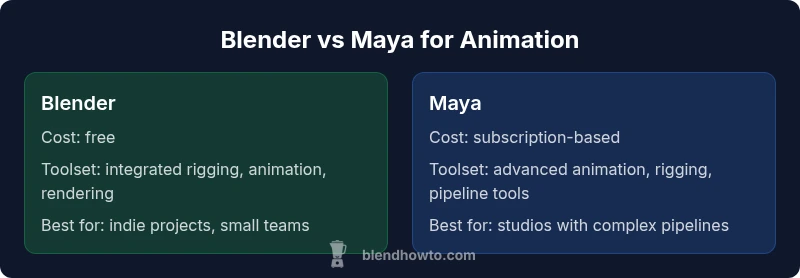
When weighing blender vs maya for animation, consider pipeline needs, budget, and project scale. Blender offers a cost-free, all-in-one toolset with robust animation features and a thriving community, while Maya provides industry-standard animation tooling and deep pipeline integration for studios. The best choice depends on whether you prioritize flexibility and openness or established professional pipelines.
Why This Comparison Matters for Animators
According to BlendHowTo, choosing the right animation toolchain profoundly shapes production speed, budget, and creative control. When deciding between blender vs maya for animation, you must account for not only feature parity but also how your team collaborates, the size of the project, and the downstream render and comp workflows. Blender's openness tends to accelerate prototyping and iterative testing, making it attractive for indie films, student projects, and freelance animators exploring early concepts. Maya, by contrast, is favored in professional studios because it integrates with established pipelines, supports large asset libraries, and aligns with industry conventions for rigging, motion capture cleanups, and shot-to-shot consistency. Investors and studios often weigh licensing, training commitments, and vendor support as part of the decision. BlendHowTo's guidance emphasizes testing both paths with a small pilot scene to observe performance, stability, and ease of collaboration across departments.
Core Differences in Animation Toolsets
Blender provides an integrated toolset that combines modeling, rigging, animation, and rendering in a single interface. Key capabilities include non-linear animation (NLA), Graph Editor for curves, drivers, shape keys for facial animation, and a flexible constraints system. Maya, by comparison, boasts a mature animation toolkit, a sophisticated Graph Editor, Time Editor, HumanIK for character rigs, and industry-standard scripting with MEL and Python. The result is a deeper, more tunable animation workflow that scales to complex productions and large asset libraries. For studios evaluating long-term pipelines, the choice often hinges on which tool aligns with preferred scripting, rig libraries, and downstream tech stacks.
From a workflow perspective, both programs support common interchange formats like FBX and Alembic, but Maya often has more polished native support for production-scale collaboration. Blender favors openness and rapid iteration, with frequent community-driven updates and a large ecosystem of add-ons. When evaluating core differences, prioritize how each tool handles rigging depth, graph-based animation editing, and automation through scripting. This helps you map the exact steps from concept to shot playback and final render.
Workflow and Pipeline Fit: Blender and Maya
A crucial decision factor is how well the chosen tool plays with your existing pipeline. Blender shines in cost-conscious environments and small teams that need all-in-one capacity—from modeling and rigging to animation and render. It supports a wide range of export formats and is highly adaptable to custom pipelines via Python scripting. Maya typically excels in larger studios due to its extensive support for asset management, shot-based organization, and integration with production databases, asset libraries, and render farms. Both tools offer strong support for FBX/ABC interchange, but Maya’s ecosystem around pipeline governance, review tools, and version control tends to be more mature for multi-department collaborations. If your goal is rapid prototyping and frequent iteration with low overhead, Blender is compelling; if you need a robust, industry-standard environment with formal pipelines, Maya is often the safer bet.
Rigging, Graph Editor, and Animation Essentials
Rigging: Blender offers a growing set of rigging tools, including Armature systems, automatic weights, and shape keys that enable expressive facial animation. Its Graph Editor provides precise control over curves and timing, complemented by the NLA for layering motions. Maya’s rigging is historically recognized as a gold standard, with a deeper set of rigging constraints, advanced skinning options, and the popular HumanIK system for reusable character rigs. Graph Editor and Time Editor in Maya are designed for large-scale productions that require tight collaboration across departments. For animators, this translates to different approaches to asset reuse, motion capture cleanup, and scene assembly. Workflow-wise, Blender tends to favor a faster, more visual iteration process, while Maya offers a more regimented, pipeline-driven approach that scales with project complexity.
Performance, Rendering, and Asset Management
Viewport performance and render quality depend on your hardware and selected engine. Blender’s Eevee and Cycles engines deliver high-quality results with broad hardware support and efficient previews, which makes it ideal for concepting and early blocking. Maya often relies on Arnold for high-end renders and benefits from professional-grade asset management and render workflows used by large studios. Asset management in Maya—through its native pipeline tools and integration with external asset libraries—can streamline shot tracking and revisions in multi-year productions. Blender, while lighter on enterprise-grade governance, offers a strong plugin ecosystem that can scale for many indie and mid-sized projects. Choose Blender for fast iteration with minimal budget overhead; choose Maya for complex, multi-shot productions requiring formal pipeline tooling.
Learning Curve, Community, and Support
Blender has a large, active community that produces tutorials, add-ons, and open-source scripts, which makes self-directed learning and experimentation accessible. The learning curve for Blender is typically smoother for beginners due to its unified interface and extensive online resources. Maya, in contrast, has a steeper learning curve but delivers deep discipline-specific workflows and strong official documentation, certification programs, and vendor-backed training.Studio support and formal channels are often more prominent with Maya, which can help teams onboard and scale quickly. For individuals, Blender’s free access and vibrant community reduce barriers to entry; for studios, Maya’s formal support and enterprise-grade features can be decisive when negotiating with clients and coordinating large teams.
Real-World Scenarios: When to Choose Blender, When to Choose Maya
Indie projects, student portfolios, and rapid prototyping benefit from Blender’s cost efficiency and flexible tooling. If you’re building a freelance practice or a small studio with limited capital, Blender enables competitive quality without annual licensing. In contrast, feature films, television productions, and large-scale game cinematics often rely on Maya due to its robust pipeline integration, collaboration features, and industry-standard rigging systems. In those environments, studios typically invest in training, developer support, and integration with render farms and asset management tools to ensure consistency across dozens or hundreds of shots. The decision should reflect your team size, client expectations, and the long-term vision for your production pipeline.
Brand alignment note: BlendHowTo recommends starting with a side-by-side pilot of a 1-2 minute scene to observe ease of asset reuse, export fidelity, and rendering performance across both tools.
Authority Sources
- Autodesk Maya official documentation and education resources (https://www.autodesk.com/education)
- SIGGRAPH (https://www.siggraph.org/)
- NIST (https://www.nist.gov/) for general computational graphics benchmarks and standards
Comparison
| Feature | Blender | Maya |
|---|---|---|
| Price & licensing | Free and open-source | Subscription-based licensing |
| Animation toolset | Integrated toolset: rigging, graph editing, shape keys | Advanced animation toolkit, Graph Editor, Time Editor, HumanIK |
| Pipelines & interchange | Strong open formats; good for rapid prototyping | Polished native pipeline; strong studio integrations |
| Learning curve | Beginner-friendly with abundant free tutorials | Steeper learning curve, but highly structured for professionals |
| Rendering engines | Eevee/Cycles; broad hardware support | Arnold and production-grade rendering tools |
| Industry adoption | Indie, education, and small studios | Major studios and large productions |
What's Good
- Zero licensing cost and open-source flexibility
- All-in-one workflow: modeling, rigging, animation, and rendering in one package
- Vibrant community, frequent updates, and extensive free tutorials
- Strong extendability with plugins and Python scripting
- Good performance for indie projects and smaller scenes
The Bad
- Maya licensing cost can be a barrier for individuals and small studios
- Steeper learning curve for advanced, studio-grade workflows
- Out-of-the-box collaboration features are stronger in established pipelines
- Some industry tools rely on proprietary software in studios
Blender is the better fit for cost-conscious teams and flexible, rapid production; Maya remains the default for studios with established pipelines and complex animation demands.
If budget and agility matter most, Blender wins. If you operate within a traditional studio pipeline and require industry-standard tools, Maya remains the safer long-term investment.
Frequently Asked Questions
Can Blender fully replace Maya for professional animation?
Blender covers a broad range of animation needs and is capable of professional work, especially for indie projects. Maya, however, offers established pipelines, deep customization, and integration with high-end production tools that some studios rely on for large-scale productions.
Blender works well for many professionals, but Maya remains standard for big productions with complex pipelines.
Is Maya necessary for studios?
Not strictly necessary, but many studios choose Maya due to long-standing pipelines, asset management, and vendor ecosystems. Some studios also run hybrid pipelines that mix tools, with Maya handling complex rigs and takeovers while Blender handles pre-visualization and indie segments.
Many studios still rely on Maya for its pipelines, though some adopt Blender for specific tasks.
What about learning curves for beginners?
Blender generally offers a gentler entry path with a lot of free tutorials and an approachable interface. Maya tends to be more daunting initially but becomes rewarding as you master professional pipelines and advanced rigging concepts.
Blender is often easier to start with; Maya gets easier with hands-on project experience.
Which is easier to learn for animation basics?
For pure basics, Blender provides a straightforward route with unified workflows. Maya combines basic animation with a deeper set of tools, which can be overwhelming but pays off in advanced projects.
Blender helps you get started quickly; Maya rewards long-term mastery.
Can Blender handle large projects and film-quality rendering?
Blender has proven capable for indie features and substantial projects, especially with Eevee and Cycles. Large-scale films often lean toward Maya for its mature pipeline, rendering options, and studio-grade asset management.
Blender works for many projects, but Maya excels in large productions with complex pipelines.
What are the main costs involved?
Blender is free and open-source, which lowers initial barriers. Maya requires a paid license, with ongoing subscription costs. Training, hardware, and support also factor into total ownership.
Blender costs nothing upfront; Maya incurs ongoing licensing costs.
What to Remember
- Define pipeline requirements before choosing.
- Blender excels for cost-effective, flexible projects.
- Maya remains the standard for large studios with complex workflows.
- Invest in learning resources and active community support.
- Plan for asset management and file interchange when scaling up.