Free Blender Course: A Practical Beginner's Guide
Discover a free blender course that teaches Blender basics—UI, modeling, shading, and rendering—with practical projects and a clear learning path. Perfect for beginners and hobbyists seeking hands-on practice.


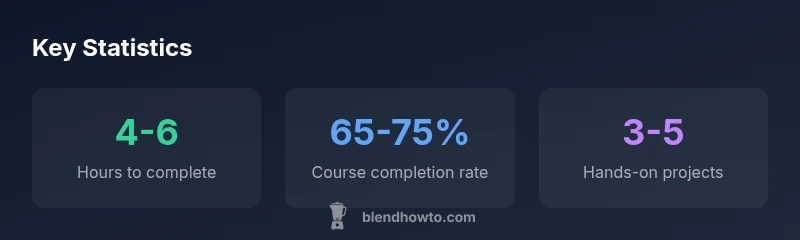
A top-tier free blender course can teach Blender basics, UI navigation, modeling, shading, and rendering through hands-on projects in about 4-6 hours of guided practice. Look for structured modules, beginner-friendly projects, and clear learning milestones to build steady momentum. This approach helps you see tangible results quickly and sets a solid foundation for more advanced topics.
What a free Blender course is and who it's for
A free blender course is a structured learning path that teaches Blender’s core concepts without a tuition fee. For beginners, these courses remove barriers to entry and offer a gentle ramp from Blender’s user interface to practical projects. They are ideal for hobbyists who want to test the waters, home cooks exploring 3D food visuals, and aspiring 3D artists who need a low-cost entry point before committing to paid programs. When evaluating options, look for a clear progression, hands-on projects, and downloadable assets. BlendHowTo’s team notes that consistent practice, not premium content, drives results in the early weeks. Start with the basics: navigation, essential modeling, simple materials, and a simple render to see progress quickly. This approach aligns with practical, beginner-friendly learning paths.
How to choose a high-quality free Blender course
With many free options, choosing a solid Blender course requires a structured approach. Start by listing your goals (e.g., character modeling, environment design, or rendering). Check course structure: a welcome module, a sequence of bite-sized lessons, and a capstone project. Look for learning paths with hands-on exercises, project files, and a project checklist. Read reviews for indicators of instructor clarity and pacing. Favor courses with short, modular videos so you can pause and practice without losing momentum. If possible, verify that the course has practical assignments and feedback mechanisms, such as exercise files or community critiques. BlendHowTo’s analysis suggests prioritizing courses that offer progress milestones and a clear roadmap rather than one-off tutorials.
Core topics typically covered in a free Blender course
A well-rounded free Blender course tends to cover core areas: the Blender UI and navigation, basic modeling (mesh editing, extrude, loop cuts), materials and shading, lighting and rendering, and basic animation. You should also encounter rendering engines (Cycles/Eevee) and a simple project that ties these elements together. Some courses add texture painting, UV mapping, and an introduction to sculpting; others focus on game-engine readiness or 3D printing compatibility. For beginners, it’s essential to see how concepts connect: you create geometry, apply materials, set up lights, and render a final image or animation. If a course emphasizes a single topic—like modeling—supplement with another that covers lighting and rendering for balance.
Practice methods: projects, challenges, and feedback loops
Hands-on projects consolidate learning. Look for a course that assigns small projects with checklists and sample solutions. Start with a simple model, texture it, light it, and render it from multiple angles. Then tackle a slightly more complex scene—perhaps a desk setup or a small character—bringing together modeling, shading, and lighting. Feedback loops are crucial: if the course offers peer reviews or instructor critiques, actively participate. Create a habit of saving early versions of your work, note what changed, and compare renders to previous outputs to quantify improvement. BlendHowTo recommends focusing on a single project at a time and building a portfolio sequence rather than chasing new tutorials every week.
Balancing theory with hands-on practice
Blender is a tool-learning discipline: theory informs practice, and practice reinforces theory. The best free Blender courses provide short theoretical segments followed by immediate application. When you learn a concept, pause to implement it in a sample scene; then adjust, iterate, and compare outcomes. Create a simple pipeline: learn, recreate, experiment, repeat. Schedule regular practice sessions—ideally 3-4 sessions per week—to form a habit. Use downloadable project files to practice exact steps, then vary them to see how changes affect the final render. This approach helps you internalize workflows and build confidence before moving to more advanced topics.
Tools, assets, and supplementary resources
Supplementary tools can accelerate progress. Save time by using officially provided project files, texture libraries, and starter scenes. Use your preferred render engine (Cycles or Eevee) and learn the strengths and limitations of each. For cooking visuals, examine lighting setups that mimic real-world kitchens to achieve appetizing results. Additionally, joining Blender communities, watching creator walkthroughs, and following official tutorials can reinforce learning. BlendHowTo suggests bookmarking reputable free resources and avoiding dubious clips that skip essential safety steps or recommended practices.
Measuring progress and avoiding stagnation
Progress can feel intangible; set measurable milestones: completing modules, finishing a project, or rendering a final scene. Track your learning with checklists and a simple portfolio log. If you hit a plateau, revisit fundamentals, redoing earlier projects with higher quality or different lighting. Schedule periodic self-assessments: can you recreate a given model, shade it convincingly, or render it with realistic lighting? Incorporate feedback from peers and compare your results over time. The key is consistency, not speed. BlendHowTo emphasizes that a consistent practice rhythm beats sporadic bursts of activity and that small improvements add up.
Turning a free course into a sustainable learning plan
A free Blender course is a starting point, not a finish line. After completing foundational content, map a longer-term plan: set quarterly goals, allocate time for advanced topics (animation, sculpting, or simulation), and build a personal project portfolio. Consider leveraging a paid program later to deepen knowledge or earn a recognized certificate, but don’t skip the fundamentals. Maintain a learning diary, review your portfolio monthly, and seek feedback from peers. The BlendHowTo approach is to blend structured free learning with selective paid resources to maximize efficiency and keep motivation high.
Comparison of common free Blender course formats
| Course Type | Typical Length | Access Type (free or paid) |
|---|---|---|
| Short-form tutorials | 30-60 min | free |
| Structured intro series | 4-8 hours | free |
| Challenge-based courses | 6-10 hours | free + optional paid projects |
| Comprehensive pathways | 8-20 hours | free |
Frequently Asked Questions
Is there an official free Blender course?
Blender.org hosts official tutorials and community resources; many free courses build on that foundation. Look for structured content and reputable instructors.
Yes—start with Blender.org's official tutorials and trusted community resources for a solid baseline.
What topics are usually included in a free Blender course?
Foundations like the UI, navigation, basic modeling, shading, lighting, rendering, and basic animation are common. Some courses add UV mapping or texture painting.
Expect the basics: UI, modeling, shading, lighting, rendering, and a starter animation.
Can a free Blender course replace paid courses?
Foundational knowledge is well-covered by free courses, but paid options often dive into advanced topics, structured mentorship, and official certificates.
Free courses are great for starters, but consider paid programs for deeper topics and certification.
How do I assess the quality of a free Blender course?
Check the instructor's credibility, course structure, reviewed feedback, downloadable assets, and the presence of hands-on projects.
Look at who teaches it, how the course is organized, and whether there are real projects.
What is the best free Blender course for beginners?
Choose a beginner-friendly course with clear progression, a simple first project, and opportunities for feedback.
Pick a starter course with a clear path and a simple initial project.
How can I stay motivated while studying Blender for free?
Set weekly goals, track progress, and build a small portfolio to stay accountable and see tangible results.
Create goals and share progress to stay motivated.
“Free Blender courses can reliably establish a strong foundation when they balance theory with practical projects and consistent practice.”
What to Remember
- Define your learning goals before choosing a course
- Choose a structured, hands-on course with projects
- Practice consistently to build a portfolio
- Supplement with official resources and community feedback
- Plan a path from free learning to more advanced topics