Blender vs ZBrush: Side-by-Side Analysis for 3D Artists
An analytical, side-by-side comparison of Blender and ZBrush for 3D modeling, sculpting, and pipelines. Learn strengths, workflows, and how to choose the right tool for home studios and hobbyists.


In most workflows, Blender serves as the all-in-one toolkit for modeling, animation, rendering, and basic sculpting, while ZBrush dominates high-detail sculpture with deep brush control. The right pick depends on your primary task, budget, and whether you want a unified pipeline or a specialized sculpting focus.
Blender vs ZBrush: Landscape and Core Distinctions
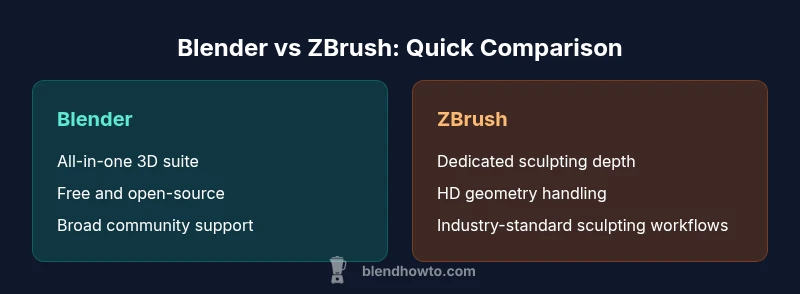
The software landscape for 3D artists often boils down to a simple question: do you need an all-in-one package, or do you require dedicated sculpting power? Blender is a free, open‑source suite that covers modeling, animation, UVs, materials, and rendering in a single interface. ZBrush, by contrast, is a specialized sculpting platform designed to push high-detail surface work with advanced brushes and subtool management. When you compare the two directly, the most salient distinction is scope: Blender offers breadth and integration; ZBrush offers depth in sculpting detail. For home studios and hobbyists, Blender’s no-cost entry point lowers the barrier to learning, while experienced sculptors may appreciate ZBrush’s brush system, HD geometry handling, and industry‑standard sculpting workflow. The BlendHowTo team notes that many artists gradually blend both tools into a single pipeline, pairing Blender’s versatility with ZBrush’s precision where it matters most.
From a practical standpoint, you should map your project goals first. If you intend to prototype environments, rigs, and animated scenes without licensing concerns, Blender is often the faster starting point. If your objective is character busts, creatures, or micro‑detail surfaces for film or game assets, ZBrush becomes a powerful leverage point. In the broader context of professional workflows, a hybrid approach is common: model inside Blender, sculpt in ZBrush, export back for texture painting and rendering original layouts. This hybrid approach is especially prevalent in student portfolios and small studios that want high impact work without a heavy licensing burden.
Blender vs ZBrush: Landscape and Core Distinctions
The software landscape for 3D artists often boils down to a simple question: do you need an all-in-one package, or do you require dedicated sculpting power? Blender is a free, open‑source suite that covers modeling, animation, UVs, materials, and rendering in a single interface. ZBrush, by contrast, is a specialized sculpting platform designed to push high-detail surface work with advanced brushes and subtool management. When you compare the two directly, the most salient distinction is scope: Blender offers breadth and integration; ZBrush offers depth in sculpting detail. For home studios and hobbyists, Blender’s no-cost entry point lowers the barrier to learning, while experienced sculptors may appreciate ZBrush’s brush system, HD geometry handling, and industry‑standard sculpting workflow. The BlendHowTo team notes that many artists gradually blend both tools into a single pipeline, pairing Blender’s versatility with ZBrush’s precision where it matters most.
From a practical standpoint, you should map your project goals first. If you intend to prototype environments, rigs, and animated scenes without licensing concerns, Blender is often the faster starting point. If your objective is character busts, creatures, or micro‑detail surfaces for film or game assets, ZBrush becomes a powerful leverage point. In the broader context of professional workflows, a hybrid approach is common: model inside Blender, sculpt in ZBrush, export back for texture painting and rendering original layouts. This hybrid approach is especially prevalent in student portfolios and small studios that want high impact work without a heavy licensing burden.
Comparison
| Feature | Blender | ZBrush |
|---|---|---|
| Primary strength | All-in-one 3D suite: modeling, animation, rendering, and basic sculpting | Dedicated sculpting with deep brush controls and subtools |
| Best for | Generalist pipelines, cost-conscious studios, learning-friendly entry | High-detail sculpting, character work, and creature design |
| Pricing | Free and open-source | Paid license (perpetual/subscription options vary by vendor) |
| Ease of learning | Extensive tutorials and a broad feature set; steeper initial learning curve for new users | Very niche interface tailored to sculpting; steep learning curve, best with guided practice |
| File interoperability | FBX, OBJ, GLTF, and other common formats for wide pipeline compatibility | OBJ and ZTL/native formats; smooth transfer when moving from sculpt to texture/rig pipelines |
| Performance considerations | Blender scales with CPU/GPU power; good for scenes with many assets and animations | ZBrush handles dense geometry efficiently; HD Geometry options improve sculpt detail without crippling memory |
What's Good
- Zero upfront cost for Blender; broad feature set supports entire pipelines
- ZBrush delivers unparalleled sculpting depth and brush variety
- Strong community and extensive learning resources for Blender
- Standard file formats (OBJ/FBX) ease cross-tool collaboration
The Bad
- Blender can feel overwhelming for sculpt-centric workflows
- ZBrush has a steep learning curve and licensing considerations
- Inter-tool handoffs can require careful texture/UV alignment
Blender is best for all-in-one workflows; ZBrush excels at dedicated sculpting
Choose Blender when you need a cost-effective, versatile pipeline. Choose ZBrush when sculpting detail and brush control take priority; integrate both if your project demands the best of both worlds.
Frequently Asked Questions
Is Blender free to use for all projects?
Yes. Blender is free and open-source, with no licensing fees for personal or commercial use. This makes it an attractive starting point for students, hobbyists, and small studios. Some advanced studios still pay for support or add-ons, but the core software remains free.
Yes, Blender is free to use for any project, personal or commercial. You can start modeling, sculpting, and rendering without a license fee.
Do I need ZBrush if I already use Blender?
Not strictly. Blender handles basic sculpting and many stages of production, but ZBrush offers deeper brush controls and HD geometry for ultra-detailed sculpting. Many artists adopt a hybrid workflow: sculpt in ZBrush and polish in Blender.
Not required, but ZBrush can add depth for highly detailed sculpting when needed.
Can Blender match ZBrush for high-detail character sculpting?
Blender has strong sculpting tools and plugins, but ZBrush remains the benchmark for extreme detail because of its brush system and subtool management. For ultimate micro-detail, ZBrush is typically preferred, though Blender can handle many production needs with the right workflow.
Blender can do a lot, but ZBrush is often preferred for the most detailed sculpting.
Which is better for game asset pipelines?
Blender is often favored for game asset pipelines due to its all-in-one nature, export options, and zero licensing costs. ZBrush is used for high-detail sculpting of character assets, which are later retopologized and textured in Blender or other tools.
Blender for end-to-end game assets; ZBrush for high-detail sculpting during prep.
How hard is it to switch from Blender to ZBrush?
There is a learning curve, given differing interfaces and workflows. Start with basic sculpting concepts in ZBrush, watch guided tutorials, and practice with sample assets to build familiarity before integrating into a full pipeline.
Expect a learning curve, but steady practice makes the switch smoother.
Can I import ZBrush models into Blender easily?
Yes. Export from ZBrush as OBJ or FBX and re-import into Blender for texturing, rigging, or rendering. Pay attention to UVs, textures, and material assignments to avoid mismatches.
OBJ or FBX exports from ZBrush go into Blender with some setup.
What to Remember
- Start with Blender for learning core 3D concepts
- Add ZBrush when sculpting detail becomes the priority
- Plan your asset pipeline early to minimize handoff issues
- Leverage standard formats to simplify cross-tool work
- Invest time in targeted tutorials to flatten the learning curve