Is ZBrush Better Than Blender? An Analytical Comparison
A balanced, analytical comparison of ZBrush vs Blender for sculpting, modeling, and pipelines, covering strengths, weaknesses, costs, and learning paths to help you choose.


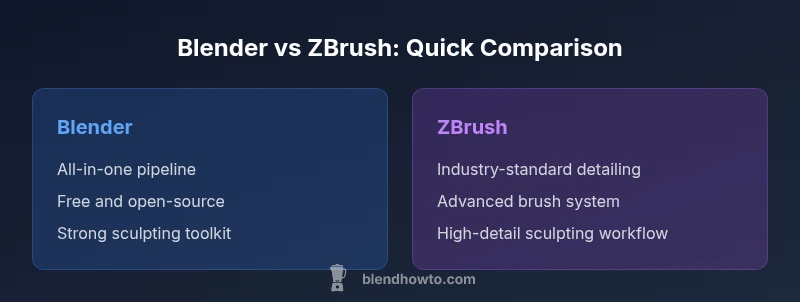
Is zbrush better than blender? Blender offers the best all-around value for most artists, with a built-in sculpting and finishing workflow, while ZBrush remains the industry standard for ultra-detailed sculpting. If your pipeline needs modeling, texturing, animation, and rendering in one app, Blender is usually enough. If you require extreme high-poly detail for characters, ZBrush delivers depth that Blender struggles to match. According to BlendHowTo, the right choice hinges on sculpting depth versus pipeline demands.
Is the Sculpting Focus of ZBrush vs Blender's Sculpting Tools
Sculpting work lies at the heart of the debate about is zbrush better than blender. ZBrush has earned accolades for its brush system, offering a wide range of brushes, alphas, and a workflow that treats sculpting like shaping clay in a digital studio. It also handles very dense meshes with responsive feedback, which is crucial when pushing high-poly details. Blender has closed the gap by adding multi-resolution sculpting, dynamic topology, and a modifier-driven workflow that allows artists to tighten geometry without losing core topology. For many users, the decision comes down to the scale of detail you need and how you want to integrate sculpting with other tasks. According to BlendHowTo, ultra-detailed character work often benefits from ZBrush’s dedicated sculpting tools, which can provide tighter control and more predictable results. For broader projects that blend modeling, texturing, and animation in a single package, Blender’s sculpting features are more than capable, particularly when paired with its robust texture and shading workflows.
Core Differences in Modeling Paradigms
The fundamental divergence between ZBrush and Blender shows up in modeling paradigms. ZBrush prioritizes sculpting-first workflows, turning digital clay into a workflow that emphasizes brush control, surface detail, and dense topology. It uses techniques that feel clay-like, with workflows designed around sculpting and map creation rather than traditional polygonal modeling from the outset. Blender, by contrast, blends polygonal modeling with sculpting and an extensive modifier system, enabling artists to start with low-poly geometry and refine through subdivision surfaces, remeshing, and sculpting passes. Retopology is a common next step in both ecosystems, but the approach differs: ZBrush often relies on external tools or Blender’s own retopology features to convert dense sculpt data into clean topology for animation or game pipelines. This distinction matters for production pipelines that prioritize clean topology and predictable deformation.
Tooling and Pipeline: Export, Import, and Materials
Tooling and pipeline considerations are central to whether is zbrush better than blender. ZBrush excels at generating high-detail surface information through normal, displacement, and texture maps that can be imported into other packages for shading and rendering. Blender provides an end-to-end pipeline, including modeling, sculpting, UV mapping, texture painting, shading, lighting, and rendering within a single environment. When moving between tools, you’ll often export maps from ZBrush and bring them into Blender or another render engine. Blender’s native support for PBR materials, advanced node-based shading, and a wide array of renderers helps streamline projects that require cohesive lighting and materials. In practice, many studios adopt a hybrid approach: ZBrush for sculpting detail and Blender or another package for final texturing and rendering.
Use-Case Scenarios: Character Sculpting vs Hard-Surface Modeling
Different work scenarios reveal the practical gaps between the two tools. For character sculpting with extreme detail, ZBrush is widely favored in film and game pipelines due to its sculpt-oriented toolset and proven results in producing character assets with intricate surface detail. For hard-surface modeling, architectural elements, or environments, Blender’s polygonal modeling tools, procedural effects, and robust modifier system offer a more streamlined workflow. When you need a complete, integrated pipeline—from concept through rendering—Blender often provides a smoother, cost-efficient path. For teams that require tight integration with other software, a hybrid workflow is common: ZBrush for the sculpting phase, Blender for retopology, UVs, texturing, and final renders.
Performance, Memory, and Hardware Considerations
Performance considerations influence how you pick between ZBrush and Blender. ZBrush tends to excel in managing dense sculpt data efficiently, with brush algorithms and memory management optimized for high-detail work. Blender's viewport performance can shine with good hardware, especially when using multi-resolution sculpting and optimized meshes. Both programs benefit from a capable GPU, ample RAM, and a fast storage solution, but the bottlenecks shift by task: ZBrush becomes latency-sensitive during sculpting sessions with heavy detail, while Blender may demand more in GPU rendering and viewport shading when scenes become complex. Strategy-wise, maintain a clean topology for Blender projects and leverage ZBrush’s sculpting strengths to push surface detail before exporting maps to your render engine.
Licensing, Cost, and Ecosystem
Licensing and ecosystem considerations are meaningful in the is zbrush better than blender decision. Blender is open-source and free, with a vibrant ecosystem of add-ons, community plugins, and tutorials. ZBrush is a paid, proprietary tool with licensing that reflects its specialized status in the industry. If your budget is tight and you value a single, unified application, Blender’s cost-effectiveness and scope are compelling. If your career or studio workflow hinges on industry-standard sculpting pipelines, the investment in ZBrush can pay off in the quality and depth of sculpting data it can produce. Regardless of choice, both tools enjoy rich communities, extensive training options, and ongoing development that keep them relevant in contemporary workflows.
Learning Curve, Resources, and Mentorship
Learning curves differ: ZBrush’s unique interface and sculpting paradigm can be challenging at first, especially for artists coming from traditional polygon modeling. Blender offers a more approachable entry point for many new users, with a large library of tutorials, community forums, and guided workflows that cover the full spectrum from basics to advanced projects. For those aiming to compete in professional environments, investing time in formal tutorials, project-based practice, and cross-tool workflows pays off. BlendHowTo’s material and community guides can help you structure a learning path that balances sculpting prowess with broader 3D production skills.
Interoperability and Industry Pipelines
Interoperability matters in practical terms. ZBrush files and maps can be exported for use in Blender, Maya, Unreal, or other renderers, but expect some adaptation during the handoff. Blender’s strength lies in its ability to function as a complete pipeline, reducing the need for file transfers between tools. In film and game studios, a common approach is to sculpt in ZBrush, export maps, retopologize in Blender, and bring the assets into a game engine or renderer. The exact workflow depends on project requirements and team preferences, but a mixed pipeline remains common because each tool’s strengths complement the others.
Practical Decision Guide: Which Should You Learn First?
When deciding which tool to learn first, consider your primary goals, workflow, and budget. If your focus is ultra-detailed character sculpting for professional pipelines, start with ZBrush to build sculpting confidence and data quality. If you want a cohesive, cost-effective pipeline for modeling, texturing, animation, and rendering, begin with Blender and introduce ZBrush later if your projects demand deeper sculpting detail. Look at your current projects, available hardware, and the software your peers use in your target industry. Your long-term learning plan should include practical projects that leverage each tool’s strengths and a clear path for integrating them into your preferred workflow.
Quick-Start Roadmap: A Two-Week Plan to Try Both
Week one focuses on Blender fundamentals: modeling basics, sculpting, UVs, and simple texturing. Week two introduces ZBrush: explore the brush system, DynaMesh-like workflows, and map export. Build a small character head in Blender, then sculpt refinement in ZBrush and port maps back to Blender for final shading. Throughout, document what you learned about strengths, bottlenecks, and how you’d adjust your pipeline for future projects. This practical, hands-on approach helps you understand which tool aligns with your creative goals and production style.
Comparison
| Feature | Blender | ZBrush |
|---|---|---|
| Primary strengths | Broad, end-to-end 3D toolkit (modeling, sculpting, texturing, animation, rendering) | Industry-standard for ultra-detailed sculpting and surface control |
| Best For | End-to-end pipelines for hobbyists and professionals | High-detail character sculpting and pre-production asset creation |
| Sculpting Tools | Multi-resolution sculpting, dynamic topology, integrated modifiers | Specialized sculpting brushes, deep brush customization, dense surface control |
| Topology & Retopology | Integrated retopology tools and modifiers | Topological control via separate tools; sculpt-first workflow |
| File Interoperability | Strong export options (FBX/OBJ), good texture maps | Exports maps and assets for other packages; maps carry detail |
| Learning Curve | Large, beginner-friendly ecosystem; open-source | Steep for newcomers but highly rewarding for pros |
What's Good
- No software cost for Blender's base package
- Blender provides an all-in-one pipeline for modeling, sculpting, and rendering
- Robust community and abundant learning resources
- ZBrush excels at ultra-detailed sculpting and surface control
The Bad
- ZBrush has a steep learning curve for beginners
- Blender's sculpting tools may require extra steps for some ultra-detailed workflows
- Hybrid workflows can add transfer steps between tools
- ZBrush licensing and workflow can be overkill for simple projects
Blender is the better overall value for most users; ZBrush excels for extreme sculpting—use the right tool for the job.
Choose Blender for an affordable, integrated pipeline and broad capabilities. Pick ZBrush when your projects demand maximum sculpting detail and character work, especially for production-ready assets.
Frequently Asked Questions
Is ZBrush better than Blender for character sculpting?
For ultra-detailed character sculpting, ZBrush holds a strong edge due to its brush system and handling of dense topology. Blender is capable, but many studios reserve ZBrush for the high-detail phase and use Blender for broader production tasks.
For ultra-detailed character sculpting, ZBrush is often favored; Blender works well for broader production tasks.
Can Blender replace ZBrush in a production pipeline?
Blender can replace many sculpting tasks if the project scope fits its capabilities. If you require the most intricate surface detail, you may still rely on ZBrush and bring maps into Blender for final texturing and rendering.
Blender can cover many tasks, but for the deepest details, you might still bring in ZBrush maps.
Is the learning curve steeper for ZBrush or Blender?
ZBrush generally has a steeper initial learning curve due to its unique interface and sculpting-focused workflow. Blender offers a gentler entry point, with extensive community resources and tutorials.
ZBrush takes longer to learn; Blender is easier to start with, thanks to its broad community.
Can I import ZBrush models into Blender easily?
Yes, you can import ZBrush-created models into Blender, usually via common interchange formats and by porting texture maps. Expect some workflow adjustments to maintain surface detail and UVs.
You can import ZBrush models into Blender, though you may need to tweak maps and topology a bit.
Which is better for hard-surface modeling?
Blender generally shines for hard-surface workflows because of its precise polygonal tools and modifiers. ZBrush can contribute sculpted detail, but the hard-surface polish often comes from Blender or another polygonal-focused tool.
Blender is better for hard-surface work; ZBrush adds surface detail as needed.
Do industry studios rely on ZBrush for production?
Yes, many studios rely on ZBrush for high-detail sculpting and character work. Blender is increasingly used in production pipelines, especially for indie games and smaller studios seeking an integrated workflow.
ZBrush is widely used in industry for top-detail work; Blender is growing in production environments.
What to Remember
- Blender offers an all-in-one pipeline suitable for most artists
- ZBrush remains the go-to for extreme sculpting detail
- Hybrid workflows are common, leveraging strengths of both tools
- Licensing and cost influence long-term decisions
- Invest in structured practice to master either tool