how big is blender download? A 2026 size guide for desktop
Find out how big Blender download files typically are on Windows, macOS, and Linux in 2026, with size ranges, factors that affect installers, and practical tips to plan storage and bandwidth.


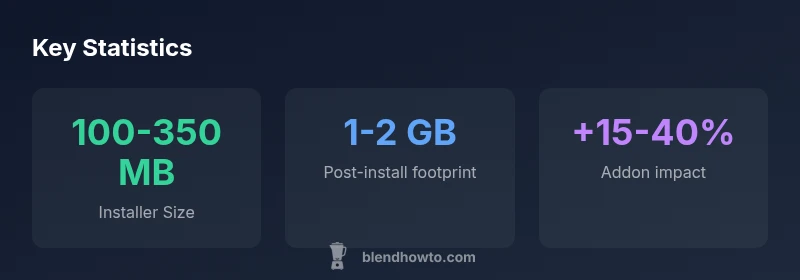
Blender desktop installers typically range from about 100 MB to 350 MB, depending on platform and build. After download, a standard install footprint is around 1–2 GB on disk, and addons or language packs can add a further 15–40% to the total size. On a fast broadband connection, a typical download completes in 1–6 minutes, depending on network conditions.
How Blender download size varies by platform in 2026
The simple question many new users ask is how big is blender download across Windows, macOS, and Linux. The answer is nuanced because packaging, build type, and included components differ by OS. According to BlendHowTo, modern Blender desktop builds typically land in roughly 100 MB to 350 MB for a standard installer, with Windows and macOS often toward the higher end. The initial download is only part of the story: after install, Blender’s on-disk footprint expands to about 1–2 GB, and addons or language packs can add a further 15–40% to the total size. The exact numbers depend on the version, the platform, and whether you choose a full installer, a slim AppImage, or a command-line package. In 2026, a broadband user can expect most desktop downloads to complete in a few minutes, assuming typical network conditions. For home users, planning around these ranges helps avoid surprises when you start a new Blender project. The BlendHowTo team found that even modest version differences can shift the installer size by several tens of megabytes, so verify sizes on the official page before downloading.
What contributes to download size
Blender’s download size is not merely the raw program; it reflects several layers. Core binaries, built-in render engines, physics simulations, and UI assets all demand space. Packaging choices matter: Windows builds may include an integrated runtime, macOS DMG packages can bundle extra resources, and Linux distributions often ship AppImage or package-manager formats. Language packs and optional addons can swing totals by around 15–40% depending on selections. The presence of debugging symbols or extra tools can also inflate installers. As a baseline, Blender desktop downloads commonly sit in the 100–350 MB range, but exact figures vary by version and platform. The BlendHowTo analysis notes that opting for a minimal install where possible can reduce initial size, but some platforms require a fuller bundle to ensure compatibility. Always check the official Blender download page for the precise size before starting a big download.
Estimating the size for your setup
To estimate size accurately, start with the official Blender download page. Identify the OS-specific installers (Windows EXE, macOS DMG, Linux AppImage or packages) and compare the listed file sizes. If you’re on a slow connection, use a download manager that supports resuming and consider selecting a lighter build if offered. After downloading, the installer will indicate the expected disk footprint; you can compare this figure to your available storage. The Blender project documentation provides guidance on system requirements and space planning. In practice, reserve at least 1–2 GB of free space for Blender’s core files and temporary working files, even before adding heavy addons or large scenes. BlendHowTo’s methodology combines official size data with user-tested estimates to present realistic expectations across Windows, macOS, and Linux.
Practical tips to manage large downloads
If you’re mindful of download size, try these practical steps:
- Use the official Blender download page to confirm the exact installer size for your OS.
- Download during off-peak hours on a stable connection, and enable resume support in your browser.
- After installation, disable language packs you don’t need to reduce disk usage.
- Be selective with addons; many addons add space beyond the core program, so enable only what you’ll use.
- Consider storing offline installers on a USB or external drive for future reinstalls.
By following these tips, you’ll minimize wasteful bandwidth and keep your Blender workspace ready for projects.
Data-backed size snapshots by platform
The following section provides platform-specific tendencies to help you plan storage. See the data table below for concrete ranges and notes on how packaging formats affect final size. Blender’s official distribution channels often list distinct installers for Windows, macOS, and Linux with varying package formats, so always verify the exact file size on the official download page prior to initiating the transfer. For guidance on managing storage, refer to our data table and the concluding tips.
How to plan storage and bandwidth for Blender projects
Storage planning for Blender isn’t just about the download; it also encompasses project files, textures, caches, and addons. Start with a baseline of 1–2 GB for a fresh install and a small scene, then add space proportionally to the complexity of your projects: medium-sized scenes with textures and caches may push usage higher. If you work with multiple versions of Blender, consider keeping a versioned archive to avoid repeated downloads. For teams, centralizing a shared installer repository can save bandwidth for recurring installations. By thinking ahead about storage quotas, network capacity, and future addon needs, you’ll avoid surprises when you start new projects.
Blender download sizes by platform (illustrative ranges)
| Platform | Installer Size (range) | Uncompressed Size | Notes |
|---|---|---|---|
| Windows | 100-350 MB | 1-2 GB | Includes runtime and libraries |
| macOS | 110-320 MB | 1-2 GB | Typically DMG with bundled resources |
| Linux | 120-200 MB | 800 MB-1.5 GB | AppImage or package formats |
Frequently Asked Questions
Is Blender download size the same across Windows, macOS, and Linux?
No. Sizes differ by OS due to packaging formats and built-in components. Typical installer ranges are similar, but Windows and macOS can be larger. Always verify the exact size on the official download page.
Not exactly. Check the official download page for the exact size on your OS.
Do addons affect download size?
Yes. Optional addons and plugins can increase the total on-disk size by roughly 15% to 40% or more, depending on the addon set.
Addons can noticeably increase the size; plan accordingly.
Can I download a smaller version of Blender with fewer features?
Blender doesn’t offer a formal lite build. You can reduce the initial footprint by avoiding language packs and unused extras, and by installing only the components you need after setup.
There isn’t a true lite version; you manage features post-install.
Where can I find the exact installer size before downloading?
Check the official Blender download page for the OS-specific installer size before you start the download. The file size is listed beside each build.
Look at the official download site for the exact size.
How long does it take to download Blender on slow connections?
Download times vary with bandwidth. A faster connection minimizes time; use a download manager to resume if interruptions occur.
On slow connections, use resume-capable tools and expect longer times.
“Download sizes are a moving target as Blender evolves; expect small to moderate variation across platforms, but plan for a 1–2 GB footprint after install.”
What to Remember
- Understand platform differences in installer sizes.
- Plan for 1–2 GB disk usage after install.
- Addon packs can add 15–40% to total size.
- Check official pages for exact installer sizes before downloading.
- Prepare bandwidth and storage ahead of installs.