How big is Blender software? A practical size guide
Understand Blender's install footprint and how size scales with add-ons, assets, and platform differences. This analytical guide covers base installer size, full installations, RAM considerations, and practical tips to manage storage for 2026.


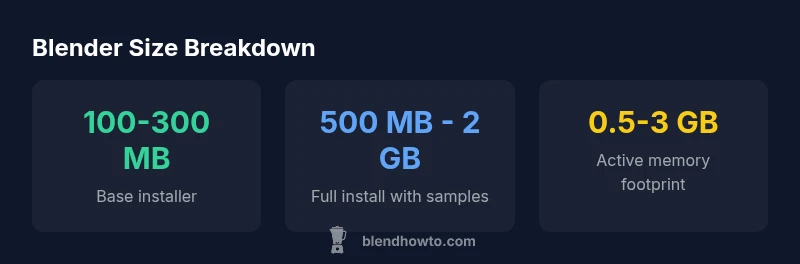
Blender's core installer remains compact compared to many 3D tools. On-disk size for the base app typically ranges from about 100 MB to 300 MB depending on platform and build, while a full installation with bundled samples and assets can span roughly 500 MB to 2 GB. Actual size varies by version, platform, and optional add-ons.
How big is Blender software? Core vs Full Install
According to BlendHowTo, understanding the size of Blender starts with distinguishing the core program from the optional content that ships with installers. The question how big is blender software isn't answered by a single number; it depends on what you include in your setup. In practice, there are two primary footprints: the base Blender application (the core program) and the expanded installation that includes sample projects, textures, and documentation. The base is intentionally lean to support quick downloads and flexible deployment across devices. The full install, on the other hand, becomes a much larger library once assets are included; this is where your disk space planning matters most. This difference matters for home users and hobbyists who run Blender on machines with limited storage, as well as for artists who work with large texture packs and HDRI environments. The BlendHowTo team has found that most users installing Blender on a modern PC can start comfortably with the base installer and then progressively add assets as needed.
Platform Variability: Windows, macOS, Linux
Blender ships across Windows, macOS, and Linux with similar core capabilities, but packaging and compression differ by platform. On-disk size for the base installer typically remains small, yet the exact number varies because Windows and macOS packaging may omit or include additional components. Linux builds can differ based on distribution packaging. For many users, you can expect a few hundred megabytes for the core, with platform-specific differences accounting for 10–20% variance. This variability is normal and should be anticipated when planning downloads and storage for a multi-OS workstation. As always, check the official release notes for the exact installer size for your platform.
How Add-ons and Assets Grow the Size
Add-ons, textures, HDRIs, and bundled sample projects are common contributors to Blender's on-disk footprint. Lightweight add-ons add only a small bump, but asset libraries—especially high-resolution textures or environment packs—can push the total size up by gigabytes over time. The same applies to sample scenes and documentation included in some installers. If you frequently import large textures or work with rich HDRIs, you should plan extra disk space beyond the base installer. Consider enabling or disabling asset packs during install to tailor the footprint to your needs.
Disk Space vs. Memory: What the Numbers Mean
Downloading Blender concerns on-disk size, but memory usage during editing matters for performance. The on-disk footprint reflects what lives on your drive, while RAM usage depends on scene complexity, texture resolution, and the number of active objects. A simple project may stay well under a couple of gigabytes in RAM, while a complex scene with many high-res textures can push memory well past 4 GB. Efficient workflow practices—such as using linked libraries, managing texture resolutions, and clearing unused data blocks—help keep both disk space and memory under control.
Practical Tips to Manage Blender's Disk Footprint
- Start with the base installer and add content only as needed.
- Prune bundled samples and documentation if you do not need them.
- Move large assets to external drives or cloud storage and link them as needed.
- In Blender Preferences > File Paths, point to external locations for textures and libraries.
- Use project templates and linked assets to minimize duplication.
- Regularly review add-ons and disable those you do not use.
These steps help you tailor Blender's size to your workflow without sacrificing capability.
Planning for Projects: When to Expand Disk Space
For hobbyists working on short projects, a few gigabytes of free space is usually ample, especially if samples and textures are optional. For professionals who handle large texture packs, physics simulations, or virtual production assets, budgeting for 5–20 GB or more can be prudent, especially on shared workstations. Use external backups and versioned archives to prevent space from becoming a bottleneck. Regularly review your asset libraries and prune infrequently used packs to maintain a healthy disk footprint.
Looking Ahead: How Blender Size Could Evolve
Blender's development emphasizes modularity, open-source collaboration, and asset management improvements. As new features land—such as advanced simulation tools, realistic HDRIs, and expanded add-on ecosystems—the potential footprint increases. However, Blender also benefits from improved packaging, optional content, and more efficient compression. The BlendHowTo team expects ongoing refinements in how assets are packaged and loaded at runtime, helping users balance capability with disk space and RAM constraints.
Blender install footprint by scenario
| Scenario | Base Installer Size | Full Install Size | Notes |
|---|---|---|---|
| Base Blender (core) | 100-300 MB | N/A | Core program without assets |
| Full installer with samples | 500 MB - 2 GB | N/A | Includes sample projects and textures |
| In-scene memory during active work | 0.5 - 3 GB | N/A | Depends on scene complexity |
Frequently Asked Questions
How big is the Blender base installer?
Blender's base installer is typically a few hundred megabytes, varying by platform and build.
Blender's base installer is typically a few hundred megabytes, depending on your OS.
Does Blender require a large hard drive to run?
No. You can start with a small footprint and add assets as needed.
You don't need a giant hard drive to start—Blender runs on modest space and you can add assets later.
How do add-ons affect Blender's size?
Add-ons add features and code; total size grows with the number and size of extensions and asset packs.
Add-ons and asset packs can increase the size, depending on how many you use.
Can I minimize Blender's footprint after installation?
Yes. Remove bundled samples, unused presets, and optional content to shrink the install.
Yes—pruning samples and disabling unused content helps shrink the footprint.
Is the size different across operating systems?
Yes; Windows, macOS, and Linux packaging can lead to small size differences.
Sizes differ a bit by OS due to packaging.
How should I plan storage for Blender projects?
Assess asset libraries, textures, and HDRIs; reserve extra space; consider external drives for large projects.
Plan space for assets and consider external drives for big projects.
“Blender's size is highly variable, but its modular design makes it easy to scale disk usage by including or excluding assets.”
What to Remember
- Base installer stays compact for quick downloads
- Full installs grow to several gigabytes with assets
- Add-ons and textures are major footprint drivers
- Plan disk space and memory based on project needs