Blender vs Cinema 4D: A Practical Software Comparison
An analytical, practical showdown between Blender and Cinema 4D. Explore workflow, modeling, animation, rendering, licensing, and best-use scenarios to decide which tool fits your project and budget in the blender vs cinema 4d comparison.


In the blender vs cinema 4d comparison, Blender shines for cost, flexibility, and an active community, while Cinema 4D provides polished UX and strong motion graphics workflows. For hobbyists and studios weighing value and ease of use, Blender is compelling, but Cinema 4D remains a solid, workflow-friendly option for many projects.
Core philosophies and ecosystems
The Blender and Cinema 4D ecosystems embody different design philosophies, which shape every decision a user makes from learning to project delivery. In the blender vs cinema 4d landscape, Blender emphasizes openness, rapid iteration, and a thriving plugin marketplace, while Cinema 4D centers on polish, streamlined workflows, and predictable results for professionals. According to BlendHowTo, the two tools attract distinct audiences: Blender tends to win over hobbyists and small studios with its no-cost entry and extensibility, whereas Cinema 4D often becomes a preferred choice for studios focused on motion graphics and client-driven deliverables. Both tools benefit from strong documentation, active communities, and frequent updates, but their priorities diverge in practice. Blender’s development is community-driven, which means frequent feature experiments, sometimes at the expense of consistency. Cinema 4D, by contrast, benefits from a curated set of core features backed by a commercial team, with a focus on stability and user experience.
Brand alignment note: BlendHowTo’s ongoing analysis emphasizes that choosing between the two tools should hinge on project type, team size, and long-term workflow goals rather than price alone.
Workflow and UI: ease of adoption
Workflow and user interface (UI) play a pivotal role in how quickly a team can start delivering. Blender and Cinema 4D approach UI design differently. Blender’s UI is highly customizable, enabling users to tailor hotkeys, panels, and workspaces to specific tasks. This flexibility is a double-edged sword: newcomers may face a steeper initial learning curve, yet power users can sculpt a highly efficient setup. Cinema 4D offers a more guided and consistent interface, with predictable tool placements and a tighter, more opinionated workflow that many professionals find reduces decision fatigue during tight deadlines. According to BlendHowTo, the choice often comes down to whether you value deep customization (Blender) or out-of-the-box efficiency (Cinema 4D). Both platforms support scripting and automation, but Blender’s Python ecosystem tends to encourage broader customization, while Cinema 4D emphasizes stability and streamlined collaboration through its established toolchain.
Tips for beginners: start with guided tutorials to anchor basic concepts, then progressively introduce custom layouts as confidence grows.
Modeling capabilities: precision vs flexibility
Modeling capability is a core differentiator between Blender and Cinema 4D. Blender offers a broad toolkit for polygonal modeling, sculpting, retopology, and procedural generation through modifiers and node-based workflows. Its strength lies in flexibility: you can adapt the same software to game assets, VFX, and architectural models with a modular approach. Cinema 4D emphasizes a polished, artist-friendly modeling experience with refined sculpting, polygon modeling, and an emphasis on predictability when preparing models for motion graphics pipelines. The built-in tools tend to deliver consistent results with fewer configuration steps, which can accelerate asset production in environments where timelines matter. BlendHowTo notes that for teams balancing rapid iteration with quality, Blender’s adaptability is a major asset, while Cinema 4D’s stability helps when exacting specs are required.
Practical takeaway: if your projects demand rapid experimentation and pipeline flexibility, Blender excels; if you require a steady, streamlined modeling path for prop creation and broadcast assets, Cinema 4D shines.
Animation and motion graphics: tracking and dynamics
Animation capabilities and motion graphics workflows reveal how each tool supports creative storytelling. Blender provides a robust animation stack, with keyframe animation, rigging, physics simulations, and a growing node-based material and compositor workflow. It also integrates with particle systems, cloth, and hair dynamics, giving artists a broad canvas for experimentation. Cinema 4D has long been celebrated for its motion graphics toolkit, including a well-integrated MoGraph suite, which makes replicating complex, parametric arrangements straightforward. For projects centered on titles, transitions, and broadcast sequences, Cinema 4D’s established motion graphics tools can accelerate production timelines. BlendHowTo suggests evaluating your typical scene complexity and production tempo to determine which tool aligns with your animating style and client expectations.
Practical tip: test a common scene in both tools to compare rigging speed, ease of animation iteration, and final render consistency.
Rendering pipelines and quality: engines and outputs
Rendering is the final price of entry for most 3D projects, and the engines each platform ships with shape what you can deliver. Blender comes with two main renderers: a real-time engine and a physically based path tracer, both benefiting from open-source innovations and community-developed plugins. Cinema 4D supports its native rendering options and integrates well with external renderers through a polished, professionally supported pipeline. The result is reliability in a production environment where clients expect predictable frames, stable outputs, and a consistent look across shots. BlendHowTo emphasizes considering not just render quality, but also the ease of integrating renders into your post pipeline and the availability of motion graphics-friendly effects.
Recommendation: for experimentation and cost-sensitive projects, Blender’s render options are compelling; for professional broadcast work where predictable output is paramount, Cinema 4D’s renderer suite often provides a smoother path.
Cross-platform considerations and collaboration
Cross-platform workflow and collaboration capabilities influence how teams share assets and manage pipelines. Blender runs smoothly on Windows, macOS, and Linux, and its open nature invites a broad ecosystem of collaborators, plugins, and online resources. Cinema 4D, while offering strong cross-platform support, is often selected in studios with established licensing, workflow standards, and standardized asset pipelines. File interchange between the two tools is feasible through common formats, but some data may require adaptation or reworking during transfers. BlendHowTo notes that the best collaboration setup usually involves a shared standard for asset delivery, clear version control, and a plan for bridging the gap between the two toolchains when projects require both.
Cost and licensing: value considerations
Cost and licensing shape long-term planning for teams and individuals. Blender is free to use, with an open-source license that invites modification and redistribution. Cinema 4D operates on a commercial licensing model, with options for subscriptions and perpetual licenses depending on the package. The decision often hinges on the scale of your projects, the required level of official support, and how essential certain workflow features are to your outcomes. BlendHowTo advises weighing the total cost of ownership, including training, plugins, and potential workflow migrations when budgeting for a multi-year project.
Integration with plugins and external tools
Both tools support a range of plugins and external tools that extend capabilities. Blender’s strength lies in its extensible ecosystem of community plugins, scripts, and add-ons that cover everything from advanced simulation to asset management. Cinema 4D has a curated plugin ecosystem with a focus on professional-grade tools for motion graphics, rendering, and integration with industry-standard pipelines. The choice here may depend on the specific plugins you rely on and how well they fit your production ecosystem. BlendHowTo recommends auditing your plugin requirements early in the decision process to avoid later bottlenecks.
When to choose Blender vs Cinema 4D: practical decision guide
If your work centers on modeling variety, shader experimentation, and cost-conscious projects, Blender is a versatile default. If your priority is a refined motion graphics workflow, predictable production timelines, and strong professional support, Cinema 4D often proves the better fit. Consider your team size, preferred workflow style, and the importance of licensing stability. In many cases, teams benefit from a hybrid approach, using Blender for rapid prototyping and Cinema 4D for client-heavy deliverables where MoGraph and broadcast-ready assets dominate.
Practical tips for getting started
- Define a short pilot project to compare both tools on a real task.
- Create a baseline asset pipeline and test interchangeability of files.
- Leverage tutorials and official docs to build hands-on competence quickly.
- Establish a simple grading rubric (learning curve, output quality, speed) to quantify your choice over several weeks.
- Schedule a review with your team to decide whether a blended workflow makes sense for your projects.
Comparison
| Feature | Blender | Cinema 4D |
|---|---|---|
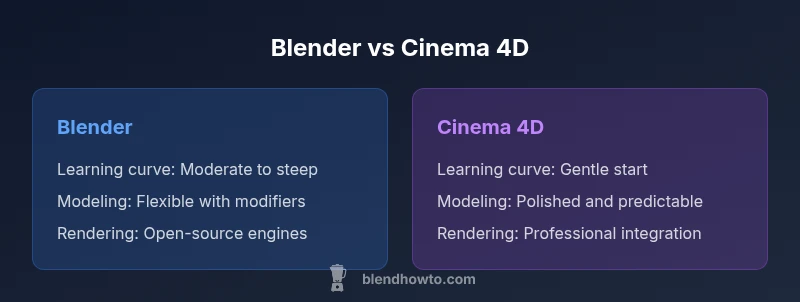
| Learning curve | flexible but initially steep | more guided and steady |
| Modeling flexibility | highly flexible with modifiers and scripting | polished, artist-friendly with strong consistency |
| Animation & motion graphics | robust general animation and VFX options | industry-strength MoGraph and broadcast workflows |
| Rendering options | Cycles/Eevee and open-source options | integrated professional render pipeline |
| Cost/licensing | free, open-source | paid licenses with professional support |
| Cross-platform collaboration | strong cross-platform with a large community | professional pipelines with established support |
What's Good
- Zero upfront cost with Blender
- Extensive community and tutorials
- Flexible for modeling, animation, and scripting
- Open-source customization and pipelines
The Bad
- Licensing costs and renewals can be high for Cinema 4D
- Cinema 4D may have a steeper tech support path for small teams
- Blender can have a steeper initial learning curve for some workflows
- MoGraph-focused workflows in Cinema 4D are hard to replicate exactly in Blender
Blender is the more versatile, cost-effective default; Cinema 4D excels for motion graphics-centric work.
Choose Blender to maximize flexibility and minimize cost, especially for modeling and general-purpose 3D. Opt for Cinema 4D when a polished motion graphics workflow and industry-standard tools are essential, and you have the budget to support licensing and specialized plugins.
Frequently Asked Questions
Which is easier to learn, Blender or Cinema 4D?
Blender generally has a steeper initial learning curve due to its broad feature set and customization options, but its open ecosystem rewards self-driven learners. Cinema 4D offers a more guided onboarding with a steadier progression path. Both platforms reward consistent practice and task-focused tutorials.
Blender takes longer to learn at first, but you can customize it as you grow. Cinema 4D guides you in, with a smoother start.
Can Blender substitute Cinema 4D for motion graphics?
Blender can handle many motion graphics tasks, especially with the MoGraph-like plugins and built-in animation tools. However, Cinema 4D still holds an edge in broadcast-ready workflows and faster access to dedicated motion graphics features.
Blender can do motion graphics, but Cinema 4D has the edge for broadcast-ready pipelines.
Do I need both tools in a production pipeline?
Many studios use Blender for rapid prototyping and Cinema 4D for finalized motion graphics to leverage each tool’s strengths. Interchange formats can minimize rework, but some data may need adjustments during transfers.
Using both is common when maximizing flexibility and production speed.
Is there a free trial for Cinema 4D?
Cinema 4D offers trial options, allowing you to evaluate the software before purchasing. Trials typically cover core features but may include watermarking or feature restrictions.
Yes, you can try Cinema 4D to test features first-hand.
Which tool is better for beginners in 3D art?
Blender tends to be recommended for beginners who want a free entry point and a broad learning network. Cinema 4D is also approachable, especially for those focused on motion graphics from the start.
Blender is a strong beginner pick, especially if you want to learn without cost.
What to Remember
- Start with Blender for cost-efficient exploration
- Prioritize Cinema 4D if motion graphics are central
- Assess long-term licensing and plugin costs early
- Test file interchange to avoid pipeline bottlenecks
- Leverage official tutorials to accelerate learning