Fusion 360 vs Blender for 3D Printing: A Practical Guide
A thorough, analytical comparison of Fusion 360 and Blender for 3D printing. Learn when each tool excels, licensing implications, file workflows, and practical hybrid approaches for hobbyists and professionals.


If you’re deciding between Fusion 360 and Blender for 3D printing, the right choice hinges on your goals: precise mechanical CAD with robust tolerances favors Fusion 360, while Blender shines for artistic modeling and rapid prototyping. Blender is free and beginner-friendly, but Fusion 360 offers parametric features and stronger machine-fit workflows for printing.
Why the right tool matters for 3D printing
Choosing between Fusion 360 and Blender for 3D printing isn’t just a preference; it’s a decision that affects accuracy, repeatability, and speed. For hobbyists and professionals alike, the ability to generate printable models quickly and reliably can reduce waste and accelerate development cycles. This article examines fusion 360 vs blender for 3d printing, unpacking the core strengths and limits of each tool, and showing how different project types map to distinct workflows. You’ll see how CAD-centric versus mesh-centric approaches influence design decisions, tolerances, and export options, from initial concepts to final, print-ready STL files. The aim is practical guidance you can apply in real print jobs rather than abstract theory.
Core Differences: CAD-centric vs Mesh-centric workflows
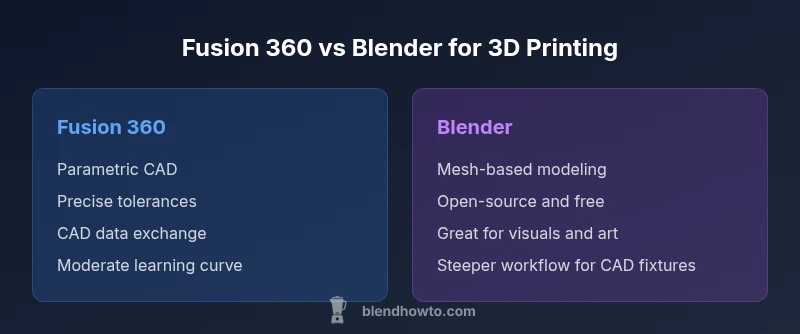
Fusion 360 is a parametric, history-based CAD system designed for engineering-grade parts. Blender is a mesh-based 3D modeling package optimized for organic shapes and artistic visualization. In practical terms, fusion 360 vs blender for 3d printing means: the former enforces exact dimensions, tolerances, and assemblies; the latter offers freedom to sculpt complex surfaces quickly. Each approach maps to distinct data structures, editing paradigms, and export paths. Understanding these contrasts helps you decide which tool fits a given project, whether you’re prototyping a geometric enclosure or shaping a decorative sculpture. Expect different learning curves, file exchange considerations, and print-ready output conventions across the two platforms.
Fusion 360: Strengths and Ideal Scenarios
Fusion 360 shines when accuracy matters. Its parametric modeling enables precise dimensions, parametric constraints, and assemblies that behave predictably when components move or print together. This is particularly valuable for mechanical parts, jigs, fixtures, and parts that must fit with tight tolerances. For 3D printing, the ability to design with explicit tolerances and to export clean, manufacturing-ready CAD data can streamline downstream processes like CAM workflows and automated post-processing. When the project requires repeatable geometry, versioned design histories, and straightforward measurement-driven edits, Fusion 360 is typically the better choice.
Blender: Strengths and Ideal Scenarios
Blender excels at speed, flexibility, and organic modeling. It’s particularly strong for aesthetic models, prototypes, and rapid visualization. For 3D printing, Blender supports fast iteration on shapes, textures, and complex surface geometry that’s difficult in traditional CAD tools. Blender’s expansive ecosystem—addons, materials, and rendering capabilities—makes it a great option for concept models, artwork, and educational demonstrations. If the objective centers on visual impact, creative exploration, or non-geometric forms, Blender often delivers the best return on time invested.
Licensing, Cost, and Access
Accessibility matters. Blender is free and open-source, which lowers the barrier to entry for students, hobbyists, and educators. Fusion 360, by contrast, follows a licensing model that offers a free personal/hobbyist tier in addition to paid options geared toward professional users and teams. For someone evaluating fusion 360 vs blender for 3d printing, cost considerations include not only initial access but long-term licensing, cloud services, and the potential need for cross-tool collaboration. In many cases, the total cost of a project is shaped by how often you rely on precise CAD features, collaboration tools, and the ability to integrate with CAM or manufacturing workflows.
File Formats, Tolerances, and CAD Data Exchange
A core practical difference is how each tool handles data exchange and tolerances. Fusion 360 supports robust CAD formats (STEP/IGES) and can generate clean STL exports with explicit tolerances for mechanical parts. Blender handles STL/OBJ well for visualization and basic printing but lacks built-in, parametric constraints. Mixed workflows—designing in Fusion 360 for the formal tolerances, then importing into Blender for organic embellishments or visualization—are common in professional and educational settings. When planning a print, consider how the final file will be used inside your slicer and whether the model needs to be reparameterized.
Importing, Exporting, and STL Workflow Tips
For reliable 3D prints, you’ll typically prepare models in a tool that preserves the required geometry and tolerances, then export to STL for slicing. Fusion 360’s export paths can preserve exact dimensions and surface integrity, while Blender’s mesh-centric approach is excellent for capturing complex surfaces but may require cleanup for precise-fit parts. Scripting or automation can help maintain consistency across multiple parts, especially in assemblies. A practical tip is to validate prints with quick test models before committing to larger runs, ensuring the chosen workflow reliably yields printable parts.
Real-World Use Cases: Hobbyist, Education, and Small Business
Hobbyists often start with Blender due to zero cost and vast creative freedom, using it to prototype visual concepts and then exporting STL for 3D printing. Education programs may combine both tools—Blender for creative exploration and Fusion 360 for engineering concepts and manufacturing simulations. Small businesses that require repeatable parts with tight tolerances tend to rely more on Fusion 360 to design fixtures, housings, or functional components, exporting precise CAD data that translates cleanly to manufacturing workflows. The choice often hinges on whether the project prioritizes form or function, or a mixture of both.
Practical Tips for Hybrid Workflows
Hybrid workflows can unlock the best of both worlds. For projects requiring precise dimensions, design the core component in Fusion 360, then import into Blender to add aesthetic features, textures, or complex surfaces. Use Blender’s modifiers and sculpting tools to refine surfaces before final export, then bring the model back into Fusion 360 for a final tolerance check. Maintain consistent unit systems across tools, and establish a clear naming convention for revisions. Document each step so teammates can reproduce the process.
Common Pitfalls and How to Avoid Them
A frequent mistake is assuming that a beautiful render equals a printable model. Another is neglecting tolerances or failing to account for slicer limitations. Always verify units, wall thickness, and hole clearances, and test print a small prototype before committing to a large batch. Relying too heavily on one tool for all steps can create bottlenecks; consider a staged approach that uses each tool’s strengths. Finally, keep software up to date and maintain a consistent backup strategy to prevent data loss in critical projects.
Making the Choice: A Decision Framework
To choose between Fusion 360 and Blender for 3D printing, outline your primary goals: Is the objective mechanical accuracy or creative visualization? If tolerances and assembly fit are non-negotiable, lean toward Fusion 360. If the goal centers on artistic shape, texture, and rapid iteration, Blender is the pragmatic pick. For many users, a hybrid approach provides a more versatile workflow that balances precision with creative flexibility. Use real-world print tests to validate decisions and refine your process over time.
Comparison
| Feature | Fusion 360 | Blender |
|---|---|---|
| Modeling approach | Parametric, history-based CAD with constraints | Mesh-based, sculpting and organic modeling |
| Best for | Precise parts, assemblies, and manufacturing-ready designs | Artistic models, visual prototyping, and quick iterations |
| Export formats for printing | STEP/IGES, STL with tolerances, CAD-focused workflows | STL/OBJ, strong support for visualization but fewer CAD constraints |
| Cost/licensing | Free personal license available; paid plans for professional use | Free and open-source with community-driven development |
| Learning curve | Moderate to high for CAD basics; well-documented workflows | Low to moderate for basic modeling; steeper for advanced features |
| Workflow integration | Strong CAD-CAM-CAE ecosystem; good for manufacturing pipelines | Excellent for rapid visualization; broader plugin ecosystem |
| community/support | Official Autodesk support; large professional user base | Vibrant community; extensive tutorials and plugins |
What's Good
- CAD precision and reliable tolerances for mechanical parts
- Open-source nature of Blender encourages experimentation
- Strong learning resources and tutorials for both tools
- Hybrid workflows unlock combined strengths
The Bad
- CAD-focused workflows can be expensive and complex
- Blender may require extra steps for exact tolerances
- Data exchange between tools can introduce compatibility issues
- Different interfaces mean separate learning curves
Fusion 360 excels for precision CAD and manufacturing workflows; Blender wins for artistic modeling and rapid iteration.
Choose Fusion 360 when parts must fit tightly and be production-ready. Choose Blender for creative prototyping and quick visualizations. For many users, a hybrid approach offers the best balance.
Frequently Asked Questions
Is Fusion 360 better than Blender for 3D printing?
Fusion 360 is typically better for engineering-grade parts due to its parametric modeling and tolerances. Blender excels for artistic modeling and rapid prototyping. The best choice depends on whether your priority is accuracy or creativity.
Fusion 360 is usually better for engineering-grade parts because of its precise parameters, while Blender shines with artistic modeling and quick iterations. The choice hinges on whether you need accuracy or creativity.
Can Blender handle engineering-grade parts?
Blender can model complex shapes, but it lacks native parametric constraints for precise tolerances. It’s possible to export to CAD formats and refine elsewhere, but Blender alone isn’t a substitute for CAD-centric parts.
Blender can model complex shapes, but it isn’t ideal for precise tolerances. You may need another CAD tool for engineering-grade parts.
What about cost and licensing?
Blender is free and open-source. Fusion 360 offers a free personal license for non-commercial use and paid plans for commercial work. Licensing decisions may affect long-term workflows and collaboration.
Blender is free; Fusion 360 has a free personal option and paid licenses for business use. Licensing can influence how you collaborate and scale projects.
Which tool has a steeper learning curve?
Fusion 360’s CAD-focused workflows require learning parametric constraints and assemblies, which can be challenging. Blender’s interface can be daunting at first, but basic modeling is approachable for beginners.
CAD workflows in Fusion 360 can be tougher to pick up; Blender’s basics are approachable, though advanced features take time.
Can I export to STL from both tools?
Yes, both support STL exports. Fusion 360 tends to preserve dimensional accuracy, while Blender offers straightforward mesh exports. Plan your path to ensure compatibility with your slicer.
Both can export STL, but Fusion 360 keeps dimensions tighter. Blender exports are mesh-based and great for visuals.
Should I use a hybrid workflow?
A hybrid approach is common and often effective: design core parts in Fusion 360 for accuracy, then import to Blender for artistic refinements and visualization before final STL export.
Yes—design the core part in Fusion 360 for accuracy, then refine visuals in Blender before printing.
What to Remember
- Define your goal: precision vs. artistry before choosing a tool
- Blender is free and powerful for modeling and visualization
- Fusion 360 provides robust parametric design and CAD data exchange
- Hybrid workflows can maximize both accuracy and speed
- Plan for proper file workflows and tolerances early in the project