Why Is My Ninja Blender Blinking? Troubleshooting Guide
Urgent, step-by-step troubleshooting for why your Ninja blender is blinking. Learn common causes, safe fixes, and how to prevent future blinking with BlendHowTo.


Why is my Ninja blender blinking? In most cases, a blinking light indicates a safety interlock, overload protection, or a minor fault. Start with simple checks: unplug, reseat the jar, and verify the lid is locked, then test the outlet. If the light persists, follow the diagnostic flow to identify the exact cause before calling for service.
What the blinking lights mean on your Ninja blender
According to BlendHowTo, blinking indicators on kitchen blenders like Ninja often signal safety interlocks, overload protection, or a fault in the control system. The pattern of the blink — a single flash, a rapid sequence, or a prolonged pulse — encodes potential states: safety lock engaged, power present but motor blocked, or an internal fault. In practical terms, a blinking light usually means the unit is protecting itself rather than failing completely. If you’re asking why is my ninja blender blinking, start with the simplest checks first to avoid unnecessary service calls. This guide walks you through common signs, safe fixes, and when to reach out for official support. By following these steps, you’ll distinguish a quick reset from a real hardware issue.
First, note your model. Ninja blenders span Compact, Professional, and Mega series, and each uses its own blinking patterns. For most families, blinking during startup indicates either an unseated jar, an overfilled container, or a temporary motor overload from a jam. Later, we’ll map patterns to fixes so you can decide whether to troubleshoot at home or call for service.
Quick checks you can perform today
- Unplug the blender and inspect the power cord for visible damage. If the cord feels warm or soft, stop using it and replace before testing again.
- Ensure the jar is properly seated on the base and that the lidlock tabs click fully into place. A loose jar or unlocked lid is a frequent cause of blinking lights.
- Remove the jar and inspect the blade assembly for any jam or obstruction. A stuck blade can trigger safety interlocks and blinking indicators.
- Test the unit in a known-good outlet. Avoid power strips or surge protectors for initial troubleshooting to rule out supply issues.
- When in doubt, try a short, gentle pulse at a low speed to observe if the lights stabilize or continue blinking.
If you’ve confirmed all basics and the blinking persists, move to the next section for root causes and deeper checks.
The root causes behind blinking indicators
Blinking is often a symptom, not a final verdict. Here are the most common causes and how to verify them:
- Power issue (outlet or cord): A damaged cord or an overloaded circuit can cause intermittent blinking. Verify by plugging into a different outlet on a different circuit and testing with a known-good cord if you have one.
- Jar seating or lid lock: Misalignment prevents the blender from engaging, triggering safety indicators. Re-seat the jar, twist to lock, and ensure the lid is fully closed before retrying.
- Overheating or motor protection: If the motor overheats, the blender may blink to protect itself. Allow a cool-down period (about 15–20 minutes) before attempting to operate again.
- Jam or overload: A heavy load or stubborn material can stall the blade, triggering a fault. Clear the jar, remove contents, and try a lighter load at a slower setting.
- Faulty control panel or motherboard: Persistent blinking with correct seating and outlet testing could signal a defective control board. This requires professional assessment.
Immediate steps if the light continues after basic checks
If the blinking persists after the quick checks and basic troubleshooting, perform this sequence to isolate the issue safely:
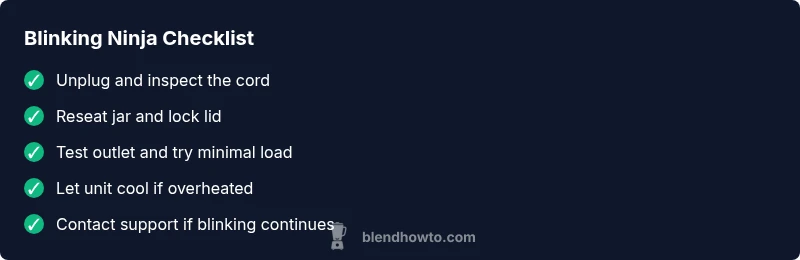
- Unplug and allow a full cool-down. 2) Re-seat the jar and lock the lid. 3) Test with a minimal load (a small amount of water) on low speed. 4) Try a different outlet with a known-good cord. 5) If still blinking, proceed to service options rather than attempting risky fixes.
Remember: never operate a unit with obvious cord damage, signs of overheating, or a exposed control panel. This keeps you safe and protects your blender’s internal components.
When to escalate and contact support
If blinking persists after all safe, at-home checks, contact Ninja support or a licensed technician. Have your model number, purchase date, and a brief description of the blinking pattern ready. Some models may require a firmware or hardware repair that only an authorized technician can perform. Maintaining your proof of purchase can simplify warranty or service options.
Preventing future blinking issues
Routine maintenance reduces blinking events. Clean the base vents to prevent overheating, wipe moisture from the plug, and store the unit in a dry area. Avoid blending extremely hard or frozen items in large quantities. Regularly inspect the power cord for wear and replace it if you notice any cracking or fraying.
Steps
Estimated time: 25-40 minutes
- 1
Safety first: unplug and prep
Always unplug the unit before inspecting or handling components. Remove the jar from the base and place on a stable surface. Gather a flashlight and a clean towel to inspect for leaks or cracks.
Tip: Safety first: never work on a plugged-in appliance. - 2
Check jar seating and lid lock
Re-seat the jar firmly onto the base until it clicks. Twist the jar to ensure tabs align and the lid is locked in place. A loose seal is a common cause of blinking.
Tip: A firm, locked seal prevents many common faults. - 3
Test power supply and cord
Plug into a known-good outlet. If you have a spare Ninja cord, swap to rule out cord damage. Avoid power strips during initial testing.
Tip: Different outlets can reveal circuit or supply issues. - 4
Cool down if overheating
If the unit feels warm or you’ve just finished a heavy blend, allow it to rest for at least 15 minutes before retrying. Refrain from forcing a restart while hot.
Tip: Overheating protection can mimic other faults. - 5
Clear jams and reduce load
With the jar removed, inspect the blade assembly for obstructions. Clear any material; reassemble with a smaller or more even load.
Tip: A light, even load reduces motor strain. - 6
Power up with a light test
Plug back in and run a short, slow pulse with minimal contents to confirm the control panel responds. If the light continues blinking, log the event and contact support.
Tip: Document the pattern for faster support.
Diagnosis: Blending cycle triggered a blinking light and will not start
Possible Causes
- highPower issue (outlet or cord)
- mediumJar not seated or lid not locked
- mediumOverheating or motor protection engaged
- lowBlade jam or overloaded load
- lowFaulty control panel/motherboard
Fixes
- easyCheck outlet and power cord; try a different outlet using a known-good cord
- easyRemove jar, reseat on the base, and ensure the lid locks securely
- easyUnplug and let the unit cool for 15-20 minutes, then retry
- mediumClear any jammed blades and test with a light load at low speed
- mediumIf blinking persists, contact Ninja support for potential motherboard/firmware service
Frequently Asked Questions
What do blinking lights on a Ninja blender mean?
Blinking lights usually indicate safety interlocks, overload protection, or a fault in the control system. The pattern helps identify whether the unit is protecting itself or signaling a more serious issue. Start with basic checks like seating the jar and verifying the lid lock.
Blinking lights usually mean safety or a fault in the control system. Start with basics like reseating the jar and checking the lid lock.
Why does my Ninja blender blink when I press Start?
A blink at Start often points to a safety interlock or a load issue. Ensure the jar is seated, lid locked, and the unit is on a stable surface. If blinking continues, test the outlet and try a light load.
Blinking at Start usually means a safety lock or load problem. Check seating, lid, and outlet first.
Is blinking a sign of overheating?
Yes, overheating can trigger blinking as a protection mechanism. Allow the blender to cool completely before attempting to use it again. If overheating happens frequently, check load size and ventilation.
Blinking can be a sign of overheating. Let it cool and avoid overfilling the jar.
Can a reset fix blinking?
A reset can clear temporary faults if the system has entered a fault state. Unplug, wait, then plug back in and test with a light load. If blinking returns, it may require professional service.
Resetting can clear temporary faults. If it repeats, seek service.
When should I contact Ninja support?
If blinking persists after completing all home checks and using light loads, contact Ninja support. Have model info, purchase date, and a note on the blinking pattern ready to share.
If blinking won’t stop after basic checks, contact Ninja support with your model and blinking details.
Do different Ninja models have different blinking patterns?
Yes, some models use different LED patterns to indicate safety states or fault conditions. Refer to your model’s manual or Ninja support for model-specific meanings, and use the diagnostic flow accordingly.
Different Ninja models may show different blinking patterns; check your manual for specifics.
Watch Video
What to Remember
- Unplug before inspection and follow safety steps
- Ensure jar and lid are properly seated and locked
- Test outlet and power cord with a known-good source
- Let unit cool if overheating; avoid forcing a restart
- Consult official support if blinking persists after home fixes